

AI Outfit Changer
Lovino's AI outfit changer changes the clothes in your own photo from a short description, while the face and pose stay the same. Use it to test outfit ideas or make social posts. An edit costs 2 credits, and the 3 free daily credits cover 1 a day. Nudity edits are blocked.
2 credits per edit
What is AI Outfit Changer?
Upload a full-length photo of yourself, describe the outfit you want, and FLUX Kontext Fast redraws the clothes. You write the outfit in plain words, such as a classic blue denim jacket. It does not copy a garment from another photo, and it does not show how anything would fit.
How to use AI Outfit Changer


- 01
Upload a full-length photo
The Try button opens Studio with FLUX Kontext Fast selected. Add a clear, full-length photo of yourself as the reference image.
- 02
Describe the outfit
Write the clothes in plain words, for example a classic blue denim jacket. Add "Keep her face, pose and the background exactly the same."
- 03
Generate the edit
Lovino changes the clothes and keeps the face and pose.
- 04
Download or try another outfit
Run it again with a different outfit and compare the results.
One photo, three outfits
The woman is an AI-made model photo, not a real person. Each edit uses the same photo and the prompt shown under it. They were made with FLUX Kontext Fast in Studio, not with a dedicated button. Examples are shown without the watermark that free-plan results carry.
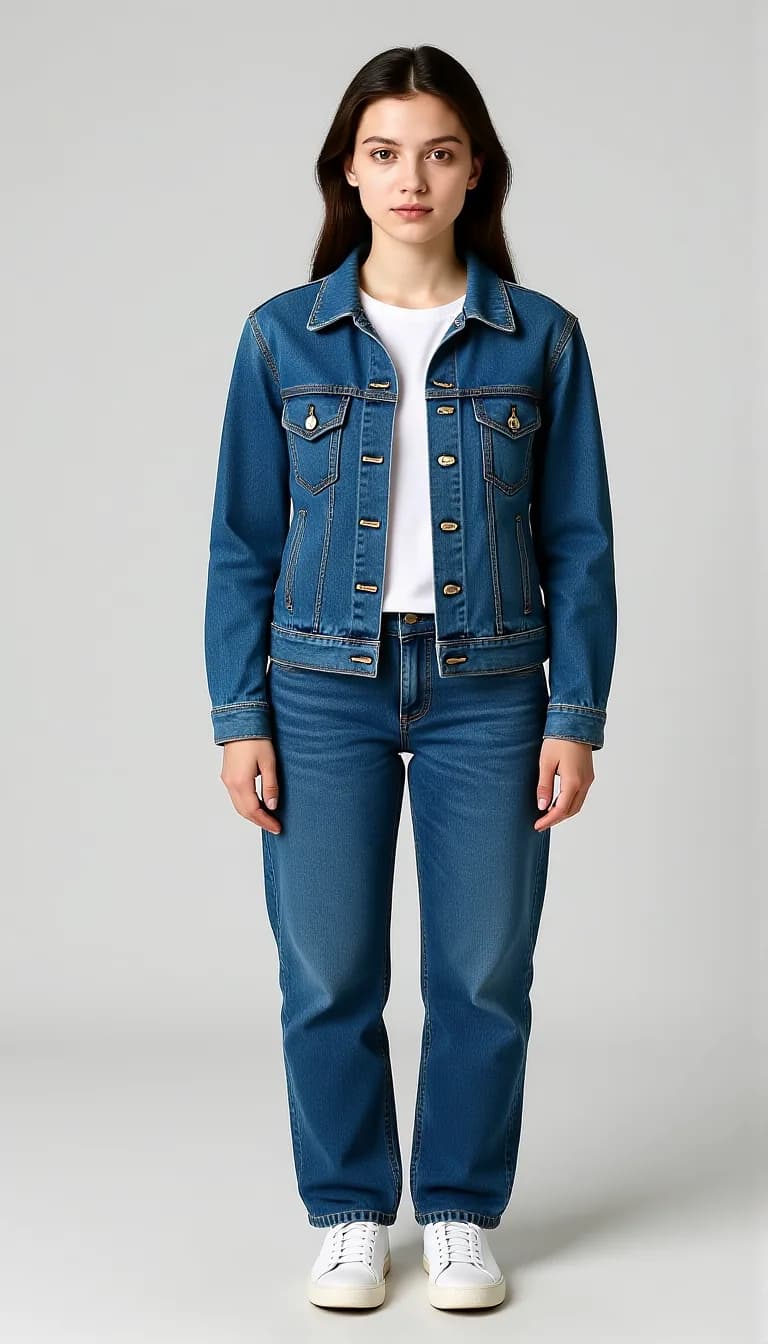 FLUX Kontext Fast
2 credits
Outfit change: denim jacket. Face and pose stay.
Change her outfit to a classic blue denim jacket. Keep her face, pose and the background exactly the same.
 Z-Image Turbo
The input: an AI-made model photo.
 FLUX Kontext Fast
2 credits
Outfit change: cream linen suit.
Change her outfit to a tailored beige linen suit with a white shirt. Keep her face, pose and the background exactly the same.
 FLUX Kontext Fast
2 credits
Outfit change: red wrap dress.
Change her outfit to a flowing red dress. Keep her face, pose and the background exactly the same.


Change clothes in a photo with AI
You describe the outfit, and FLUX Kontext Fast redraws the clothes in your photo. The instruction "Keep her face, pose and the background exactly the same." asks it to leave everything else alone. In the examples, the face, the pose and the grey backdrop stayed the same across all three outfits.
A clear, full-length photo with one person on a plain backdrop gives the edit the most to work with.
AI clothes changer: what it is good for
It is a quick way to see an idea. It is not a fitting room.
- Test how a colour or cut looks in a photo of you before you decide what to wear.
- Make several looks from one photo for social posts.
- Plan an event outfit, a costume or a theme day.
- Show a client or a friend a styling idea.
Nudity and undressing edits are blocked
Lovino blocks edits that ask to undress a person, make clothing see-through or show nudity. The check reads what an instruction is asking for, in any language, and it runs before any credits are charged. Uploaded photos are checked as well.
Repeated attempts can get an account blocked or banned. Only edit photos of yourself or of people who have agreed.
What Lovino does and does not do
| Lovino does | Lovino does not |
|---|---|
| Change the clothes to an outfit you describe in words | Copy a specific garment from another photo. For a garment photo on a model, see Flat-Lay to Model |
| Ask the model to keep the face, pose and background | Promise an identical face. It is an AI edit, so check the result |
| Show an idea of how an outfit could look | Show fit, size or how fabric moves |
| Block nudity and undressing edits | Make exceptions for them, on any plan |
| Run on the 3 free daily credits (1 edit a day, watermarked) | Remove the watermark on free-plan results. Paid-plan results have none |
More questions
Can I edit someone else's photo?
Only if they agreed. Do not upload photos of people without their permission.
What it can't do
- It shows a look, not a fit. Size, length and how a fabric hangs are drawn by the model and may not match a real garment.
- The model redraws the picture, so the face, hands and background can shift a little. Check the result before you share it.
- Printed text, logos and fine patterns on clothes can come out wrong.
- Nudity and undressing edits are blocked, and repeated attempts can lead to a blocked or banned account.
- Free-plan results carry a watermark. Paid-plan results do not.
Start free. Scale anytime.
One credit system across Studio, Flow and every tool. Cancel anytime.
| Plan | Per month | Credits |
|---|---|---|
| Free | $0 | 3 credits per day |
| Plus | $7.99 | 50 credits per month |
| Pro | $19.99 | 200 credits per month |
| Max | $44.99 | 500 credits per month |
Questions, answered.
Is the AI outfit changer free?
Partly. Each outfit edit with FLUX Kontext Fast costs 2 credits, and the 3 free credits a day cover 1 of them, with a watermark. Paid plans start at $7.99 a month, and results made on a paid plan have no watermark.
How do I change clothes in a photo with AI?
Open Studio with FLUX Kontext Fast, add your photo, and describe the new outfit. Say "Keep her face, pose and the background exactly the same." and generate.
Can it remove clothes?
No. Nudity and undressing edits are blocked, in any language, before any credits are charged. Repeated attempts can get an account blocked or banned.
Will my face and pose stay the same?
The instruction asks the model to keep them. In the examples the face and pose stayed. It is still an AI edit, so check the result.
What photo works best?
A clear, full-length photo of one person, facing the camera, in even light, ideally on a plain backdrop.
Can I put a specific shop item on my photo?
Not from a product photo. You describe the outfit in words. If you are a brand that needs your real garment on a model, Flat-Lay to Model is built for that.
Can I keep my shoes?
You can ask for it. Name what stays, for example "keep the shoes exactly the same", next to the new outfit. It is an AI edit and we have not published a shoe example, so check the result.
Does it show how the clothes would fit?
No. It shows an idea of the look. It does not know your size or how the fabric would hang.
More AI tools
Related guides
- AI Photo Editing Prompts: Change One Thing, Keep the RestCopy-paste AI photo editing prompts with real before-and-after examples: add an object, change the season or time of day, and keep everything else the same.
- AI Photo Prompts for LinkedIn: Edit Your Own Photo, HonestlyPrompts for a more professional profile photo: change clothing, light and background on your own picture while keeping your face, plus what to avoid.
- Remove Objects From Photos With AI: 3 Methods ComparedRemove people, objects or a whole background with AI: Magic Eraser brush, instruction edit or cut-out, with a real before-and-after and what each costs.
Ready to try AI Outfit Changer?
2 credits per edit. No purchase is made until you confirm a generation.