

GPT Image 2
Free with a free account: you need to sign up, but there is no card. Low-quality GPT Image 2 images cost 3 credits, so your 3 free daily credits cover 1 a day, with a watermark. Medium and high quality need a paid plan.
Credit cost is shown before generation
What is GPT Image 2?
GPT Image 2 is OpenAI's image model, available in Lovino Studio. Low quality costs 3 credits and is covered by your free daily credits, which is 1 image a day. Medium and high quality need a paid plan. It is known for readable text inside images, edits that follow instructions and photorealistic output.
Real GPT Image 2 output
Each image was generated with GPT Image 2 in Lovino from the exact prompt shown. Look at how the lettering comes out.
 GPT Image 2
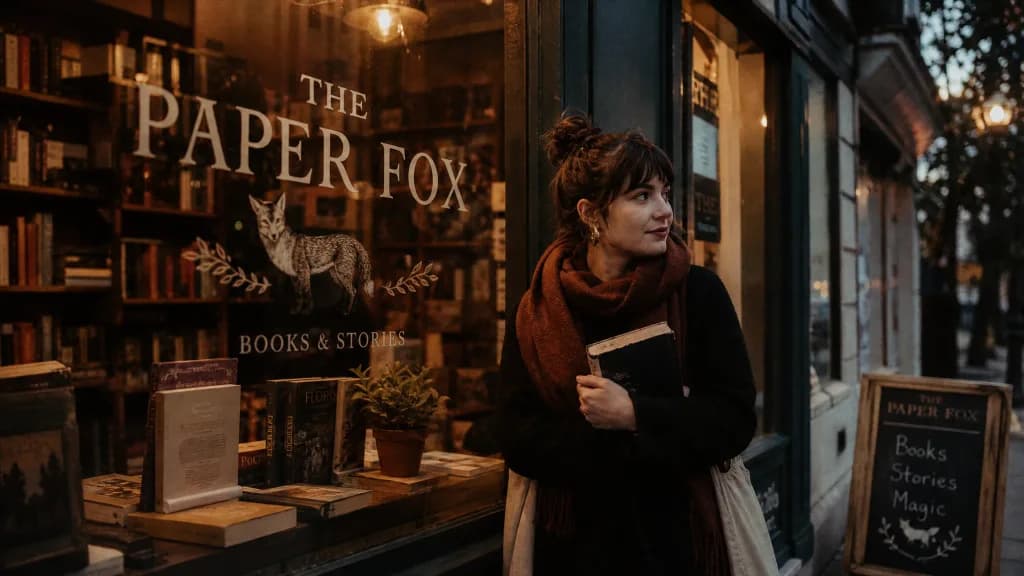
Lettering on a sign
A shop sign painted on a window: the model spells the sign correctly.
Cozy bookshop storefront at dusk with the sign 'THE PAPER FOX' painted on the window, warm light inside, cinematic warm-neutral color grade, soft directional key light, 35mm lens, shallow depth of field, natural skin tones, subtle film grain
 GPT Image 2
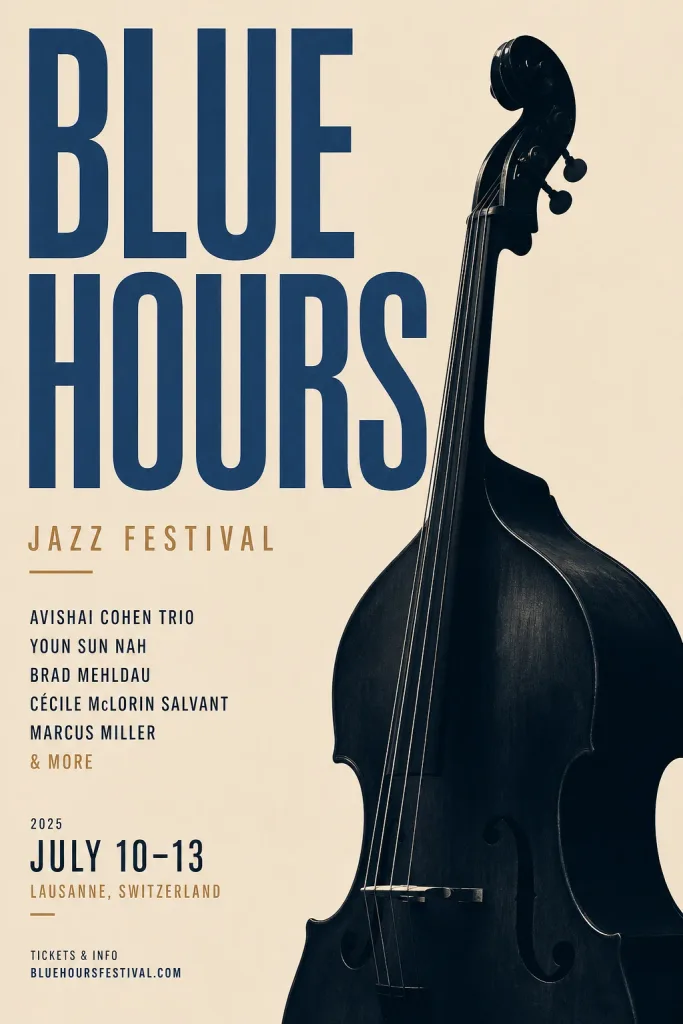
Poster layout
A Swiss-style poster with a title and a small block of supporting text. The prompt asked only for the title; the small print was invented by the model and is placeholder text.
Minimal Swiss-style poster for a jazz festival titled 'BLUE HOURS', bold typography and a double bass silhouette, warm-neutral palette, soft diffused lighting, cohesive minimal background, premium editorial composition
 GPT Image 2
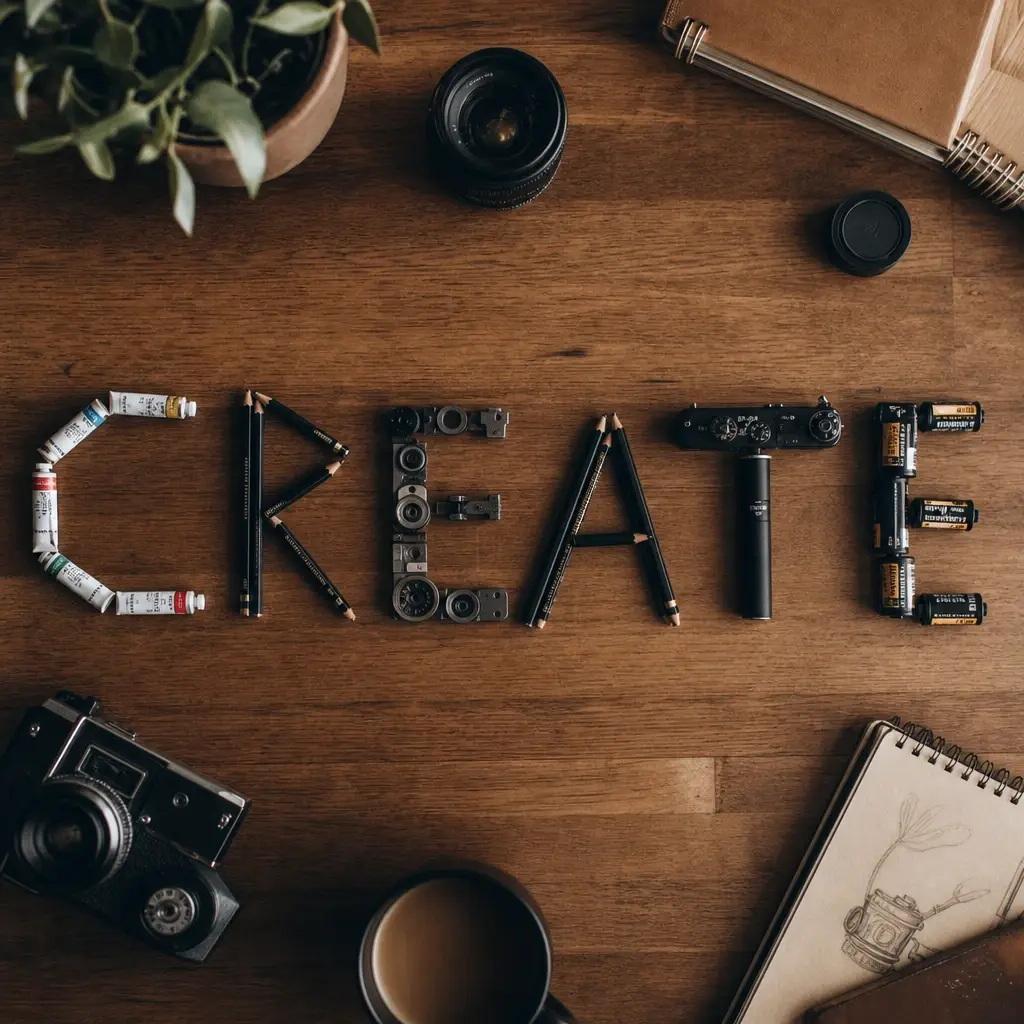
Word made of objects
A word spelled out of physical objects, seen from above.
A wooden desk flat-lay that spells the word CREATE using arranged pencils, paint tubes and camera parts, top-down, cinematic warm-neutral color grade, soft directional key light, 35mm lens, shallow depth of field, natural skin tones, subtle film grain
 GPT Image 2
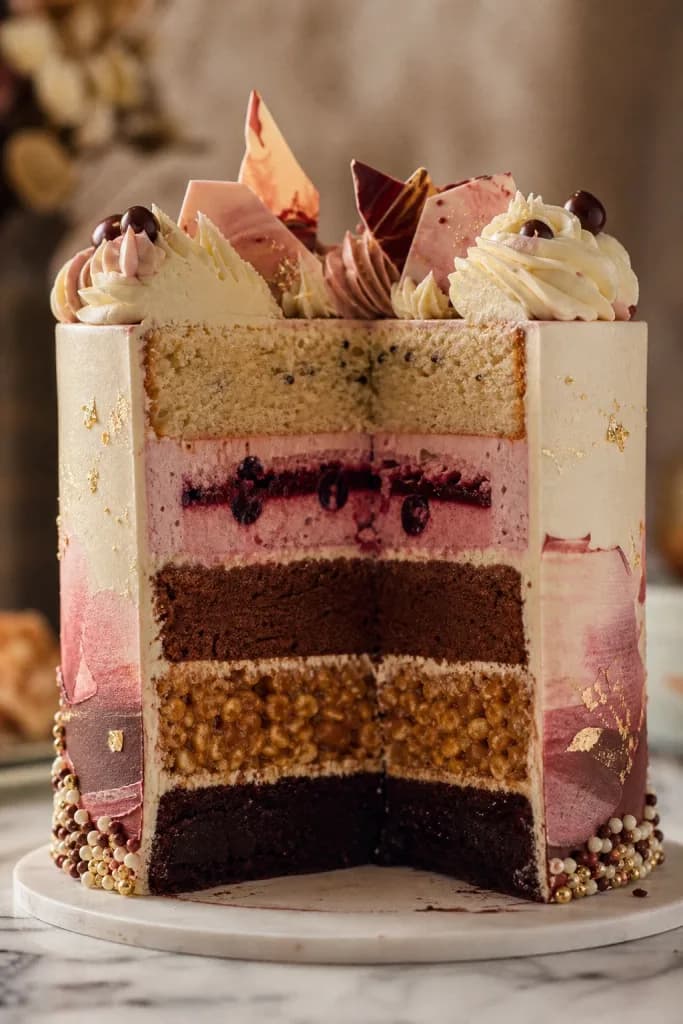
Detail and texture
A studio cross-section with five distinct textures.
Cross-section of an elaborate five-layer celebration cake, each layer a different texture, patisserie studio shot, cinematic warm-neutral color grade, soft directional key light, 35mm lens, shallow depth of field, natural skin tones, subtle film grain
How to use GPT Image 2
01
Describe it, or add a reference
Type a prompt, or add one or more reference images for instruction-following edits. Put any text you want in the image inside quotes.
02
Pick a quality tier
Low is 3 credits and works on your free daily credits. Medium is 5 credits and high is 7; both need a paid plan.
03
Generate and refine
Run it, then change one thing at a time in the prompt. The model tends to keep what you do not mention.
What GPT Image 2 is good at
GPT Image 2 is OpenAI's image model, and on Lovino you use it without an OpenAI account or an API key. Three things set it apart from most other image models: text inside the image, edits that follow written instructions, and photorealism.
Text is the headline. Signs, posters, labels and packaging usually come out spelled the way you wrote them, which is where many models still slip. For edits, you can add one or more reference images and say what to change, such as swapping a hat colour while keeping the face and pose. It also supports transparent backgrounds, which helps with cut-outs and stickers.
What free means here
Lovino gives every account 3 free credits a day. A low-quality GPT Image 2 image costs 3 credits, so the daily allowance covers 1 image a day, with a watermark on free-plan output. That is a real free tier, but it is metered, and it is not a one-off trial.
Medium (5 credits) and high (7 credits) quality need a paid plan. A free Lovino account is required either way; there is no way to use it without signing up.
Getting the text right
Put the exact words in quotes and keep them short. Say where the text sits, for example on a shop window or across the top of a poster. Ask for one block of text at a time, then add more in a second pass.
- Spell unusual names out in the prompt; do not rely on the model to guess them.
- For small or dense lettering, step up from low to medium or high. Higher tiers leave more room for fine detail.
- If a word comes out wrong, re-run with the same prompt before rewriting it. Results vary by run.
GPT Image 2 or another model?
Pick GPT Image 2 when the words in the picture matter. If you want cheaper drafts, faster runs or many reference images in one edit, one of the other free-to-try models may fit better; the table below shows what each costs and whether it takes a reference image.
GPT Image 2 quality tiers
| Tier | Credits per image | Who can use it | Good for |
|---|---|---|---|
| Low | 3 | Everyone, on free daily credits | Drafts, layout tests, short text |
| Medium | 5 | Paid plan | Everyday finished images |
| High | 7 | Paid plan | Fine detail, small or dense text |
GPT Image 2 next to other models you can try free
All of these can be used with the free daily credits. Credits are per image.
| Model | Credits per image | Takes a reference image |
|---|---|---|
| GPT Image 2 (low quality) | 3 | Yes |
| Nano Banana 2 | 2–4 | Yes |
| FLUX.2 Klein | 1 | Yes |
| Seedream 4 | 3 | Yes |
| Imagen 4 Fast | 2 | No |
Nano Banana 2 costs more at higher resolutions. The 4K setting costs more than one day of free credits.
More questions
Can GPT Image 2 edit my photos?
Yes. Add one or more reference images and describe the change, for example changing only the hat colour and keeping the face and pose. Edits work best when you name what to keep.
What aspect ratios does it support?
Square (1:1), landscape (3:2) and portrait (2:3). Requests for 16:9 or 4:3 use 3:2, and 9:16 or 3:4 use 2:3.
Can I make transparent backgrounds?
Yes. Ask for a transparent background and the image is delivered as a PNG, which suits cut-outs, stickers and product shots.
Can I use the images commercially?
Yes. Images you generate on Lovino are yours to use commercially. Paid plans download without the watermark.
What it can't do
- Three native shapes only: square, 3:2 and 2:3. A request for 16:9 or 4:3 is mapped to 3:2, and 9:16 or 3:4 to 2:3.
- Free means low quality and 1 image a day. Medium and high quality need a paid plan.
- It is not unlimited. Every image costs credits, and free-plan output carries a watermark.
- Text is better than most models but not perfect. Long paragraphs and tiny type can still contain errors.
- One image per generation. To compare options you run it again, at full price.
Pricing
Start free. Scale anytime.
One credit system across Studio, Flow and every tool. Cancel anytime.
| Plan | Per month | Credits |
|---|---|---|
| Free | $0 | 3 credits per day |
| Plus | $7.99 | 50 credits per month |
| Pro | $19.99 | 200 credits per month |
| Max | $44.99 | 500 credits per month |
Questions, answered.
Is GPT Image 2 free?
Partly. Low-quality images cost 3 credits and your 3 free daily credits cover 1 a day, with a watermark on the output. Medium and high quality need a paid plan.
Is there a free GPT Image 2 trial?
There is no separate trial. The free daily credits renew every day and are open to every account, with no credit card. When you want more images or higher quality, a paid plan or a credit pack adds credits.
Can I use GPT Image 2 with no sign up or no login?
No. You need a free Lovino account, which takes seconds. The account is what tracks your daily credits and your generations.
Is there an unlimited free version of GPT Image 2?
No. GPT Image 2 costs real compute, so every provider meters it somewhere. On Lovino the free tier is low quality, one image a day. For more, a paid plan adds a monthly credit balance.
How much does GPT Image 2 cost per image?
3 credits at low quality, 5 at medium and 7 at high. The price is shown before you generate.
GPT Image 2 or Nano Banana Pro?
GPT Image 2 for text and edits; Nano Banana Pro for 4K and multi-image edits.
Do I need an OpenAI account, API key or ChatGPT Plus?
No. Lovino runs the model for you, so you need only a Lovino account.
How do I get readable text in the image?
Put the exact words in quotes, keep them short and say where they sit. For small or dense text, use medium or high quality, and re-run before rewriting the prompt.
More AI tools
- AI Image GeneratorCreate stunning images from text in seconds
- Nano Banana 2 FreeGoogle's image model for editing with plain instructions
- FLUX.2 Klein FreeThe fast FLUX.2 model, on free daily credits
- AI Poster GeneratorDesign posters with readable text from a prompt
- AI Infographic GeneratorTurn a title and a few steps into an infographic
- AI YouTube Thumbnail MakerGenerate eye-catching YouTube thumbnails with AI
Related guides
- GPT Image 2 vs Flux: GPT Image 2 for Text, Flux for SpeedFlux vs GPT Image 2: pick GPT Image 2 for readable text and precise edits, Flux for fast, low-cost drafts. Speed, quality, editing and cost compared.
- GPT Image 2 Prompts: Copy-Paste Templates for Text in ImagesCopy-paste GPT Image 2 prompts for signs, posters, flat-lays and product shots, with the real prompt behind four examples and what each quality tier costs.
- GPT Image 2 vs DALL·E 3: Which OpenAI Image Model Should You Use?GPT Image 2 replaces DALL·E 3 as OpenAI's flagship image model. We compare text rendering, editing, pricing, and availability to help you pick the right one.
Try a template

Ready to try GPT Image 2?
Credit cost is shown before generation. No purchase is made until you confirm a generation.