

Photo to Anime AI
Lovino's photo to anime AI redraws a selfie or any photo as an anime illustration, keeping your pose and composition. Choose the Anime look in the Cartoon Filter. It costs 2 credits a run and works on the 3 free daily credits, which cover 1 run a day.
2 credits per Anime run · 1 free run a day on the free daily credits
What is Photo to Anime AI?
Photo to anime AI redraws a photo as a Japanese anime illustration with clean cel shading, expressive eyes and vivid colour. You upload a selfie or portrait, pick the Anime look in the Cartoon Filter, and Lovino returns a new picture that keeps the pose and composition. The same tool also offers Ghibli, Disney/Pixar, Cartoon, Watercolor and Comic Book looks.
How to use Photo to Anime AI


- 01
Upload a photo
Add a selfie or portrait. One clear face, lit from the front, gives the best result.
- 02
Pick the Anime look
The Cartoon Filter opens on Ghibli, so choose Anime. It also offers Disney/Pixar, Cartoon, Watercolor and Comic Book.
- 03
Generate your anime picture
Lovino redraws the photo and keeps the pose and composition. A run costs 2 credits.
- 04
Download or try another look
Save the picture, run the same photo through another look, or animate the result in Image to Video.
Real photo to anime results
The input photos are AI-made, so no real person appears. The anime pictures are real Cartoon Filter results with the Anime look. The comic, 3D, woodblock and clay pictures were made in Studio with their own prompts, and their captions say so.
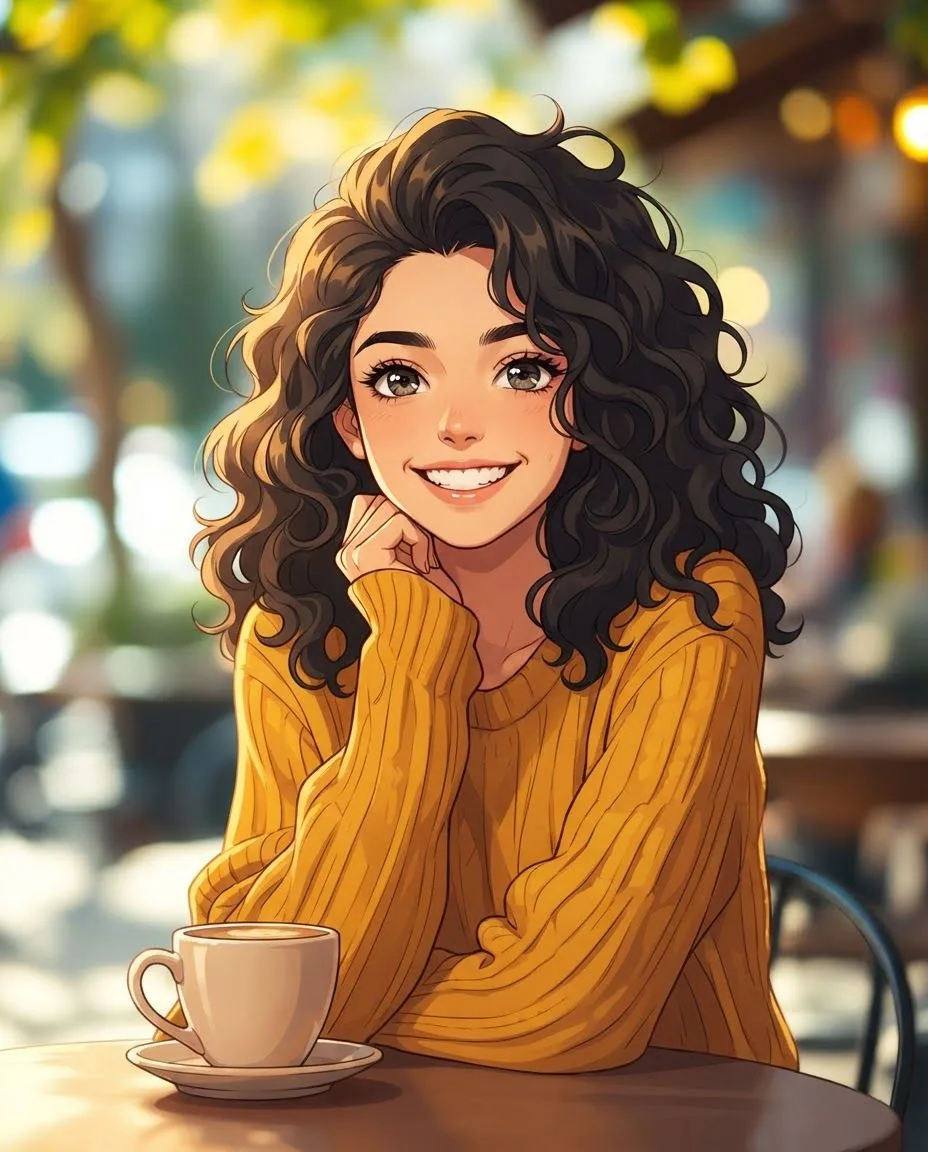 Nano Banana 2 Lite
2 credits
Cartoon Filter, Anime look. Same pose, face and cafe.
Redraw this photo as a Japanese anime illustration: clean cel shading, detailed expressive eyes and vibrant colours. Keep the same person, face, pose and composition. Do not add any text, letters, logos or signage.
 FLUX 1.1 Pro
The input: an AI-made test portrait, not a real person.
Candid 35mm photograph of a cheerful young woman with curly dark hair and a mustard knit sweater, sitting at a sunny outdoor café table with a coffee cup, head and shoulders, natural warm light, soft background bokeh, genuine smile, looking at the camera. No text, no logos.
 Nano Banana 2 Lite
2 credits
Cartoon Filter, Anime look, on a second test photo.
Redraw this photo as a Japanese anime illustration: clean cel shading, detailed expressive eyes and vibrant colours. Keep the same person, face, pose and composition. Do not add any text, letters, logos or signage.
 Z-Image Turbo
The input: an AI-made test photo.
Portrait photo of a young man in a denim jacket standing in a park, soft daylight
 Nano Banana 2 Lite
2 credits
Comic look from the same input photo. Made in Studio with a custom prompt, not the Cartoon Filter's own look.
Restyle this photo: a bold comic book panel, thick ink outlines, halftone dots, flat vivid colours, dramatic shading, no speech bubbles. Keep the same person, face, pose and composition. Do not add any text, letters, logos or signage.
 Nano Banana 2 Lite
2 credits
3D movie look from the same input photo. Made in Studio with a custom prompt, not the Cartoon Filter's own look.
Restyle this photo: turn her into a character from a 3D animated feature film, big expressive eyes, soft stylised skin, detailed hair strands, warm cinematic lighting and a softly blurred café behind. Keep the same person, face, pose and composition. Do not add any text, letters, logos or signage.
 Nano Banana 2 Lite
2 credits
Woodblock look from the same input photo. Made in Studio with a custom prompt, not the Cartoon Filter's own look.
Restyle this photo: a traditional Japanese ukiyo-e woodblock print, flat layered colours, fine carved lines, washi paper texture, stylised clouds. Keep the same person, face, pose and composition. Do not add any text, letters, logos or signage.
 Nano Banana 2 Lite
2 credits
Clay look from the same input photo. Made in Studio with a custom prompt, not the Cartoon Filter's own look.
Restyle this photo: a handmade claymation character in a miniature café set, plasticine textures with tiny fingerprints, rounded shapes, soft studio light. Keep the same person, face, pose and composition. Do not add any text, letters, logos or signage.
 Wan 2.2 Fast
3 credits at 720p
The anime result animated with Wan 2.2 Fast. Video uses paid credits.
she laughs and tucks her hair behind her ear, café light flickers
Turn a photo into anime in one run
The Anime look asks the model for a Japanese anime illustration: clean cel shading, detailed expressive eyes and vibrant colours. It is told to keep the same person, face, pose and composition, so the picture reads as your photo redrawn rather than a new character.
The result is a still picture. One run costs 2 credits, and you can run the same photo through the other looks to compare them.
Selfie to anime: a source photo that works
The model redraws what it can see, so the photo matters more than any setting.
- One face, looking roughly at the camera, with even light on it.
- A sharp photo. Blur and heavy filters tend to carry into the drawing.
- Room around the head and shoulders, so the pose is easy to follow.
- Only photos you have the right to use, and only people who have agreed to it.
An anime filter, or more control
The Cartoon Filter is the quick route: six fixed looks, 2 credits, and it works on the free daily credits. When you want more control, Style Transfer has 12 presets including Anime, plus your own words or a reference image, from 3 paid credits.
For looks the filter does not have, such as a woodblock print or a clay figure, describe the look in Studio. The woodblock and clay examples above were made that way.
Bring the anime picture to life
Take the finished picture into Image to Video and describe the motion. The clip above is the anime portrait animated with Wan 2.2 Fast: 2 credits at 480p or 3 at 720p.
Animation is video, so it uses paid credits even though the anime picture itself can use free ones.
Cartoon Filter or Style Transfer
| Cartoon Filter (Anime look) | Style Transfer | |
|---|---|---|
| Credits per picture | 2 | From 3 |
| Free daily credits | Yes, 1 run a day | No, paid credits only |
| Looks | Six fixed looks, including Anime | 12 presets, your own words, or a reference image |
| Best for | A quick anime picture of a selfie | Matching a specific style or reference |
What Lovino does and does not do
| Lovino does | Lovino does not | |
|---|---|---|
| Likeness | Asks the model to keep your face, pose and composition | Guarantee an exact likeness: faces can shift |
| Look | Redraws the whole photo as a cel-shaded anime illustration | Edit one part of the photo and leave the rest untouched |
| Cost | Runs the Anime look for 2 credits, on free credits | Give more than 1 free run a day |
| Output | Returns a still picture | Animate it unless you run Image to Video, on paid credits |
What it can't do
- Free daily credits cover 1 Anime run a day. After that you need paid credits.
- It is a redraw, not a trace. Faces can shift, so compare a few runs and keep the closest.
- The Cartoon Filter has six fixed looks. The woodblock and clay pictures above were made in Studio with their own prompts.
- Animating the picture is video and uses paid credits.
- Images made on the free plan carry a watermark. Paid plans remove it.
Start free. Scale anytime.
One credit system across Studio, Flow and every tool. Cancel anytime.
| Plan | Per month | Credits |
|---|---|---|
| Free | $0 | 3 credits per day |
| Plus | $7.99 | 50 credits per month |
| Pro | $19.99 | 200 credits per month |
| Max | $44.99 | 500 credits per month |
Questions, answered.
Is photo to anime AI free?
Partly. The Anime look costs 2 credits and works on the 3 free daily credits, which cover 1 run a day. For more runs you need paid credits from a paid plan or a credit pack. Plans start at $7.99 a month, and a starter pack is $2.99 for 15 credits.
How do I turn a selfie into anime?
Open the Cartoon Filter, upload your selfie, choose the Anime look and generate. The filter opens on Ghibli, so change it to Anime first.
Will the anime picture look like me?
It is told to keep your face, pose and composition, and the examples on this page stay close to their photos. It is still a redraw, so details can shift. Try a few runs and keep the closest.
What does the Anime look do?
It redraws the photo as a Japanese anime illustration with clean cel shading, detailed expressive eyes and vibrant colours.
Can I make a comic or 3D version too?
Yes. The Cartoon Filter has Comic Book and Disney/Pixar looks. The comic and 3D pictures on this page were made in Studio with Nano Banana 2 Lite and custom prompts, so a filter run will look a little different.
Can I animate my anime picture?
Yes, in Image to Video. It is video, so it needs paid credits. The example clip used Wan 2.2 Fast and cost 3 credits at 720p.
Does the free version add a watermark?
Yes. Images made on the free plan carry a watermark, and paid plans remove it.
Can I use the anime pictures commercially?
Images you create are yours to use. Only upload photos you have the right to use, and take care with looks tied to a specific franchise.
More AI tools
Related guides
- AI Anime Character Generator: Turn Your Photo Into ArtTransform any photo into Studio Ghibli, shonen, or classic anime style with AI. Instant results, multiple anime styles, free to try.
- Ghibli-Style AI Prompts and 6 More Art Styles to CopyCopy-paste prompts for Ghibli-style scenes plus Pixar, anime, pop art, oil painting, ukiyo-e and watercolor, with real before-and-after results.
- AI Cartoon Filter: Ghibli, Pixar & Anime StylesTransform your photos into Studio Ghibli, Pixar, anime, and cartoon styles with AI. Instant results from any photo.
Ready to try Photo to Anime AI?
2 credits per Anime run · 1 free run a day on the free daily credits. No purchase is made until you confirm a generation.