

Image to Image AI
Lovino's image to image AI makes a new picture from one reference photo and a written prompt. Restyle a portrait, change the season or add an object, and pick the model that fits. It costs 1–7 credits by model, and the 3 free daily credits cover models that need no paid plan.
1–7 credits by model · shown before you generate
What is Image to Image AI?
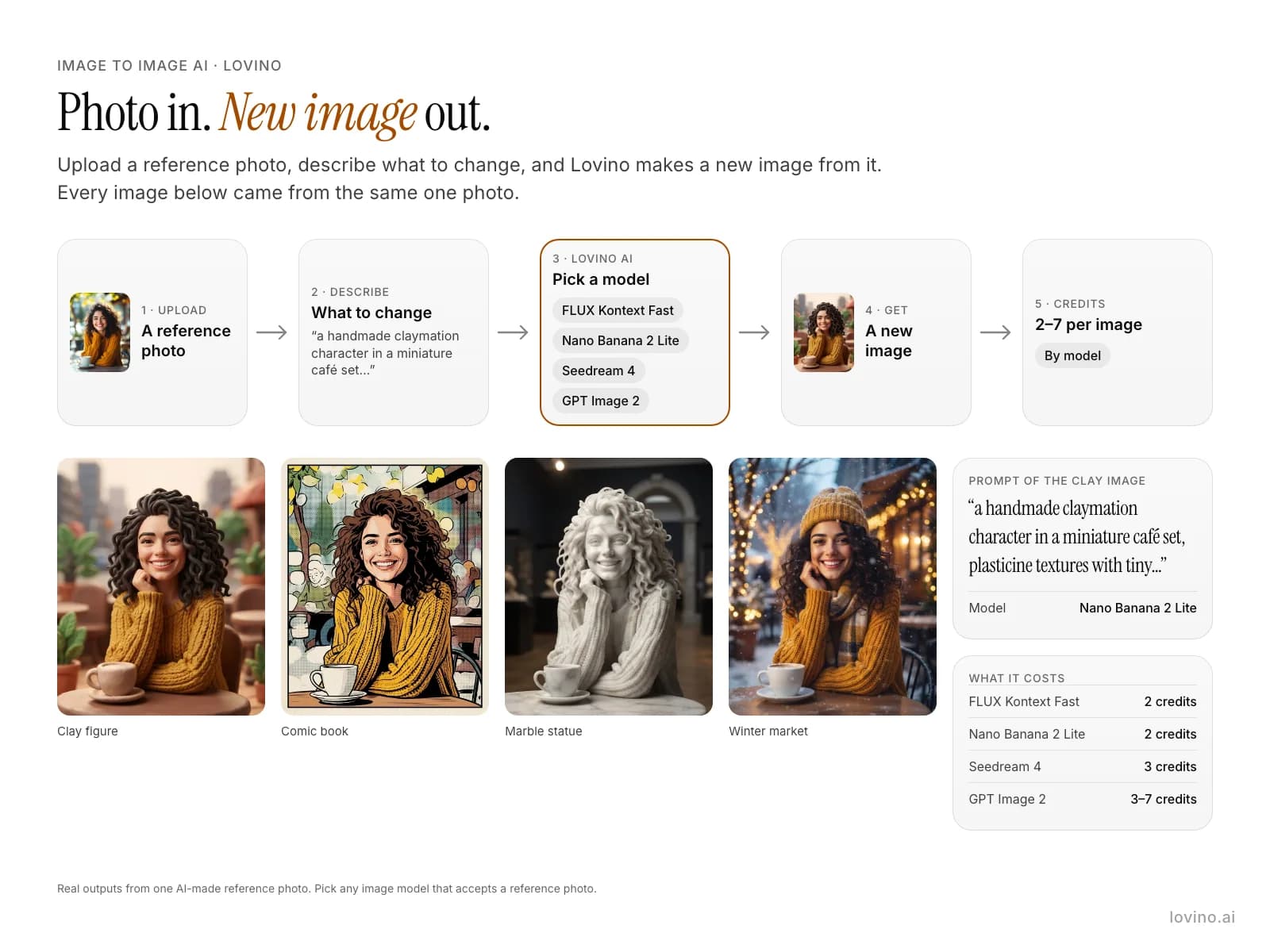
Image to image AI starts from a photo you upload instead of a blank prompt. You describe the change, pick a model, and Lovino makes a new image that follows the reference. Restyle a portrait, change the season or add one object. Credits run from 1 to 7 depending on the model.
How to use Image to Image AI
- 01
Upload a reference photo
Pick the photo the new image should follow. A sharp photo with a clear subject gives the model more to hold on to.
- 02
Describe what to change
Write the change and what must stay, for example: restyle this photo as a clay figure, keep the same person, pose and composition.
- 03
Pick a model
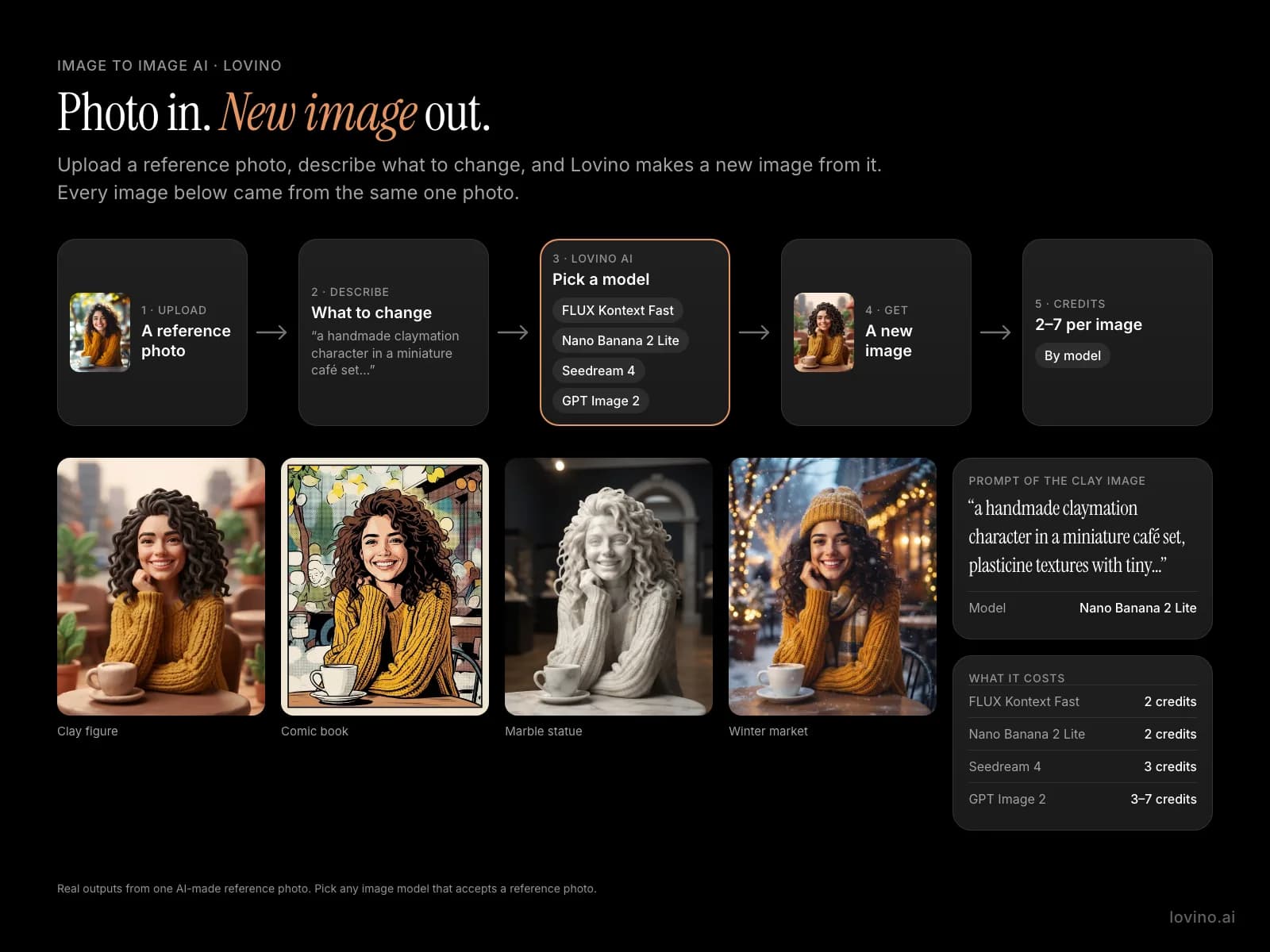
Choose a model that takes a reference photo, such as FLUX Kontext Fast, Nano Banana 2 Lite, Seedream 4 or GPT Image 2. The credit price shows before you generate.
- 04
Generate and compare
Run it, then change the prompt or the model and run again on the same photo. Download the one you like.
One reference photo, many new images
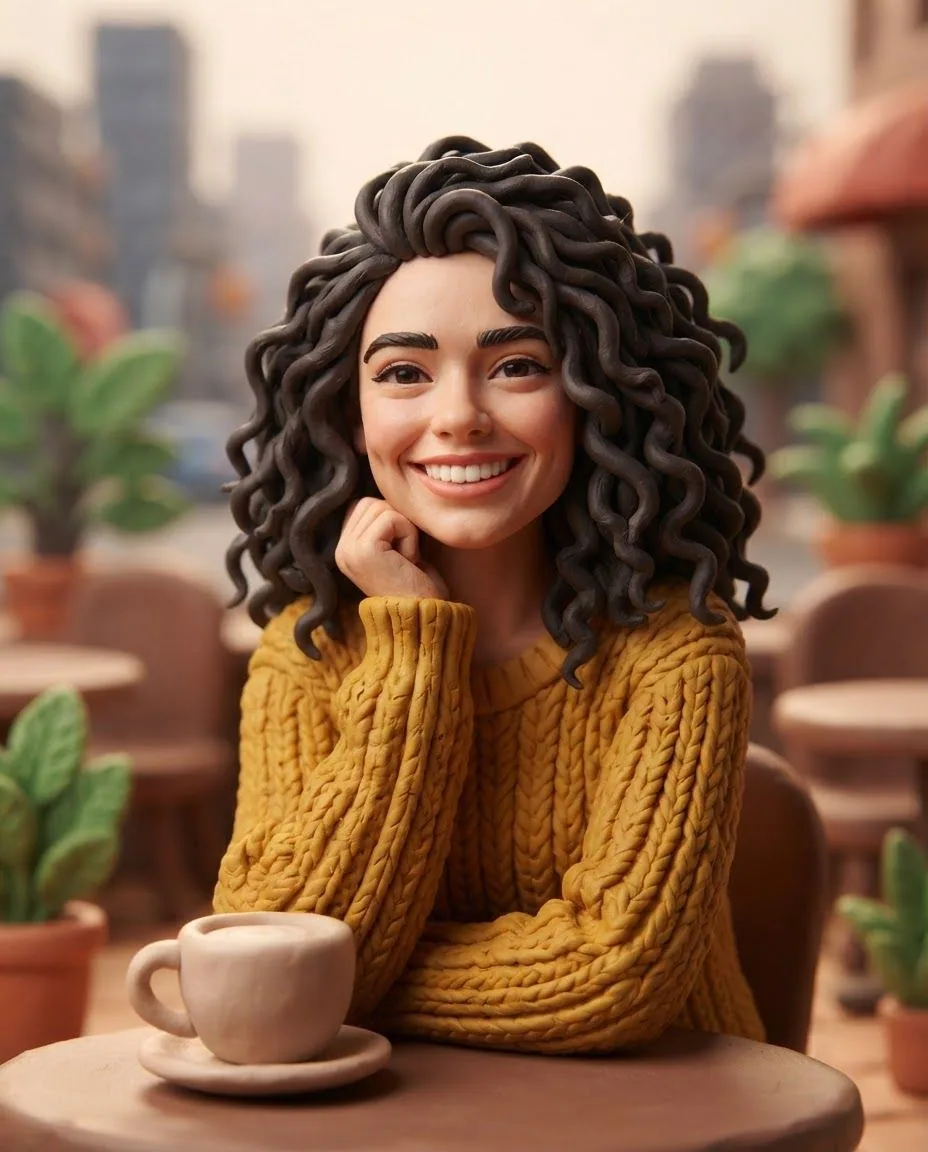
The reference portrait and the dog, park and beach photos are AI-made test images, not real people or places. Each look is a separate run on the same portrait. The three before and after pairs are instruction edits made with FLUX Kontext Fast. Prompts are shown in full.
 Nano Banana 2 Lite
2 credits
New image from the reference photo, Clay look.
Restyle this photo: a handmade claymation character in a miniature café set, plasticine textures with tiny fingerprints, rounded shapes, soft studio light. Keep the same person, face, pose and composition. Do not add any text, letters, logos or signage.

The reference photo: an AI-made test portrait.
 Nano Banana 2 Lite
2 credits
New image from the reference photo, Comic look.
Restyle this photo: a bold comic book panel, thick ink outlines, halftone dots, flat vivid colours, dramatic shading, no speech bubbles. Keep the same person, face, pose and composition. Do not add any text, letters, logos or signage.
 Nano Banana 2 Lite
2 credits
New image from the reference photo, Marble look.
Restyle this photo: a polished white marble statue carved from a single block, museum spotlight, subtle veins in the stone, soft shadows. Keep the same person, face, pose and composition. Do not add any text, letters, logos or signage.
 Nano Banana 2 Lite
2 credits
New image from the reference photo, Winter look.
Restyle this photo: the same scene on a snowy winter evening, gentle falling snowflakes, warm fairy lights, cosy scarf and hat, magical glow. Keep the same person, face, pose and composition. Do not add any text, letters, logos or signage.
 Nano Banana 2 Lite
2 credits
New image from the reference photo, Woodblock look.
Restyle this photo: a traditional Japanese ukiyo-e woodblock print, flat layered colours, fine carved lines, washi paper texture, stylised clouds. Keep the same person, face, pose and composition. Do not add any text, letters, logos or signage.
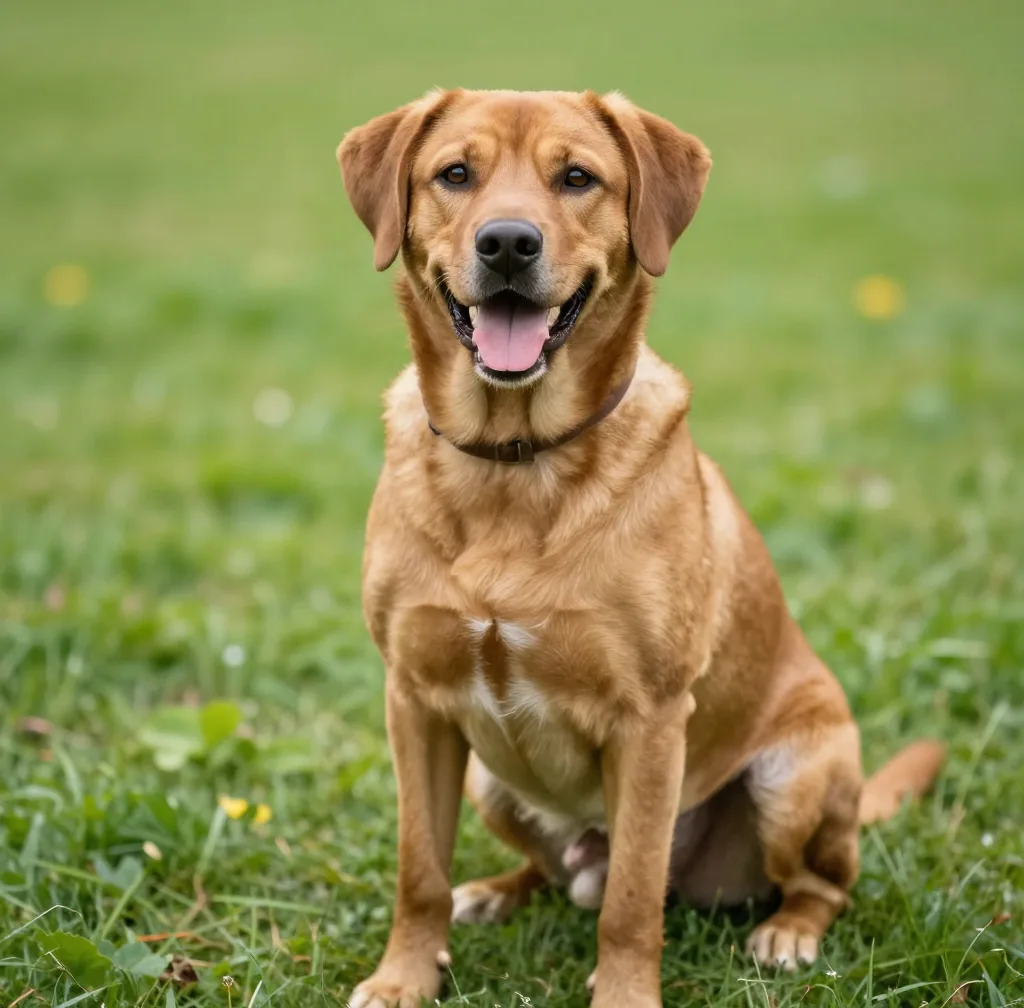
Before: the dog photo. An AI-made test photo.
 FLUX Kontext Fast
After: add a red bandana, everything else the same.
Put a small red bandana around the dog's neck. Keep everything else the same.
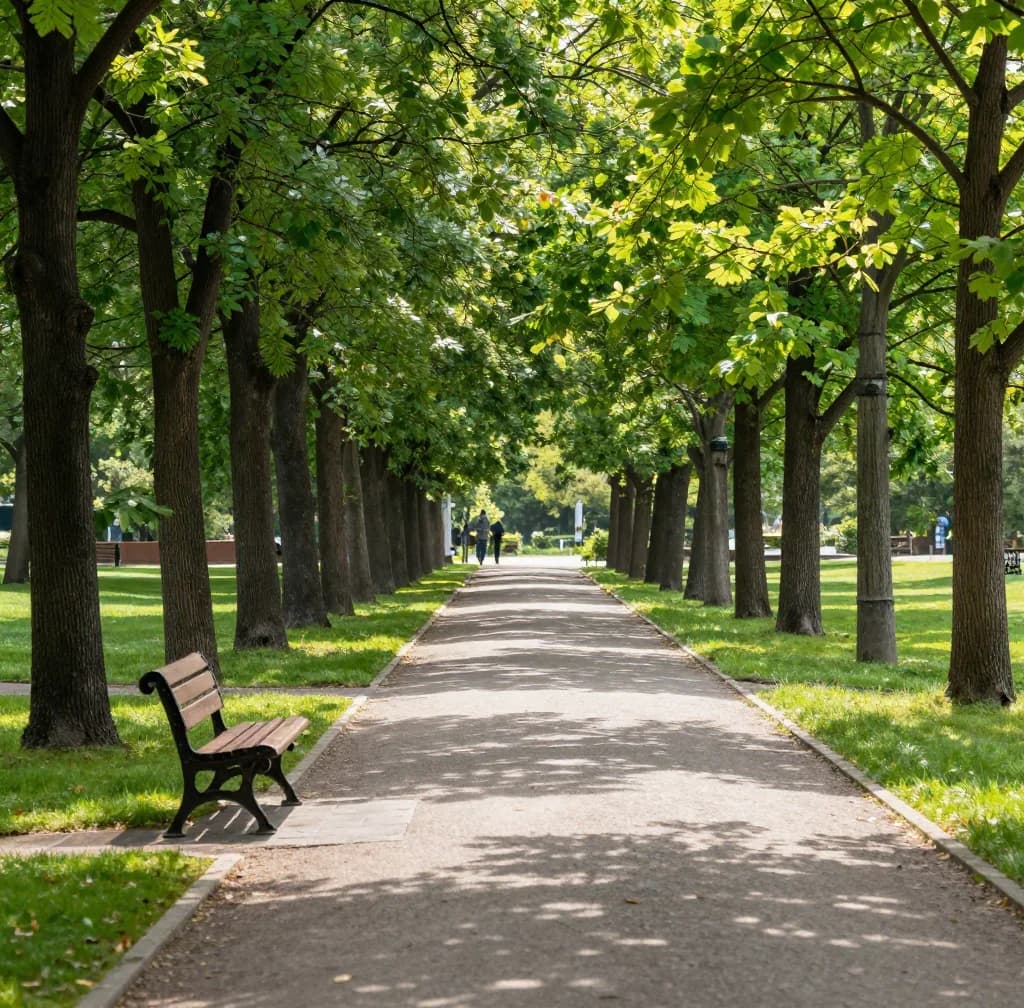
Before: summer.
 FLUX Kontext Fast
After: the same scene in winter.
Make it a snowy winter day with snow on the ground and trees. Keep the path, bench and framing the same.
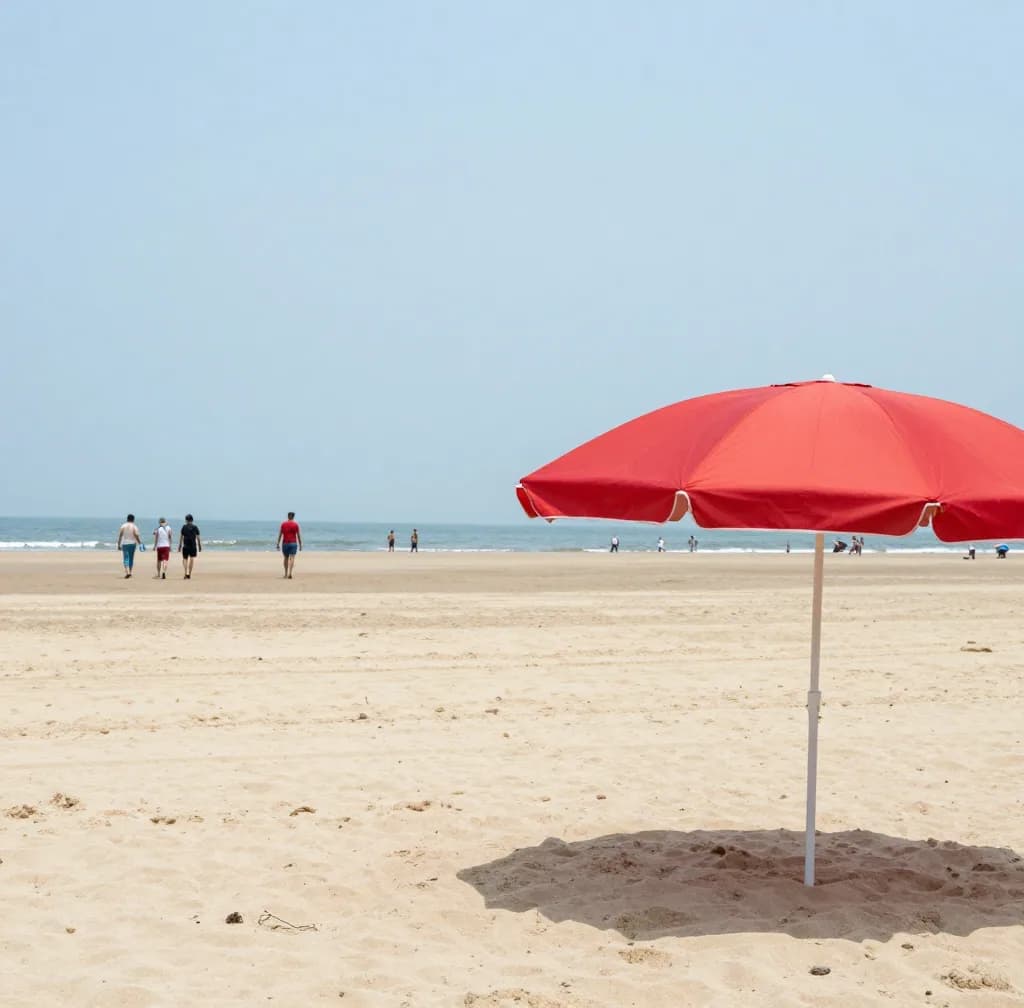
Before: people on the beach.
 FLUX Kontext Fast
After: people removed.
Remove the people in the background. Keep the umbrella, sand and sea exactly the same.
AI image from a reference photo: restyle it
Image to image keeps what your photo shows and changes how it looks. The portrait above became a clay figure, a comic panel, a marble statue and a winter market scene. Each one is a separate run on the same photo.
The prompt does two jobs. It names the new look, and it says what to keep. The examples all end with the same line: keep the same person, face, pose and composition.
Img2img online: change one thing, keep the rest
Instruction-editing models such as FLUX Kontext Fast work differently. You describe one change, like adding a bandana, turning summer to snow or removing people, and the model leaves the rest of the photo alone. The three before and after pairs above are that kind of edit.
Pick a restyle when you want a new look for the whole picture. Pick an instruction edit when most of the photo is already right.
Which model to pick
Not every model takes a reference photo. Text-only models such as Z-Image Turbo and Imagen 4 Fast do not. The table lists models that do. Start with a low-priced one to check the idea, then run the same photo and prompt on a stronger model if you want more.
What it costs
Each run costs 1–7 credits depending on the model. The 3 free daily credits cover models that need no paid plan, which is 1 run a day at 2 credits. Images made on free credits carry a watermark. More runs need credits from a plan (from $7.99 a month). Anyone can buy a credit pack, with or without a plan. A starter pack is $2.99 for 15 credits.
Models that take a reference photo
A selection, with the lowest to highest credit price per image.
| Model | Credits | Needs a paid plan |
|---|---|---|
| FLUX.2 Klein | 1 | No |
| Nano Banana 2 Lite | 2 | No |
| FLUX Kontext Fast | Shown before you generate | No |
| Seedream 4 | 3 | No |
| GPT Image 2 | 3–7 | Low quality: no. Medium and high: yes |
| Seedream 4.5 | 4–6 | Yes |
What Lovino does and does not do here
| Lovino does | Lovino does not | |
|---|---|---|
| Reference | Follows your photo when you say what to keep | Guarantee the same face or fine detail on every run |
| Models | Lets you run the same photo on several models | Take a reference photo on text-only models |
| Edits | Changes one thing on instruction-editing models | Promise that everything outside your change stays identical |
| Cost | Shows the credit price before you generate | Charge a flat price: it depends on the model |
What it can't do
- A new image is a redraw, not a pixel edit. Faces, hands and small text can change, so compare a few runs.
- Text-only models cannot take a reference photo. Pick one from the table.
- Some models need a paid plan, and images made on free credits carry a watermark.
- The model decides how closely to follow the photo. Saying what to keep in the prompt helps, but it is not a guarantee.
- Only upload photos you have the right to use, and people who have agreed. Photos and prompts are checked, and content that breaks the rules is blocked.
Pricing
Start free. Scale anytime.
One credit system across Studio, Flow and every tool. Cancel anytime.
| Plan | Per month | Credits |
|---|---|---|
| Free | $0 | 3 credits per day |
| Plus | $7.99 | 50 credits per month |
| Pro | $19.99 | 200 credits per month |
| Max | $44.99 | 500 credits per month |
Questions, answered.
Is image to image AI free?
Partly. Models that need no paid plan run on the 3 free daily credits. Nano Banana 2 Lite costs 2 credits, so that is 1 run a day, and images made on free credits carry a watermark. Models marked paid plan, such as Seedream 4.5, need one. Credits come from a paid plan or a credit pack.
What is image to image AI?
It makes a new image from an existing one. You upload a reference photo, describe the change, and the model draws a new picture that follows the photo. It is also called img2img.
Which model should I use for image to image?
For a quick restyle, try Nano Banana 2 Lite. For one precise change, such as adding an object or removing people, try FLUX Kontext Fast. For readable text in the new image, try GPT Image 2. Run the same photo on two models and keep the better result.
How do I keep the same face?
Say so in the prompt. The examples above all end with: keep the same person, face, pose and composition. Likeness is not guaranteed, so compare a few runs and keep the closest.
Can I use more than one reference image?
Some models can. Nano Banana 2 Lite accepts several reference images, and Lovino's Style Transfer tool sends it a photo plus a style image. The app shows what each model accepts.
How is image to image different from style transfer?
Image to image takes one photo and a prompt, and works with many models. Style Transfer takes a photo and a style image, runs on Nano Banana 2 Lite, costs 3 credits and uses paid credits only.
Can I change just one part of a photo?
Yes, with an instruction edit. Describe the one change and FLUX Kontext Fast leaves the rest. For a more targeted edit, the AI Image Editor costs 3 credits and uses paid credits only.
Can I use the new images commercially?
Images you generate are yours to use. Make sure you had the right to use the reference photo, and only use people who have agreed.
More AI tools
Related guides
- Image-to-Image vs Text-to-Image AI: When to Use Each ApproachUnderstand the difference between image-to-image and text-to-image AI generation — when each excels, how to use them together, and practical workflow examples.
- How to Create AI Image Variations: Multiple Versions of Any ImageLearn to generate multiple variations of any image with AI — for A/B testing, creative exploration, consistent brand assets, and social media content series.
- AI Video Generator: Create Videos From Photos & TextGenerate stunning AI videos from photos or text prompts. Create cinematic travel videos, product demos, and social media content in seconds.
Try a template


Ready to try Image to Image AI?
1–7 credits by model · shown before you generate. No purchase is made until you confirm a generation.