

What is AI Magic Eraser?
Paint over a person, object or clutter in a photo and the AI fills the gap to match the surroundings. Add a short prompt if you want something specific in its place. An erase costs 2 credits, and your 3 free daily credits cover 1 a day.
Removing the people from a beach photo
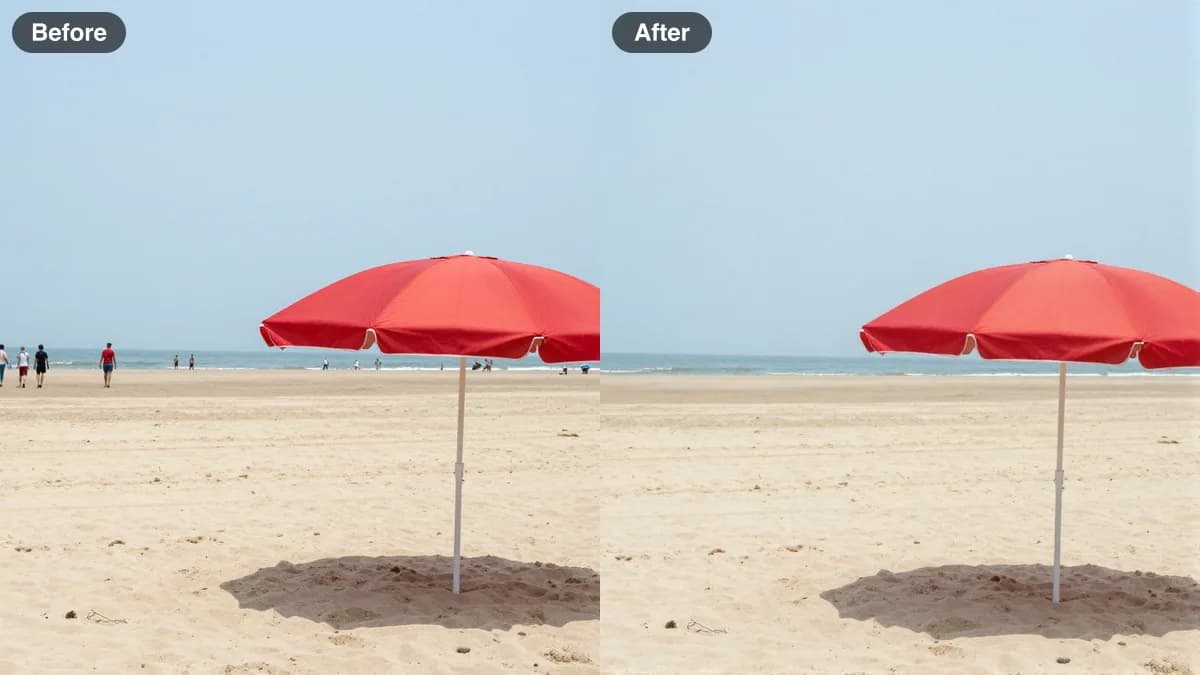
The photo is an AI-made test picture, not a real beach. In the first picture, the After side was made in Studio with an instruction edit on FLUX Kontext Fast, not with the Magic Eraser brush. It shows the same job: distant people gone, umbrella, sand and sea kept. The second picture shows where a brush would go. It was drawn by hand for our guide and is not a screenshot of the tool.
 FLUX Kontext Fast
2 credits
Before and after of an object-removal edit, made with an instruction edit rather than the brush.
Remove the people in the background. Keep the umbrella, sand and sea exactly the same.
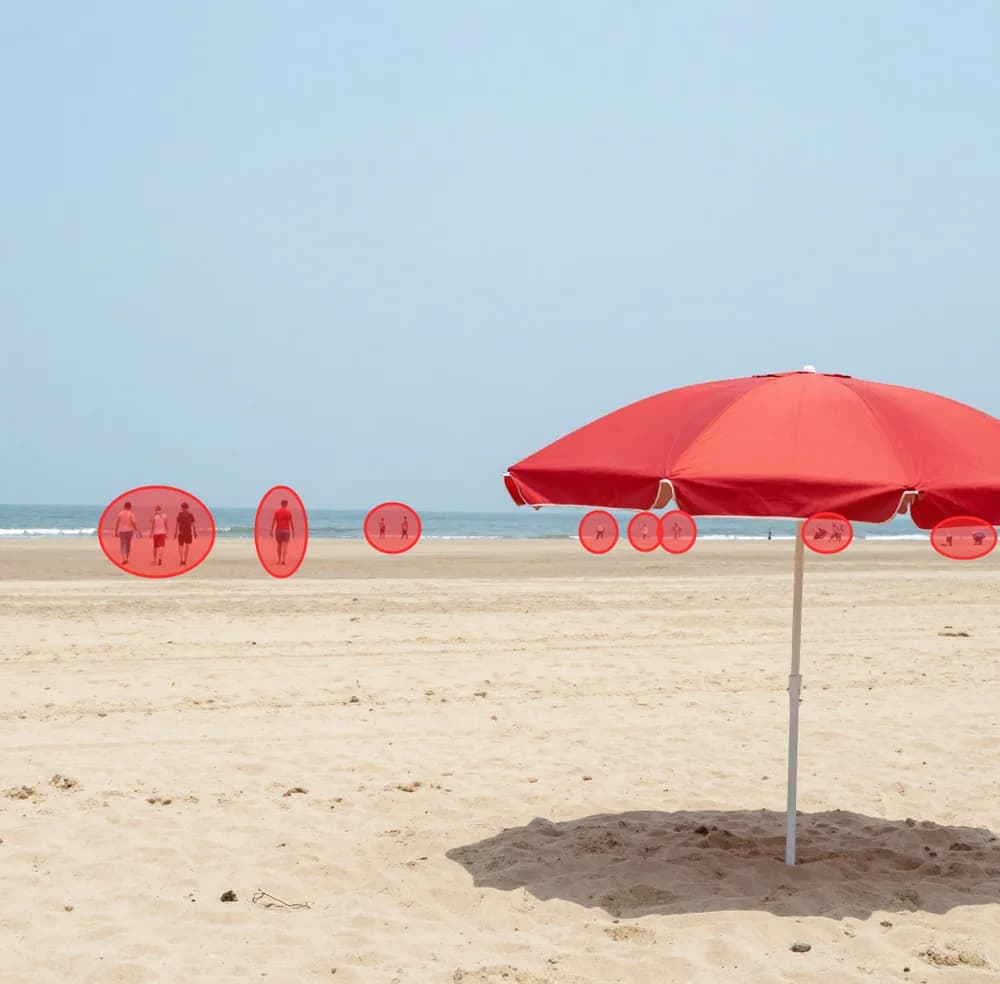
Red marks over each distant walker. Drawn by hand for our guide, not a tool screenshot.
How to use AI Magic Eraser
01
Upload your photo
Choose a JPG, PNG or WebP up to 10 MB that has something you want gone: a stranger, a sign, a cable, a stray bag.
02
Paint over what to remove
Brush across the object, and slightly past its edge so shadows and reflections go with it. Everything you paint is erased and refilled.
03
Erase, or say what goes there
Leave the prompt empty to let the AI fill the gap from its surroundings, or describe the replacement. Then download the result.
What the Magic Eraser does
The Magic Eraser is an inpainting tool. You paint a mask over the part of the picture to remove, and the model, FLUX Fill Pro from Black Forest Labs, draws new pixels for that area so it blends with the rest of the scene: sand continues, the wall stays flat, the grass keeps its pattern.
Because you draw the mask yourself, you decide exactly what disappears. That is more predictable than a one-tap removal that guesses what you meant.
Magic eraser online, no install
It runs in your browser. Upload a photo, brush over what you want gone and download the result. You need a free Lovino account, because the account tracks your daily credits.
The name is borrowed from the one-tap erasers in many photo apps. Here you paint the mask yourself, so you decide exactly what disappears.
How to get a clean erase
Most bad results come from the mask, not the model.
- Paint a little beyond the object's edge, and include its shadow and any reflection.
- Remove one object per pass. For a crowd, erase the largest person first, then repeat.
- Use the prompt to steer the fill: empty sandy beach or plain white wall works better than nothing.
- Small objects on simple backgrounds work best. Large objects on busy patterns may need two or three tries.
Erase, replace or edit?
Leave the prompt empty to erase. Add a prompt to replace what you painted with something else. If the change is broader than one masked area, such as recolouring or restyling the whole photo, use Magic Edit instead, which costs 3 credits and uses paid credits. To cut a subject out of its background, use the Background Remover.
What it costs
Each erase costs 2 credits. Your 3 free credits a day cover 1 erase, with 1 credit left for a cheaper tool. Free-plan results carry a watermark; any paid plan (from $7.99 a month) removes it and adds a monthly credit balance.
Which tool for which job
| Job | Tool | Credits | Free daily credits |
|---|---|---|---|
| Remove an object or person | Magic Eraser | 2 | Yes |
| Replace an object with something else | Magic Eraser with a prompt | 2 | Yes |
| Cut a subject out of its background | Background Remover | 1 | Yes |
| Sharpen or restore a photo | Photo Enhancer | 1 | Yes |
| Change or restyle a whole photo with text | Magic Edit | 3 | No, paid credits only |
More questions
Can I replace the object instead of erasing it?
Yes. Type a short description of what should appear in the painted area, such as a potted plant or an empty street, and the model fills the gap with that.
Will it change the rest of my photo?
It is built to change only the area you painted. Zoom in and compare the result with your original before you use it.
Can I undo an erase?
Yes. Your original stays as it was, so you can start again from it with a different mask or prompt. Each run costs credits.
Is this better than the eraser built into my phone?
Not always. If the fix is small and your phone already has an eraser, that is the quicker route. Lovino is useful when you want to work in a browser, choose the area precisely, or describe what should replace the object.
Can I use the cleaned-up photos commercially?
Yes, for photos you have the right to use. Edited images are yours to use, including for listings, marketing and client work.
What it can't do
- Free credits cover 1 erase a day, not several. Each erase is 2 credits.
- Large objects on busy backgrounds, such as a person standing in front of foliage, can leave visible patches. Try again or erase in stages.
- It generates new detail for the gap. It cannot recover what was really behind the object.
- Uploads are limited to 10 MB, in JPG, PNG or WebP.
- Only erase things from photos you have the right to edit. Do not use it to strip credits or watermarks from other people's work.
Pricing
Start free. Scale anytime.
One credit system across Studio, Flow and every tool. Cancel anytime.
| Plan | Per month | Credits |
|---|---|---|
| Free | $0 | 3 credits per day |
| Plus | $7.99 | 50 credits per month |
| Pro | $19.99 | 200 credits per month |
| Max | $44.99 | 500 credits per month |
Questions, answered.
What is an AI magic eraser?
It is a tool that removes a person, object or clutter from a photo and fills the gap so it blends with the surroundings. In Lovino you paint over the area, and the model, FLUX Fill Pro, draws new pixels for it.
Is there a magic eraser online that needs no download?
Yes. Lovino's Magic Eraser runs in your browser, so there is nothing to install. You need a free Lovino account to use your daily credits.
Is the magic eraser free?
Partly. An erase costs 2 credits and you get 3 free credits a day, so the free tier covers 1 erase a day, with a watermark on the result. Paid plans start at $7.99 a month and remove the watermark.
How do I use the AI magic eraser?
Upload a photo, paint over what you want to remove with the brush, optionally type what should go there, and generate. Download the result or run it again from the original.
What can I remove from a photo?
People, objects, signs, cables and clutter. Anything you paint over is erased and refilled to match the surroundings.
Does it work on complex backgrounds?
Often, but results vary. Simple backgrounds such as sky, sand, water and walls work best. For busy patterns, paint a slightly larger area, erase in stages and try again if the first fill looks off.
Can I remove text or a watermark?
You can erase text from your own images. Do not use the tool to remove watermarks or credits from work you do not own.
What file types and sizes work?
JPG, PNG and WebP up to 10 MB.
More AI tools
Related guides
- Remove Objects From Photos With AI: 3 Methods ComparedRemove people, objects or a whole background with AI: Magic Eraser brush, instruction edit or cut-out, with a real before-and-after and what each costs.
- How AI Object Removal Works: Brush Steps and TipsHow to remove unwanted objects, people, and distractions from photos using AI. Step-by-step guide with tips for seamless results.
- Photo Dump Reel Ideas: 10 Easy Formats That Feel EffortlessPhoto dump reel ideas that feel effortless: 10 easy formats, how to order the photos, and how AI can polish your shots without faking the day. Start here.
Try a template




Ready to try AI Magic Eraser?
2 credits per generation. No purchase is made until you confirm a generation.