AI Event Flyer Maker (2026): Legible Text, Layouts, Print Sizes
An AI event flyer maker can design a poster from one prompt, if you control the words. Learn layout, text legibility and print sizes before you hit print.
An AI event flyer maker designs the whole poster as one picture, from a description that includes your exact words. It works best with short text, a headline and one details line, on a model built for lettering. Two jobs stay yours: reading every word, and enlarging the file before it goes to print.
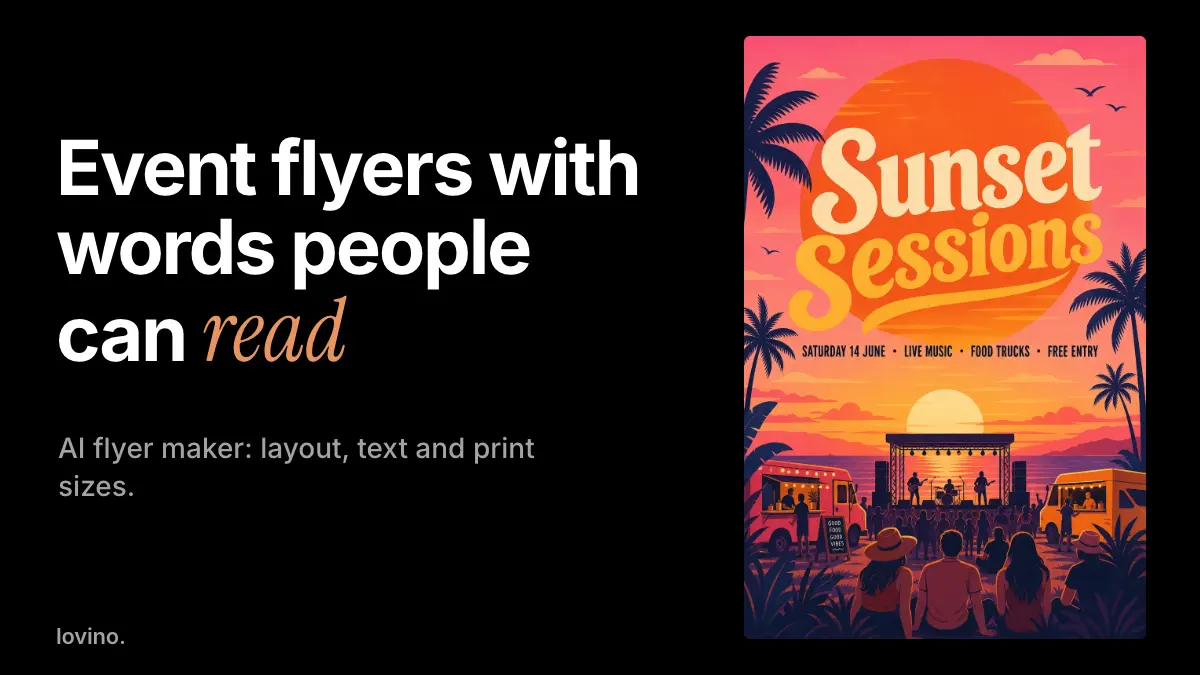
This guide walks through the prompt, the layout, the legibility test and the print sizes. The example is a real flyer made in Studio with GPT Image 2, the route behind Lovino's AI poster generator: a fictional beach music night called Sunset Sessions. You need an account to generate, and free results carry a watermark that paid plans remove.
How do you make an event flyer with AI?
- Write the words first. Event name, date, place and one hook. If it will not fit in a headline and one short line, cut it.
- Describe the look. Style, colours, mood and what is in the picture.
- Put your exact words in quotes. Say where each goes: headline first, details underneath.
- Pick a text-friendly model. GPT Image 2 handles whole layouts, and its low quality tier runs on the free daily credits. Ideogram V3 Turbo is a text-focused model that suits signs and lettering, and it needs a paid plan. See the GPT Image 2 page for what that model does.
- Generate, then read. Check every letter. Change the prompt and run again if a word is wrong.
This is the prompt behind the flyer in this guide:
A bold summer music festival poster in a flat illustration style with a big orange sun, palm trees and warm pink and orange colours. Large headline text reading "Sunset Sessions", below it the line "Saturday 14 June · Live music · Food trucks · Free entry". Clean layout, readable lettering, no logos.
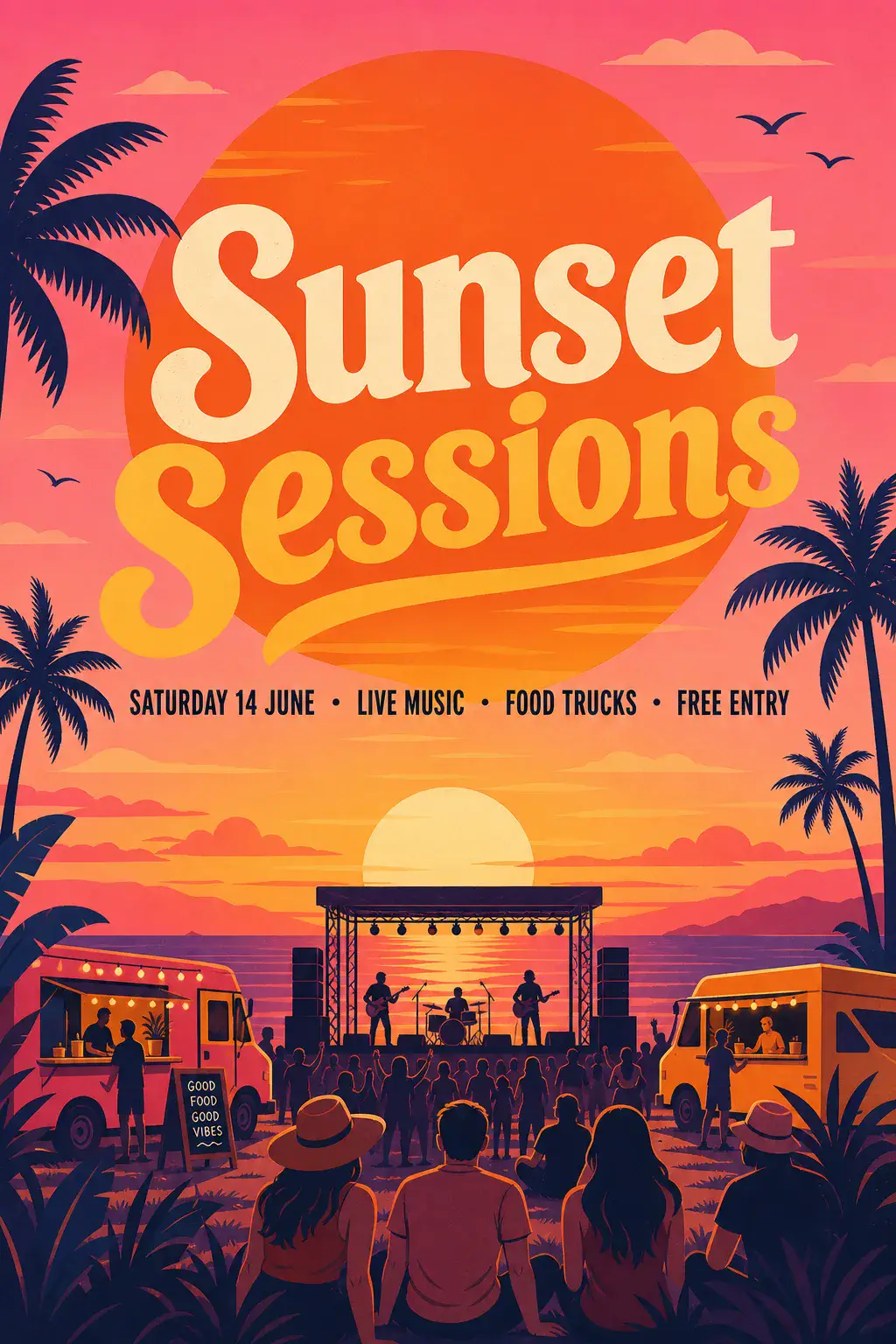
The model can only spell what you give it, and even then it can slip. Type each line inside quotes and keep the text short: a headline and two or three short lines tend to come out better than a paragraph.
What layout works on a flyer?
Think in three levels, and let the eye move down them.
- Level 1: the headline. Two to four words, large, with the most contrast on the page.
- Level 2: date and place. One line, smaller, but still easy to read.
- Level 3: everything else. Extras go last, or off the flyer. A website or a QR code is better than five more lines.
Look at how the Sunset Sessions flyer follows this. The headline is huge, the details sit on a single line under it, and the busy scene lives in the bottom half where no words compete with it.
One more thing to check. The model also painted a small chalkboard sign by the food truck that reads "Good food good vibes". It was not in our prompt. It is spelled correctly and harmless here, but on a real flyer an invented line could be a wrong promise. Zoom into the background text, not just the headline.
How do you keep text legible?
Test the flyer at the size people will actually see it. Most flyers are judged on a phone screen, as a thumbnail in a feed.

The test shows what happens to the same file. Zoomed in, every line reads. Fit to the screen, the details line is a stripe. As a thumbnail, only the headline survives. So put what matters most in the headline, and treat the small line as a bonus.
Contrast matters too. The W3C's web accessibility guidance asks for a contrast ratio of at least 4.5 to 1 for normal text and 3 to 1 for large text. It was written for web pages, but it is a handy floor for flyers seen on screens. In practice:
- Put light text on a dark area, or dark text on a light area. Do not put it across mid-tones.
- Keep words off the busiest part of the picture.
- Ask for "bold, simple lettering" and "clear space behind the text".
- Avoid thin script for anything smaller than the headline.
What size should a flyer be for print?
Print needs more pixels than a screen. As a rule of thumb, divide the pixel count by 300 to get inches at print quality, and ask your printer for its own spec. This table is simple arithmetic at 300 pixels per inch.
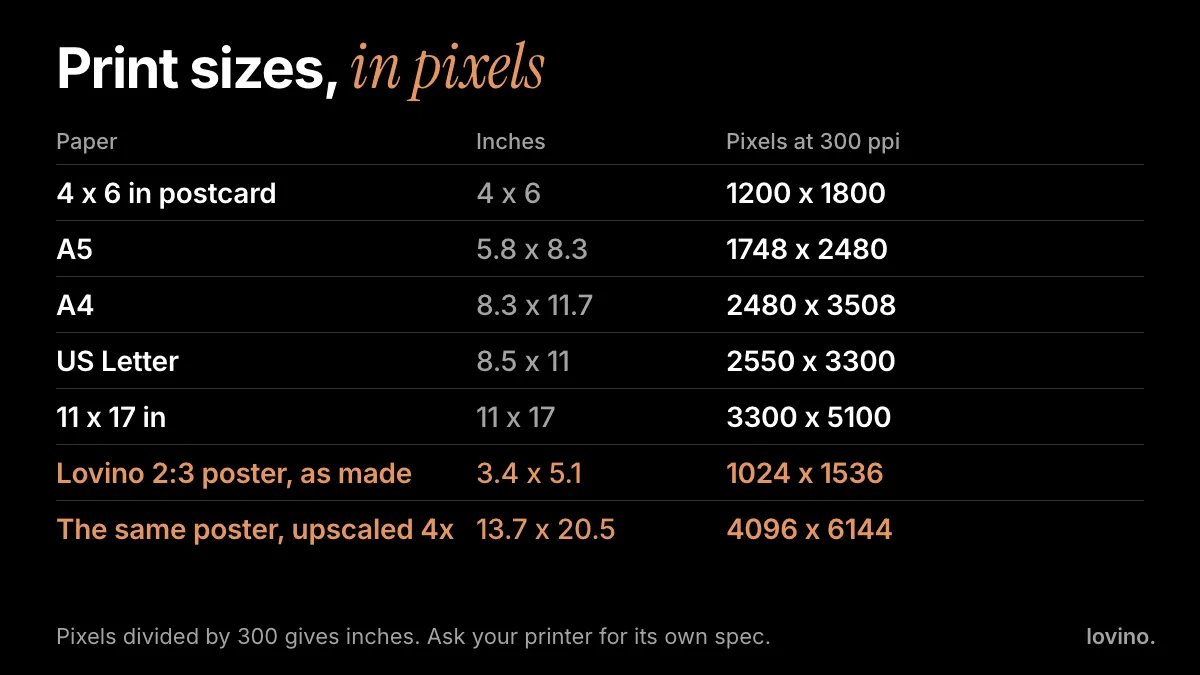
GPT Image 2 makes square, 2:3 portrait and 3:2 landscape pictures. The Sunset Sessions flyer is 1024 by 1536 pixels, a 2:3 shape. Two things follow:
- 2:3 fits a 4 by 6 inch postcard exactly, and 8 by 12 inches too.
- A4 and US Letter are not 2:3. Expect to crop a little, so keep key text inside the middle of the flyer, away from the edges.
At 1024 by 1536 pixels the flyer is only about 3.4 by 5.1 inches at print quality. For a bigger print, enlarge it first with the Image Upscaler. Its 4x setting multiplies each side by four, which takes this flyer to 4096 by 6144 pixels, about 13.7 by 20.5 inches. The Upscaler uses paid credits. See our upscaler guide. Also ask the printer about bleed, the extra picture past the cut line. Lovino gives you the finished picture and does not add a bleed area.
Lovino does not print or ship flyers. You get the image file.
Can an AI event flyer maker edit text afterwards?
Not word by word. You get one flat picture, with no layers or live text. To change a word you edit the prompt and run again, which redraws the whole poster.
If you need a guaranteed spelling, use a safer workflow. Ask the model for artwork only, such as "leave a clear area in the top third for text", then add your words in any design tool you like. It takes a few extra minutes and removes the spelling risk.
Menus and price lists work the same way
The same rules apply to a menu board. Here is a chalkboard bakery menu made with a prompt that listed each line and price:
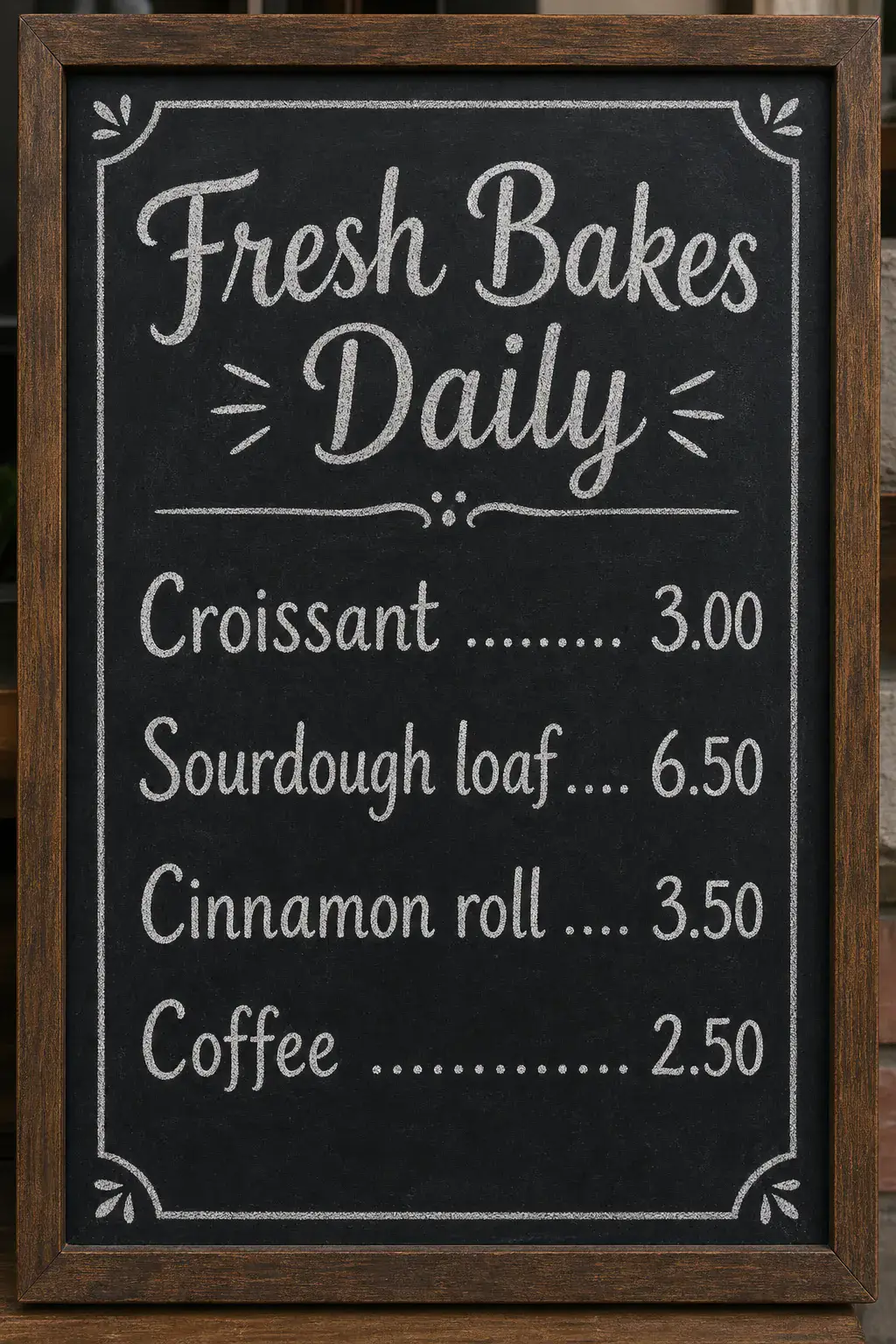
Prices are where AI errors hurt most. Read every number against your real menu before it goes on a wall.
What must stay real?
AI can style a flyer. It must not invent the facts on it.
- Date, time and address. Type them yourself and check them twice.
- Prices and offers. "Free entry" is a promise. Only print what you will honour.
- Names and logos. Use only logos you own, and never ask for a real brand mark. Get permission to name performers or sponsors.
- Photos of people. If the flyer shows a real performer, use their real photo with their consent. Do not generate a lookalike.
- Sponsors and extras. Delete anything the model added that you did not request.
Uploaded images are processed by third-party AI providers, so avoid uploading anything private. Lovino is for people aged 16 and over, and all users, free or paid, can use their results commercially.
Where to go next
If the flyer features products, a clean cut-out helps, and our guide to white background product photos shows how. For a giveaway, the AI sticker maker guide makes a matching sticker. Planning the whole event? AI content for event planners covers concepts, invitations and honest recaps. And for broader campaigns, see AI carousels, thumbnails and posters.
Ready to make one? Open the AI poster generator, put your headline and one details line in quotes, and read the result at thumbnail size before you print. Pricing lists the plans.
Questions, answered.
Can AI make an event flyer with readable text?
Yes, with text-friendly models such as GPT Image 2 and Ideogram V3 Turbo, but it is not guaranteed. Put each line of text in quotes in the prompt, keep it short, and read every letter of the result. If a word is wrong, run the prompt again or shorten the line.
What size should an AI-made flyer be for printing?
Divide the pixel size by 300 to get inches at print quality, and ask your printer for its spec. A 1024 by 1536 pixel flyer is about 3.4 by 5.1 inches at that quality, so enlarge it with an upscaler for anything bigger.
Can I edit the text on an AI flyer?
Not in place. You get one flat image, so changing a word means editing the prompt and generating again. For exact spelling, ask for artwork with clear space for text, then add the words in a design tool.
Which model is best for flyers and posters?
GPT Image 2 is a good first try for a full poster with a headline and a details line. Ideogram V3 Turbo suits signs and lettering. Run the same prompt on both and keep the version with the cleanest text.
Can I use AI flyers commercially?
Yes. Under Lovino's terms, all users, free and paid, can use their results commercially. Free results carry a watermark, which paid plans remove. Do not include brand logos or names you have no right to use.