

AI Poster Generator
Lovino's AI poster generator makes a poster or flyer from a written description that includes the words you want on it. It suits event posters, menu boards and shop signs. GPT Image 2 starts at 3 credits and runs on free daily credits. Ideogram V3 Turbo needs a paid plan.
GPT Image 2 from 3 credits · Ideogram V3 Turbo 2 credits (paid plan) · shown before you generate
What is AI Poster Generator?
Describe the poster and type the exact words you want on it, then pick a model that writes text well. GPT Image 2 and Ideogram V3 Turbo both do. Lovino makes the finished poster as one image. Proofread the lettering before you print, because AI can misspell.
How to use AI Poster Generator


- 01
Describe your poster
Write the idea, the style and the exact words, with the words in quotes. For example: a summer music festival poster with the headline "Sunset Sessions".
- 02
Pick a text-friendly model
Choose GPT Image 2 or Ideogram V3 Turbo. Both are built to put readable words in an image. The credit price shows before you generate.
- 03
Generate in Studio
Run it in Studio. If a word is wrong or the layout is off, change the prompt and run it again.
- 04
Proofread, then upscale if you need print size
Read every word before you share or print. For a larger file, enlarge the poster 2x or 4x with the Upscaler, which uses paid credits.
Real posters and lettering from Studio
These are real outputs made in Studio. The two GPT Image 2 posters were checked by eye for spelling. The neon sign, mural and matchbox show lettering from Ideogram V3 Turbo and are not poster layouts. Prompts are shown in full.
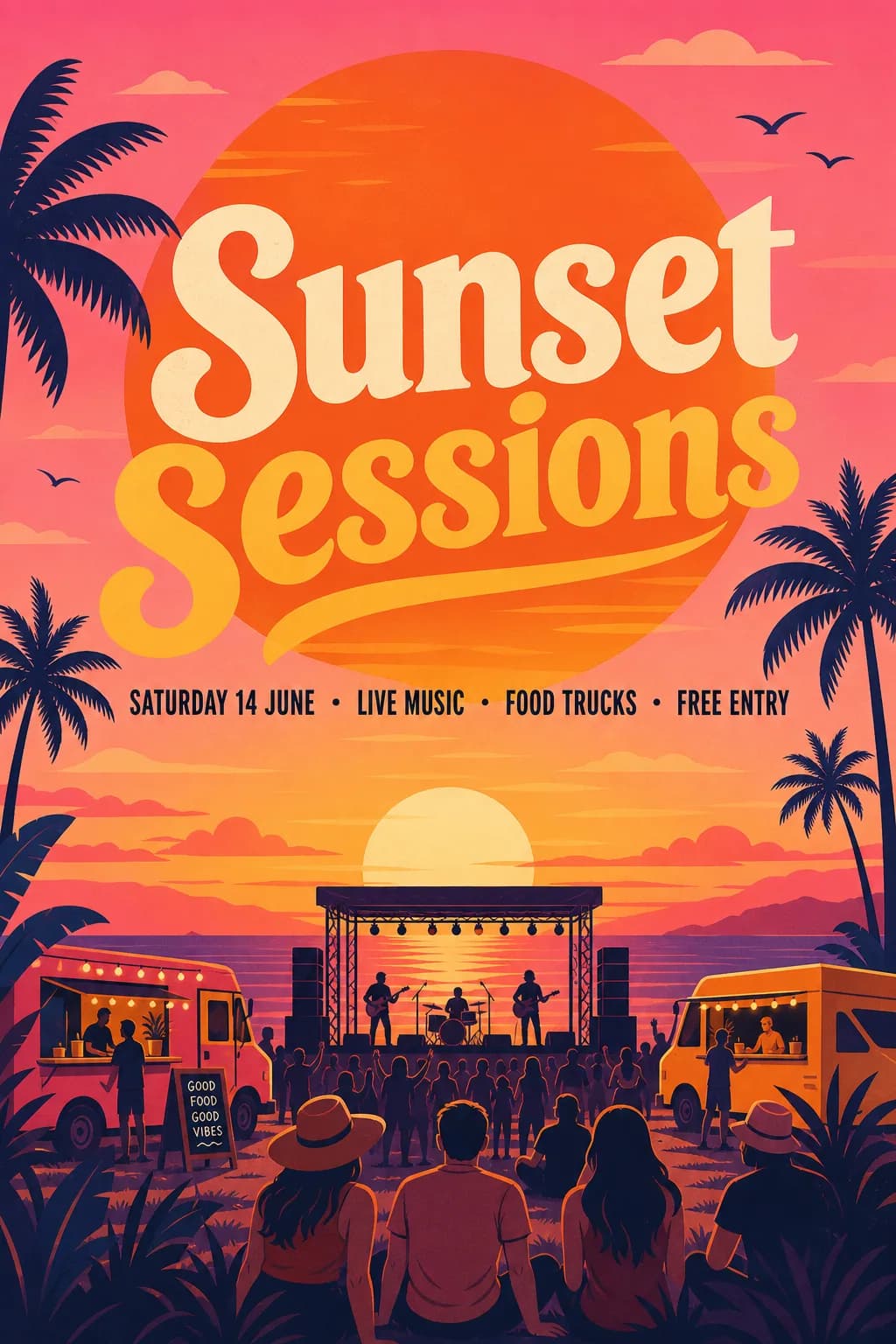 GPT Image 2
5 credits, medium quality
Event poster made in Studio with GPT Image 2. Text checked by eye.
A bold summer music festival poster in a flat illustration style with a big orange sun, palm trees and warm pink and orange colours. Large headline text reading "Sunset Sessions", below it the line "Saturday 14 June · Live music · Food trucks · Free entry". Clean layout, readable lettering, no logos.
 GPT Image 2
5 credits, medium quality
Menu board made in Studio with GPT Image 2. Text checked by eye.
A chalkboard menu board for a small neighbourhood bakery with hand-lettered white chalk text. Title "Fresh Bakes Daily". Four lines: "Croissant 3.00", "Sourdough loaf 6.50", "Cinnamon roll 3.50", "Coffee 2.50". Simple chalk borders, readable lettering, no logos.
 Ideogram V3 Turbo
2 credits
Neon sign lettering made in Studio with Ideogram V3 Turbo.
Neon sign reading 'DREAM BIGGER' in flowing cursive on a dark brick wall, subtle reflections, warm-neutral palette, soft diffused lighting, cohesive minimal background, premium editorial composition
 Ideogram V3 Turbo
2 credits
Mural lettering made in Studio with Ideogram V3 Turbo.
Street mural spelling 'MAKE WAVES' in bold graffiti letters merging into ocean waves, warm-neutral palette, soft diffused lighting, cohesive minimal background, premium editorial composition
 Ideogram V3 Turbo
2 credits
Packaging-style label made in Studio with Ideogram V3 Turbo.
Vintage matchbox design labeled 'LUMIÈRE ATELIER' with an art-deco sunburst, aged paper texture, warm-neutral palette, soft diffused lighting, cohesive minimal background, premium editorial composition


AI flyer maker: put your own words in the prompt
The model can only spell what you give it. Type each line of text inside quotes, and say where it goes: the headline, then a line underneath. The Sunset Sessions poster above used one headline and one line with the date and details.
Keep the text short. A headline and two or three short lines tend to come out better than a paragraph.
Poster with text AI: which model to pick
GPT Image 2 handles whole layouts, such as a poster with a headline and a details line or a menu with prices, and takes a reference image if you want to start from one. Ideogram V3 Turbo is a lower-priced text-focused model, and it is a good fit for signs, lettering and labels.
GPT Image 2 offers square, 2:3 portrait and 3:2 landscape shapes. Both posters above are 1024 by 1536 pixels.
Print size and proofreading
AI can swap, drop or invent letters, especially in long lines and small print. Read every word on the finished poster, and run it again if one is wrong. We checked the two GPT Image 2 posters by eye before publishing them.
A 1024 by 1536 pixel poster is small for a large print. Enlarge it with the Upscaler first, which uses paid credits, and ask your printer what resolution they need.
What it costs
GPT Image 2 costs 3 credits at low quality, 5 at medium and 7 at high. Low quality runs on the 3 free daily credits, which is 1 poster a day with a watermark. Medium and high quality need a paid plan. Ideogram V3 Turbo costs 2 credits and also needs a paid plan. Plans start at $7.99 a month. Anyone can buy a credit pack, with or without a plan. A starter pack is $2.99 for 15 credits.
Models for posters with text
| Model | Credits | Free daily credits |
|---|---|---|
| GPT Image 2, low quality | 3 | Yes |
| GPT Image 2, medium quality | 5 | No, paid plan |
| GPT Image 2, high quality | 7 | No, paid plan |
| Ideogram V3 Turbo | 2 | No, paid plan |
What Lovino does and does not do here
| Lovino does | Lovino does not | |
|---|---|---|
| Text | Writes the words you type into the poster | Guarantee correct spelling, so proofread |
| Layout | Makes a finished poster as one image | Give you layers, fonts or an editable template |
| Changes | Lets you edit the prompt and run again | Change a single word in place without a new run |
| Cost | Shows the credit price before you generate | Run medium quality, high quality or Ideogram on free credits |
What it can't do
- AI can misspell or drop words, especially in long lines and small print. Proofread every poster.
- You get one flat image. There are no layers, fonts or editable text boxes.
- To change one word you run the prompt again, and the whole poster is redrawn.
- Posters in the examples are 1024 by 1536 pixels. Enlarge them with the Upscaler, which uses paid credits, for big prints.
- GPT Image 2 medium and high quality and Ideogram V3 Turbo need a paid plan, and free-credit images carry a watermark.
- Prompts are checked, and a prompt that breaks the content rules is blocked.
Start free. Scale anytime.
One credit system across Studio, Flow and every tool. Cancel anytime.
| Plan | Per month | Credits |
|---|---|---|
| Free | $0 | 3 credits per day |
| Plus | $7.99 | 50 credits per month |
| Pro | $19.99 | 200 credits per month |
| Max | $44.99 | 500 credits per month |
Questions, answered.
Is the AI poster generator free?
Partly. GPT Image 2 at low quality costs 3 credits and runs on the 3 free daily credits, so 1 poster a day, with a watermark. Medium (5 credits) and high (7 credits) quality and Ideogram V3 Turbo (2 credits) need a paid plan. Credits come from a paid plan or a credit pack.
Can AI put readable text on a poster?
Yes, with text-friendly models such as GPT Image 2 and Ideogram V3 Turbo. It is not guaranteed. Type the words in quotes and read the result closely. We checked the two GPT Image 2 posters above by eye.
How do I get the exact words right?
Put each line of text in quotes in the prompt and say where it goes. Keep it short: a headline and two or three short lines. If a word comes out wrong, run it again or shorten the line.
Which model is best for posters?
GPT Image 2 is the one to try first for a full poster with a headline and detail lines. Ideogram V3 Turbo is the lower-priced pick for signs and lettering. Run the same prompt on both and keep the better one.
What size is the poster?
GPT Image 2 makes square, 2:3 portrait or 3:2 landscape images. The posters above are 1024 by 1536 pixels. For a bigger print, enlarge the poster with the Upscaler, which uses paid credits.
Can I make a flyer or a menu board?
Yes. Describe the layout and type the lines you want, as in the bakery menu board above, which has a title and four lines with prices. Check every price and spelling before you use it.
Can I print the poster?
Yes, after you proofread it and enlarge it. The files are 1024 by 1536 pixels, which is small for a big print, so use the Upscaler first and check your printer's file requirements.
Can I use the posters commercially?
Images you generate are yours to use. Check the text for names or logos you do not have rights to, and keep real brand logos out of the prompt.
More AI tools
Related guides
- On-Brand in One Prompt: AI Carousels, Thumbnails and PostersCarousels, thumbnails and posters each have their own rules. Iris skills handle consistency, readable text and hierarchy so your designs come out on-brand.
- GPT Image 2 Prompts: Copy-Paste Templates for Text in ImagesCopy-paste GPT Image 2 prompts for signs, posters, flat-lays and product shots, with the real prompt behind four examples and what each quality tier costs.
- YouTube Thumbnail Prompts for AI: Layout, Size and ExamplesPrompts that leave room for your title, with the real prompts behind two 16:9 thumbnail bases, a layout guide for 1280 x 720 and honest limits.
Ready to try AI Poster Generator?
GPT Image 2 from 3 credits · Ideogram V3 Turbo 2 credits (paid plan) · shown before you generate. No purchase is made until you confirm a generation.