Make AI Stickers for WhatsApp, Telegram and Print (2026)
Make AI stickers for WhatsApp, Telegram or print: write the prompt, cut out the background, test the outline and hit the sizes each app and printer wants.
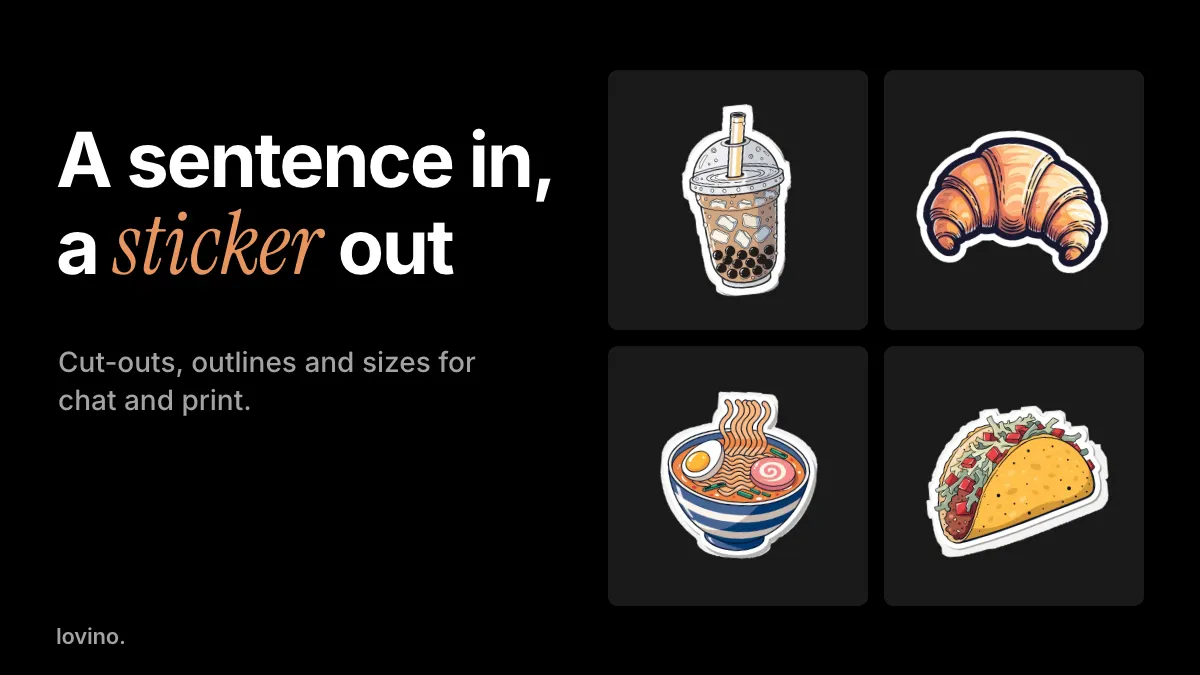
To make an AI sticker, you describe it, a model draws it, and a background remover cuts it out, so you end up with a transparent PNG. On Lovino, Recraft V4 in Studio draws the sticker and Background Remover does the cut-out. Then you resize for a chat app, or check the pixel count for print. The AI sticker generator page covers the drawing step; this guide covers everything after it.
The drawing is the easy part. The edge is where stickers succeed or fail, because a sticker lands on white chats, dark chats and bright wallpapers, and a weak outline vanishes on some of them. This guide covers the prompt, the cut-out, the outline test and the sizes, in that order.
How do you make a sticker with AI?
- Describe one subject. "A folded taco with meat, lettuce and tomato" works. "A taco festival with dancing food" does not, because a sticker holds one idea.
- Draw it in Studio. Pick Recraft V4. It needs a paid plan and costs 4 credits a sticker. A cheaper model on the free daily credits gives a different look, with a watermark.
- Ask for a die-cut look. Say thick white border, flat style and a plain background.
- Cut it out. Send the picture to Background Remover for a transparent PNG. It costs 1 credit more.
- Check the edge. Zoom in. The cut-out may trim the white border, so redo it if the edge looks chewed.
Use this template, and swap the first sentence for your subject:
A happy corgi running with a red ball in its mouth. Die-cut sticker illustration: a thick clean white border following the silhouette, flat vector style with soft shading, a single centred subject, plain solid light grey background with margin around the edge. No text, no logos, no watermark.
Recraft V4 starts from text only. It does not take a photo, so it will not turn a selfie into a sticker. For that, see the selfie route below.
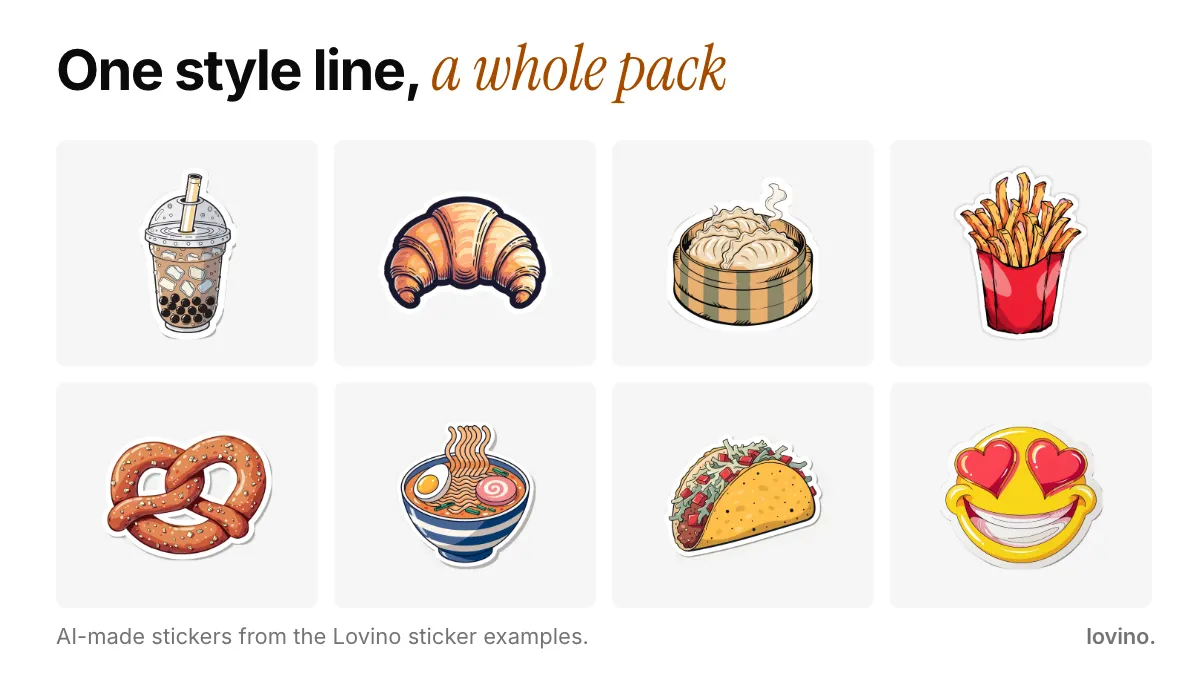
Recraft V4 drew every sticker above from the same style wording and a different subject, which is why they sit together as a set. Their backgrounds were removed outside Lovino, so your own cut-out may treat the white border a little differently. Keep your style line fixed and change only the subject.
How do you write prompts for a whole pack?
Fix one style line, and change only the subject. For a snack pack, the subjects might be:
A boba tea with a wide straw
A folded taco with lettuce and tomato
A bowl of ramen with a soft egg
A golden croissant
A bag of fries
Add the same style sentence after each one: die-cut, thick white border, flat vector, plain background, no text. Generate them in a row and keep the best of each. A pack of six to eight stickers feels like a set, and it is easier to share than one odd sticker.
What if the cut-out goes wrong?
Cut-outs fail in predictable ways.
- A chewed or missing white border. The remover may treat the border as background. Ask for a light grey background so the white border stands apart, then cut again.
- A grey halo. Zoom in and cut again, or nudge the edge in an editor.
- Parts of the subject missing. Thin items, such as a straw or noodles, are the usual victims. Ask for chunkier shapes.
- Shadows left behind. Ask for "no shadow" or "flat colours" in the prompt.
Why does the outline matter so much?
A sticker is judged on a background you do not control. A thin edge that looks fine on white vanishes on black.

Run this test on every sticker before you share it. WhatsApp's developer notes make the same point: stickers render on white, black, coloured and patterned backgrounds, so they recommend an 8 pixel white stroke around each one. The croissant passes: on black and blue its white border separates it from the background, and on white its dark inner outline does the same job.
What size should a sticker be for WhatsApp and Telegram?
Each chat app has its own spec. These are the published numbers as of October 2026.
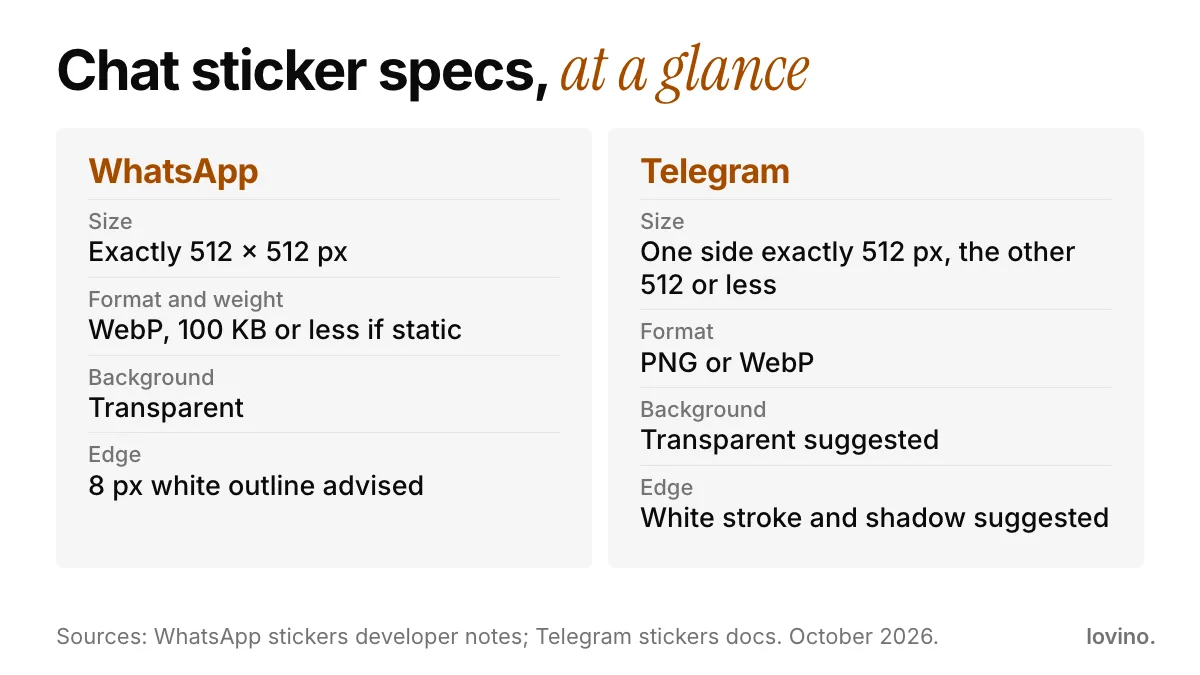
| App | Size | Format | Other notes |
|---|---|---|---|
| Exactly 512 × 512 px | WebP, 100 KB or less if static | Transparent background, 8 px white outline advised | |
| Telegram | One side exactly 512 px, the other 512 or less | PNG or WebP | Transparent background suggested; a white stroke and shadow help it stand out |
WhatsApp's numbers come from its guide for third-party sticker packs, which are packaged in an app. Lovino makes the image file. It does not package packs for WhatsApp or Telegram, so you resize, convert and upload with the tool each app asks for. Telegram's page also lists a separate size for custom emoji, so check which one you are making.
To hit 100 KB, export as WebP and lower the quality until the file fits. A flat, simple sticker compresses far better than a detailed one, which is another reason to keep your prompt simple.
How do you print an AI sticker?
Print needs pixels. As a rule of thumb, divide the pixel width by 300 to get inches at print quality. Many print shops quote 300 pixels per inch as a target, but ask yours for its own spec.
- The example stickers on Lovino's sticker page are 1024 × 1024 pixels. That is about 3.4 inches square at 300 pixels per inch.
- For a bigger sticker, run the transparent PNG through the Image Upscaler. It uses paid credits.
- Print shops usually want a cut line and a little extra edge. Ask for their template instead of guessing.
- Screen colours can shift in print. Order one sample before a big run.
Lovino does not print or ship stickers. You get the file, and you send it to the printer you choose.
Which sticker styles work best?
| Style | Prompt cue | Good for |
|---|---|---|
| Die-cut food or animal | "thick white border", "flat vector" | Chat packs, laptops |
| Emoji-style faces | "round yellow face", "plain simple circle" | Reactions |
| Flat clipart, no border | "flat clipart", "no outline" | Slides, planners |
| Hand-drawn doodle | "hand-drawn doodle", "marker lines" | Journals, gifts |
| Badge or label | A short name in quotes | Risky: check every letter |
Can you make a sticker of your own face?
Yes, with a different route, since Recraft V4 takes text only. Turn your photo into a cartoon or character with Cartoon Filter or Character Generator, then cut it out with Background Remover. Our AI avatar guide shows how to pick the photo and style. Only use your own face or photos of people who agreed.
What to get right: the rights, the text and the watermark
- Do not copy brands or characters. A sticker of a famous cartoon is someone else's artwork, not yours.
- Check every letter. AI can misspell words, so leave text out or proofread it.
- Mind the watermark. Free results carry a watermark, which looks wrong on a sticker. Paid plans remove it. All users, free or paid, can use their results commercially.
- Know where photos go. Uploaded images are processed by third-party AI providers. You need an account to generate, and Lovino is for people aged 16 and over.
A sticker for your next event
Stickers make good giveaways. If you are promoting a launch or a night out, pair the sticker with a poster whose text people can read. Our AI event flyer guide covers that part.
Ready? Open the AI sticker generator, describe one subject, add a thick white border to your prompt, and test the edge on a dark background before you share it. Pricing lists the plans.
Questions, answered.
How do I make a sticker with AI?
Describe one subject, draw it in Studio with a model such as Recraft V4, ask for a die-cut look with a thick white border, then cut out the background with a background remover to get a transparent PNG. Check the edge on a dark background before you share it.
What size should a WhatsApp sticker be?
WhatsApp's developer notes for third-party sticker packs say exactly 512 by 512 pixels, WebP format, 100 KB or less for a static sticker, with a transparent background and an 8 pixel white outline advised. Check the current notes before you publish a pack.
Can I make Telegram stickers with AI?
Yes. Telegram asks for PNG or WebP with one side exactly 512 pixels and the other 512 or less, and suggests a transparent background. Make the sticker, cut it out, and resize it to those numbers before uploading.
Can I print AI-made stickers?
Yes. The example stickers are 1024 by 1024 pixels, about 3.4 inches at 300 pixels per inch. For a larger size, upscale the transparent PNG first, then ask your print shop for its file spec. Lovino makes the image file but does not print or ship stickers.
Are AI stickers free to make?
Not for the Recraft V4 recipe, which needs a paid plan. A cheaper model on the free daily credits works with a different look, and free results carry a watermark that paid plans remove. The credit price shows before you generate.