

AI YouTube Thumbnail Maker
Generate eye-catching YouTube thumbnails with AI
1 credit per generation
What is AI YouTube Thumbnail Maker?
Describe your video and pick one of four styles, Dramatic, Minimal, Bold or Playful, and the tool generates a 1280×720 thumbnail with room left for your title. Each thumbnail costs 1 credit, so your 3 free daily credits cover up to 3 a day. Add your words in an editor afterwards.
Thumbnail-style frames
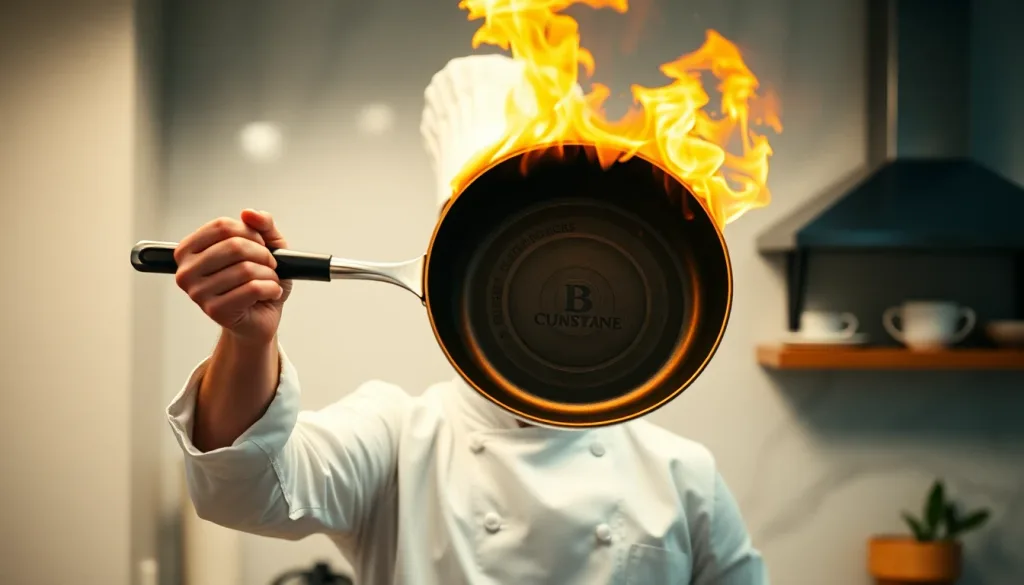
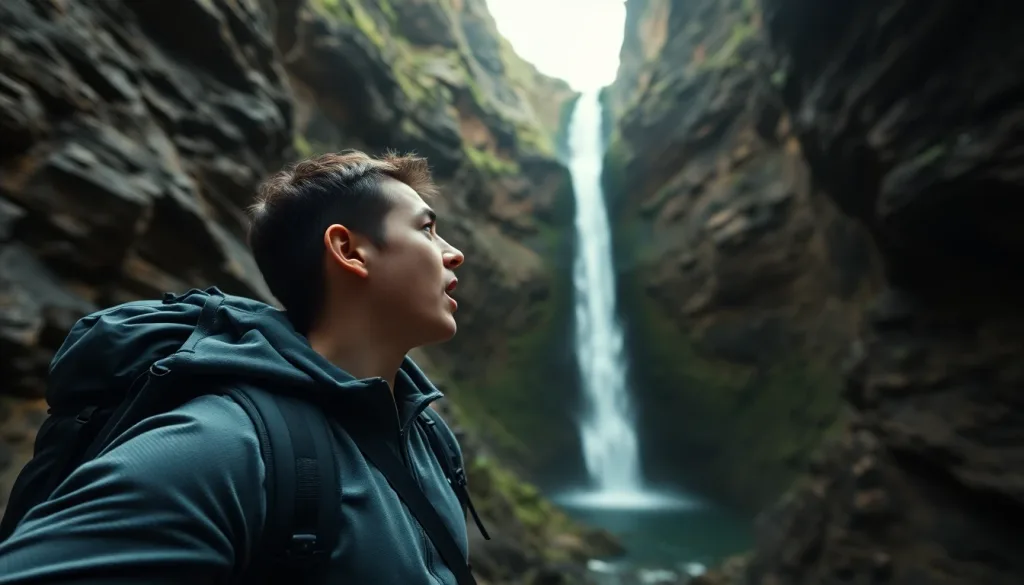
These frames were generated in Lovino from text prompts written for the thumbnail format: 16:9, one strong subject, empty space for a title. They show the composition to expect; the Thumbnail Maker adds one of its four style presets to your description.
 16:9
Text-prompt example
An excited chef with a flaming pan, with space left on one side for a title.
Excited chef holding up a flaming pan toward camera, dramatic kitchen backdrop, high-energy YouTube thumbnail composition with clear negative space left, cinematic warm-neutral color grade, soft directional key light, 35mm lens, shallow depth of field, natural skin tones, subtle film grain
 16:9
Text-prompt example
A traveller gasping at a hidden waterfall, framed for text on the right.
Backpacker gasping at a hidden waterfall canyon, point-of-view drama, YouTube thumbnail composition with negative space right, cinematic warm-neutral color grade, soft directional key light, 35mm lens, shallow depth of field, natural skin tones, subtle film grain
How to use AI YouTube Thumbnail Maker
01
Describe your video
Say what the thumbnail should show: the subject, the expression, and any props. Keep it to one clear focal point.
02
Choose a style
Pick Dramatic, Minimal, Bold or Playful to match your channel. Each one sets the lighting, colour and layout.
03
Download at 1280×720
Preview the thumbnail, download it, and add your title text in an image editor before you upload.
What the thumbnail maker does
You write a short description of your video, choose a style, and the tool generates one 1280×720 image, the standard YouTube thumbnail size. It runs on Z-Image Turbo, a fast photorealistic image model, which is why it can cost as little as 1 credit.
It takes a description only. There is no photo upload, so it cannot place your own face in the frame. What it does well is give you fast, varied starting images for a channel that publishes often.
The four styles
Each style adds its own art direction to your description, so the same idea looks different in each.
- Dramatic: strong lighting, bold colour and high contrast, with space on the right for a title.
- Minimal: a clean, centred subject on a soft pastel background with room for typography.
- Bold: graphic design with neon accents on a dark background and a large text area.
- Playful: bright, colourful and energetic, with emoji-style touches.
Writing a prompt that reads at small size
Thumbnails are seen small, so simple beats detailed. Name one subject, one emotion and one prop, for example a shocked cook holding a flaming pan. Ask for a plain, high-contrast background so the subject stands out in a crowded feed.
Prompts are limited to 500 characters, so lead with the subject and leave out the backstory.
Adding your title and your face
Unless your prompt asks for words, the tool tells the model not to draw any text, which avoids invented lettering. The style presets leave clean space for a title. Add the real words afterwards in any image editor. To put your own face in the thumbnail, cut yourself out separately and place it over the generated background.
What it costs
Each thumbnail costs 1 credit. Your 3 free credits a day cover up to 3 thumbnails, with a watermark on free-plan results. A paid plan (from $7.99 a month) removes the watermark and adds a monthly credit balance.
Thumbnail styles at a glance
| Style | Look | Suits |
|---|---|---|
| Dramatic | High contrast, bold colour, dramatic light, text space on the right | Reactions, stories, news-style videos |
| Minimal | Clean, centred subject on soft pastel | Tutorials, explainers, lifestyle |
| Bold | Graphic, neon accents on a dark background | Gaming, tech, music |
| Playful | Bright, colourful, energetic | Food, comedy, family content |
The Suits column is a suggestion, not a rule. Try more than one style on the same idea.
More questions
How do I write a good thumbnail prompt?
Name one subject, one emotion and one prop, and ask for a plain, high-contrast background. Keep it under 500 characters and leave out anything that will not read at small size.
Can I use the thumbnails commercially?
Yes. Images you generate are yours to use, including on monetised channels.
What it can't do
- It takes a text description only. You cannot upload a photo or a face.
- Output is 1280×720, 16:9 only. For vertical Shorts or TikTok covers, generate 9:16 images with the AI image generator instead.
- It does not render your title reliably. Add real text in an editor afterwards.
- Prompts are limited to 500 characters.
- It generates images. It does not test click-through rates, so you would compare thumbnails yourself.
Pricing
Start free. Scale anytime.
One credit system across Studio, Flow and every tool. Cancel anytime.
| Plan | Per month | Credits |
|---|---|---|
| Free | $0 | 3 credits per day |
| Plus | $7.99 | 50 credits per month |
| Pro | $19.99 | 200 credits per month |
| Max | $44.99 | 500 credits per month |
Questions, answered.
Is the AI thumbnail maker free?
Partly. A thumbnail costs 1 credit and you get 3 free credits a day, so you can make up to 3 a day for free, with a watermark. A paid plan starts at $7.99 a month and removes the watermark.
What size are the thumbnails?
1280×720 pixels, a 16:9 ratio, which is the size YouTube recommends for thumbnails.
What are the four thumbnail styles?
Dramatic, Minimal, Bold and Playful. Each adds its own lighting, colour and layout to your description.
Can I add text to the thumbnail?
Add it in an image editor after downloading. The styles leave clean space for a title, and unless your prompt asks for words the tool tells the model not to draw any, so you do not get invented lettering.
Can I put my own face in the thumbnail?
Not directly. The tool generates from a description and does not take a photo. Place a cut-out of your face over the generated image in an editor.
How many thumbnails can I make for free each day?
Up to 3: each costs 1 credit and you get 3 free credits a day.
Which model does it use?
Z-Image Turbo, a fast photorealistic image model. It is also one of the cheapest models on Lovino.
Can I make vertical covers for Shorts or TikTok?
This tool is 16:9 only. Use the AI image generator and choose a 9:16 ratio for vertical covers.
More AI tools
Related guides
- YouTube Thumbnail Prompts for AI: Layout, Size and ExamplesPrompts that leave room for your title, with the real prompts behind two 16:9 thumbnail bases, a layout guide for 1280 x 720 and honest limits.
- AI YouTube Thumbnail Generator: Click-Worthy Thumbnails FastCreate professional YouTube thumbnails with AI that boost click-through rates. Templates, styles, and techniques for thumbnails that stand out in feeds.
- AI Content for Personal Trainers: Save Time, Never Fake ResultsAI content for personal trainers can take over banners, posters and captions. Client results, before-and-afters and your own coaching have to stay real.
Try a template
Ready to try AI YouTube Thumbnail Maker?
1 credit per generation. No purchase is made until you confirm a generation.