

AI Interior Design
Lovino's AI interior design furnishes a room from one photo: name a style such as Japandi or mid-century, and the window, walls and floor stay. Use it for room ideas and virtual staging mock-ups. An edit costs 2 credits, and the 3 free daily credits cover 1 a day.
2 credits per edit
What is AI Interior Design?
Upload a photo of a room, empty or furnished, and name the style you want. FLUX Kontext Fast draws furniture and decor into the picture and keeps the room itself. You can restyle the whole room or ask for one thing, such as a plant and a lamp in an empty corner.
How to use AI Interior Design


- 01
Upload a room photo
The Try button opens Studio with FLUX Kontext Fast selected. Add a photo of the room as the reference image. Empty or furnished rooms both work.
- 02
Name a style, or one thing to add
Say Japandi, mid-century or another style, or ask for one item, such as a plant and a lamp. Add "Keep the room layout, walls, window and floor exactly the same."
- 03
Generate the new room
Lovino furnishes the room and keeps the window, walls and floor.
- 04
Download or try another style
Run it again with a different style and compare the results.
One empty room, two styles
The rooms are AI-made test photos, not real homes. Each edit uses the photo shown and the prompt under it. They were made with FLUX Kontext Fast in Studio, not with a dedicated button. Examples are shown without the watermark that free-plan results carry.
 FLUX Kontext Fast
2 credits
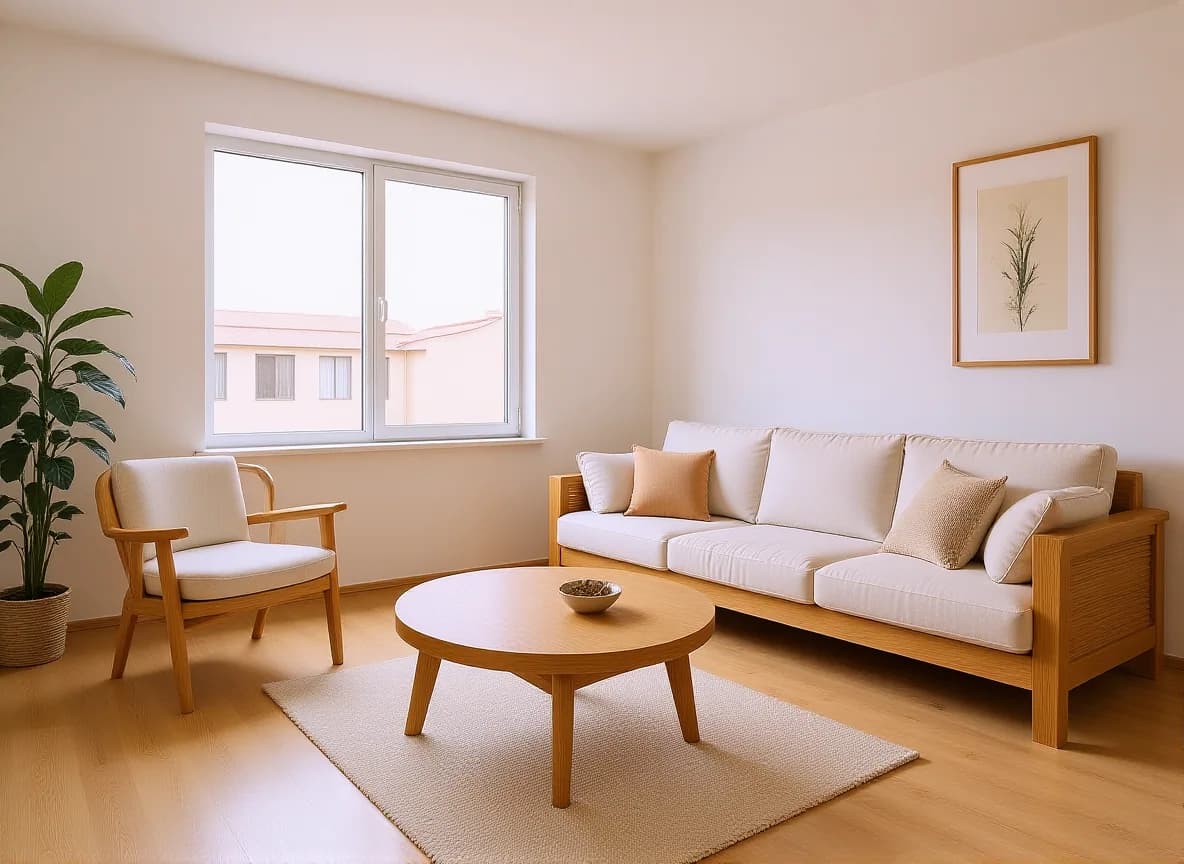
Japandi restyle. Window and floor stay.
Furnish and style this room in Japandi style: light oak furniture, a low linen sofa, soft neutral tones and minimal decor. Keep the room layout, walls, window and floor exactly the same.
 Z-Image Turbo
The input: an AI-made photo of an empty room.
 FLUX Kontext Fast
2 credits
Mid-century restyle.
Furnish and style this room in mid-century modern style: a walnut sideboard, a tan leather armchair, warm tones and a round rug. Keep the room layout, walls, window and floor exactly the same.
 Z-Image Turbo
Before: an empty corner. This test photo is AI-made.
 FLUX Kontext Fast
2 credits
After: a plant and a lamp added, everything else the same.
Add a large leafy plant in the empty corner and a warm floor lamp that is switched on. Keep everything else the same.


AI room design from a photo
You start from a real photo of the room, so the shape of the space is yours. FLUX Kontext Fast reads your instruction and redraws the picture with new furniture and decor. The line "Keep the room layout, walls, window and floor exactly the same." asks it to leave the room itself alone.
In the examples, the window, walls and oak floor stayed where they were while the furniture changed.
Virtual staging AI: furnish an empty room
An empty room is hard to picture. A staged mock-up helps a buyer, a tenant or a family member see what the space could become.
Rules on staged photos differ by place and by listing site. Many ask you to say a photo is digitally staged. Check yours before you publish.
Add one thing instead of redoing the room
You do not have to restyle everything. Ask for one change, such as a large leafy plant and a warm floor lamp in an empty corner, and say that everything else stays the same.
What Lovino does and does not do
| Lovino does | Lovino does not |
|---|---|
| Furnish and style a room in a named style, from one photo | Work from measurements or floor plans. Furniture is drawn for looks, not to scale |
| Ask the model to keep the layout, walls, window and floor | Promise nothing moves. Check doors, windows and edges after each run |
| Add a single item, such as a plant or a lamp | Name real products or give you a shopping list |
| Run on the 3 free daily credits (1 edit a day, watermarked) | Remove the watermark on free-plan results. Paid-plan results have none |
What it can't do
- The furniture is drawn by an image model. It is not real stock, it is not to scale, and it does not come with a price or a shop link.
- The room is redrawn, so small details of walls, windows and light can change. Look closely before you use the picture.
- It does not produce floor plans, measurements or building advice.
- A staged photo can mislead buyers if it is not labelled. Follow the rules of your market and listing site.
- Free-plan results carry a watermark. Paid-plan results do not.
Start free. Scale anytime.
One credit system across Studio, Flow and every tool. Cancel anytime.
| Plan | Per month | Credits |
|---|---|---|
| Free | $0 | 3 credits per day |
| Plus | $7.99 | 50 credits per month |
| Pro | $19.99 | 200 credits per month |
| Max | $44.99 | 500 credits per month |
Questions, answered.
Is AI interior design free?
Partly. A room edit with FLUX Kontext Fast costs 2 credits, and 3 free credits a day cover 1 of them, with a watermark. Paid plans start at $7.99 a month, and results made on a paid plan have no watermark.
How do I redesign a room from a photo?
Open Studio with FLUX Kontext Fast, add a photo of the room, and name a style, such as Japandi. Say "Keep the room layout, walls, window and floor exactly the same." and generate.
Can it furnish an empty room?
Yes. The example starts from an empty room with a window and an oak floor, and returns it furnished in Japandi and mid-century styles.
Will the layout stay the same?
The instruction asks the model to keep the layout, walls, window and floor, and in the examples it did. It is an AI edit, so check the result.
Can I add just one item?
Yes. Ask for the one thing, for example a large leafy plant and a floor lamp in the corner, and say everything else stays the same.
Can I match the style of a reference photo?
Style Transfer redraws a photo in the style of an image you pick. It needs paid credits and costs from 3 credits.
Is it good enough for virtual staging?
It makes a quick mock-up of how a room could look. It is not to scale, and some places require you to label staged photos. Check the rules for your listing site.
Does it work on outdoor spaces?
The instruction and the examples are written for indoor rooms. We have not published a garden or balcony example, so treat an outdoor space as an experiment and check the result.
More AI tools
Related guides
- AI Photo Editing Prompts: Change One Thing, Keep the RestCopy-paste AI photo editing prompts with real before-and-after examples: add an object, change the season or time of day, and keep everything else the same.
- On-Brand in One Prompt: AI Carousels, Thumbnails and PostersCarousels, thumbnails and posters each have their own rules. Iris skills handle consistency, readable text and hierarchy so your designs come out on-brand.
- What Is an AI Creative Agent? One Sentence In, a Whole Kit OutThe agentic leap you've felt in Claude and ChatGPT has arrived for visual creation: Iris plans the deliverables, picks the models, and produces a whole kit.
Ready to try AI Interior Design?
2 credits per edit. No purchase is made until you confirm a generation.