Video Ad Specs for Meta, TikTok, YouTube and LinkedIn (2026)
Video ad specs for 2026: ratio, length, file type and size limits for Meta, TikTok, YouTube and LinkedIn, from each platform's own page, plus safe zones.
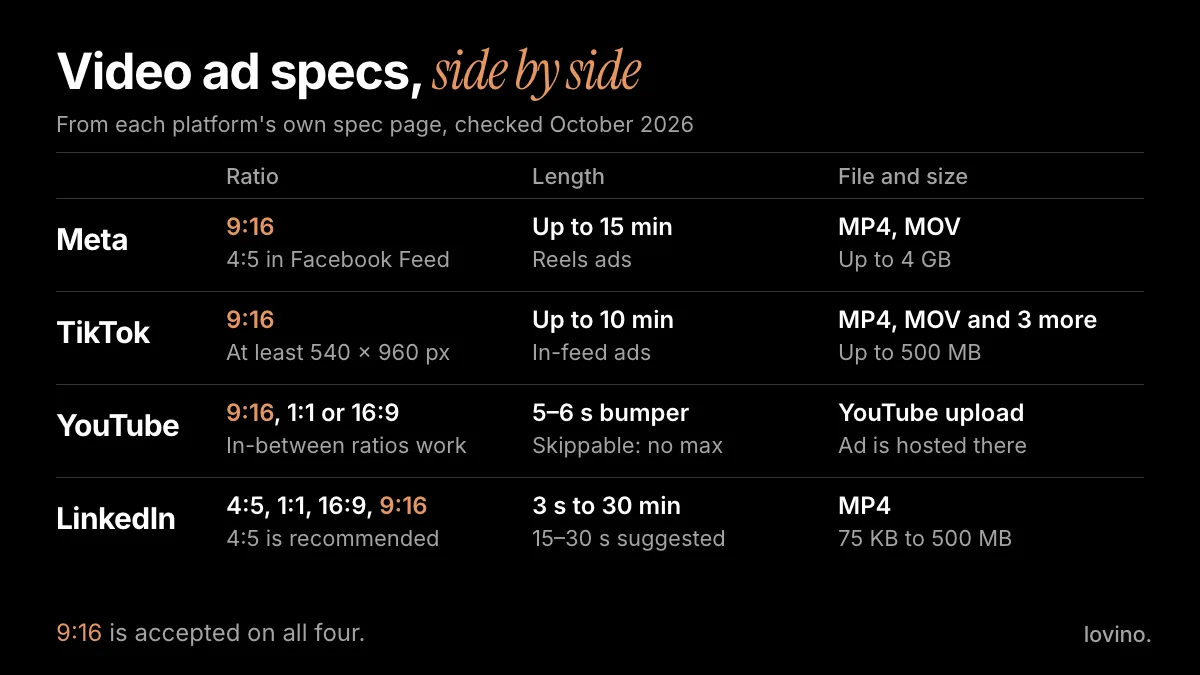
Here are the video ad specs that matter, in one line: export a vertical 9:16 MP4 at 1080 × 1920, keep the point inside the first few seconds, and keep words out of the top 14% and bottom 35% of the frame. Meta, TikTok, YouTube and LinkedIn all accept 9:16, so one master file gets you into every one of them. Every number below comes from the platforms' own spec pages, checked on 13 October 2026.
Specs change without notice. Treat this page as a dated reference, and open the live page before you export for a paid campaign.
What are the video ad specs for Meta, TikTok, YouTube and LinkedIn?
This is the side-by-side view. The sources are linked at the end of the post.
| Placement | Ratio | Recommended pixels | Length | File and size |
|---|---|---|---|---|
| Facebook Feed (Meta) | 4:5 | 1440 × 1800 | 1 second to 241 minutes | MP4, MOV or GIF, up to 4 GB |
| Instagram Feed (Meta) | 9:16 | 1080 × 1920 | 1 second to 60 minutes | MP4, MOV or GIF, up to 4 GB |
| Instagram Stories (Meta) | 9:16 | 1440 × 2560 | 1 second to 60 minutes | MP4, MOV or GIF, up to 4 GB |
| Instagram Reels (Meta) | 9:16 | 1440 × 2560 | Up to 15 minutes | MP4 or MOV, up to 4 GB |
| TikTok in-feed (non-Spark) | 9:16, 16:9 or 1:1 | At least 540 × 960 for 9:16 | Up to 10 minutes | MP4, MOV, MPEG, 3GP or AVI, up to 500 MB |
| YouTube (Google Ads) | 9:16, 1:1 or 16:9 | Not listed | Bumper 5 to 6 seconds, skippable no maximum | Uploaded to YouTube |
| LinkedIn feed | 4:5 recommended, also 16:9, 1:1, 9:16 | 720 × 900 for 4:5, 720 × 1280 for 9:16 | 3 seconds to 30 minutes | MP4, 75 KB to 500 MB |
The fine print behind the table:
- Meta lists H.264 compression and stereo AAC audio at 128 kbps or more for Stories and Reels. Reels ads cannot use licensed music.
- TikTok asks for a bitrate of at least 516 kbps on non-Spark in-feed ads. Spark Ads, which promote an organic post, have no duration limit.
- YouTube ads must be hosted on YouTube. Google says ratios between 16:9 and 9:16 also work, and that 9:16 suits Shorts best.
- LinkedIn lists H.264 or VP8 video, AAC audio and a frame rate under 30 fps. Captions must be an SRT file.
What is the safest size for a video ad that runs everywhere?
A 9:16 master at 1080 × 1920. Every platform in the table accepts that ratio, and it fills a phone screen. It is not the recommended shape everywhere, though. Facebook Feed lists 4:5, and LinkedIn recommends 4:5. If either of those carries real budget, export a second 4:5 version rather than letting the platform crop your headline.
Then respect the safe zone. For Reels, Meta suggests keeping at least 14% of the top, 35% of the bottom and 6% of each side free of text, logos and key details, so the profile name, caption and button do not cover them. TikTok publishes its own downloadable safe-zone files, and the covered area changes with caption length.

The bottom band is the one that bites. It is more than a third of the frame, and it is the natural place to put a headline, which is exactly why headlines get covered.
How long should a video ad be?
The limits are generous. The useful numbers are the small ones.
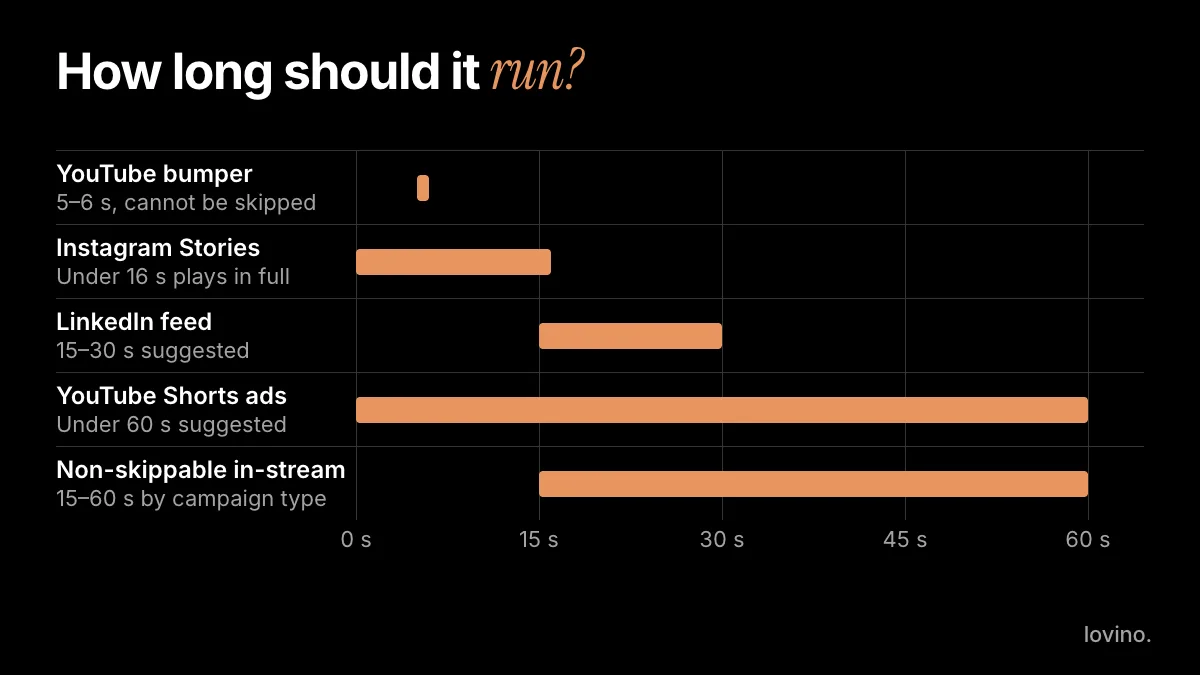
- On YouTube, a skippable in-stream ad can be skipped after 5 seconds, so your point has to land before then. Google recommends staying under 3 minutes.
- Instagram Stories plays an ad under 16 seconds in full. Longer ads may be split across several Story cards.
- LinkedIn suggests 15 to 30 seconds so the video qualifies for every feed placement.
- A YouTube bumper runs 5 to 6 seconds and cannot be skipped.
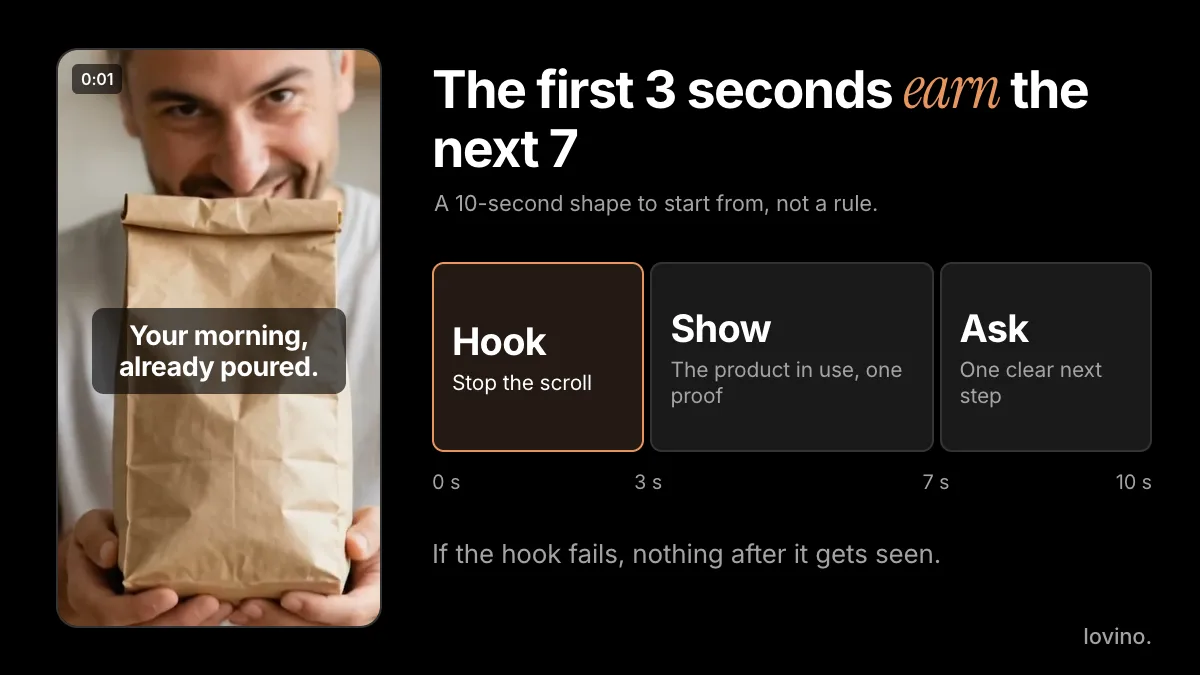
Our advice for a first test: make it 6 seconds. That fits a bumper, a Story and a Reel without a re-cut. If the idea needs room, 15 seconds still fits Stories, Reels and LinkedIn's suggested range. How to spend those seconds is its own craft, covered in the video ad hooks guide.
How do you make a vertical video ad with AI?
Start from a still, then animate it. It is the same method as turning an image into a video, aimed at a 9:16 frame.
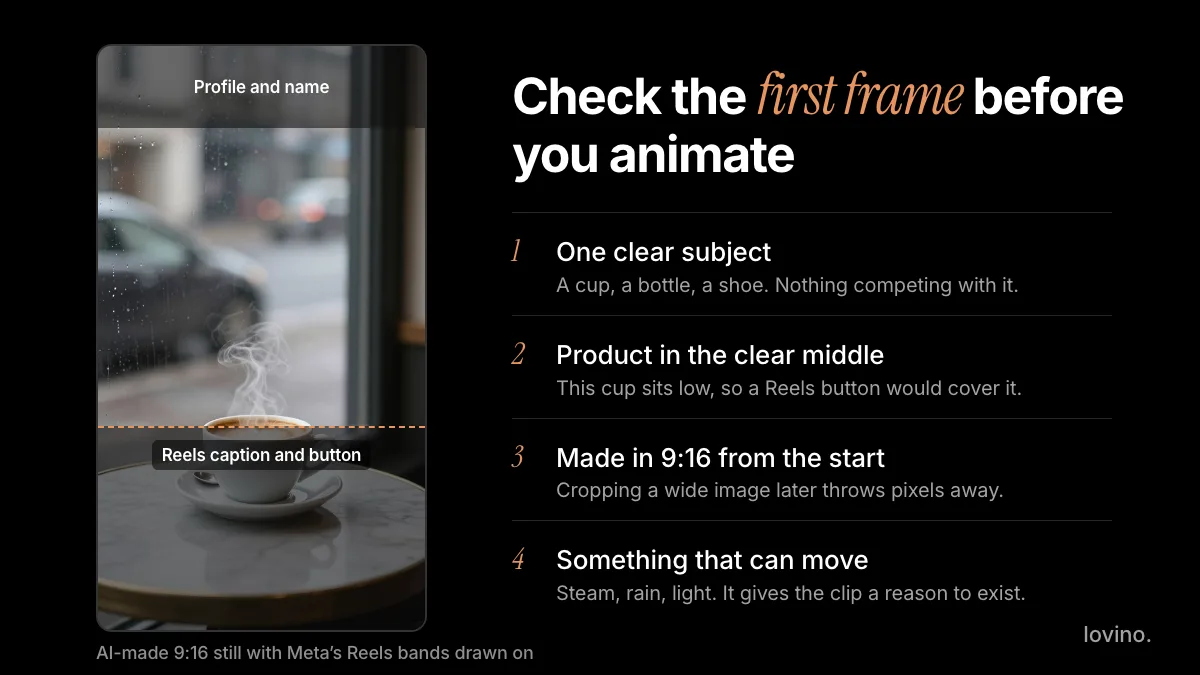
- Make or pick the first frame. One product, an uncluttered background, and the product in the middle of the frame, clear of the bands above. Lovino's AI product photography tool makes clean product stills from a plain photo.
- Set 9:16 before you generate. Re-cropping a wide image later throws pixels away.
- Write a one-line motion prompt. For example: "Slow push-in on the bottle, soft window light, steam drifting behind it." Name one camera move, not three.
- Choose the model with resolution in mind. On Lovino, Veo 3.1 Fast makes 9:16 clips at up to 1080p. Seedance 2.0 makes 5, 10 or 15 second clips at 480p or 720p. Hailuo 02 reaches 1080p on 6-second clips. All three need a paid plan, and video always uses paid credits. See pricing.
- Check the pixels against the table. A 720 × 1280 clip meets TikTok's minimum and LinkedIn's recommended 9:16 size, but it sits below Meta's recommended 1440 × 2560 and can look soft on a big phone. If the ad is your main spend, pick a 1080p model.
The still below shows why step 1 matters. It is a good frame in most ways: one subject, a plain background and steam that will move nicely. But the cup sits low, so in a Reels placement the caption and button would sit on top of it.
Here is a 5-second vertical clip made with Ad Studio's "Make it a video" step, shown at draft size. It opens on the plain product photo and pulls back to a table scene.
Models and credit costs move quickly, so compare them in image-to-video AI models and what they cost before you commit a budget.
What should you check before you upload?
Run this list on every export:
- Ratio and pixels match the placement you chose.
- File type is MP4 with H.264 video and AAC audio. Meta and LinkedIn name those codecs, and TikTok accepts MP4.
- Length fits the placement, and the first seconds make sense on their own.
- Captions are burned in, or uploaded as an SRT file where the platform asks for one. Meta marks captions and sound as optional but recommended.
- Safe zone is clear of text, logos and the product itself.
- Real content stays real. AI can style and present your product. It must not invent results, reviews or a product you do not sell.
- AI labels are added where the rules ask for them. Google's help pages note that AI regulations in the European Union, India and New York require disclosures on ads that use certain AI-generated or edited assets. Our guide to AI content disclosure covers the platform side.
Which mistakes cost the most?
- Uploading 16:9 to a vertical placement. You get black bars, or a crop that cuts your product in half.
- Putting the headline in the bottom third. The button and caption cover it.
- Trusting an old spec table. That includes this one, a few months from now. Open the live page.
- Skipping the preview. Every platform has an ad preview. Check it on a real phone before you spend.
Make the 9:16 master first, then branch. When you are ready to find out which version earns its budget, run a clean creative test. To start the master now, open the image to video tool with your best product photo. For organic Reels sizes and safe zones, see Instagram Reels size and length.
Questions, answered.
What is the best aspect ratio for video ads in 2026?
9:16 is the safest choice. Meta, TikTok, YouTube and LinkedIn all accept it, and it fills a phone screen. Meta's guide lists 4:5 for Facebook Feed and LinkedIn recommends 4:5, so export a second version if those placements matter most.
How long can a TikTok ad be?
TikTok's page for non-Spark in-feed ads lists a duration of up to 10 minutes, with a file size of 500 MB or less. Spark Ads, which promote an organic post, list no duration limit. Shorter ads are usually easier to hold attention with.
What file type should I use for a video ad?
MP4 is accepted on Meta, TikTok and LinkedIn. Meta lists MP4 and MOV, TikTok lists MP4, MOV, MPEG, 3GP and AVI, and LinkedIn lists MP4 only. Use H.264 video and AAC audio to stay inside Meta's and LinkedIn's settings.
What is the safe zone for a 9:16 video ad?
For Reels, Meta suggests keeping at least 14% of the top, 35% of the bottom and 6% of each side free of text, logos and important details. TikTok publishes its own safe-zone files, and the covered area changes with caption length.
Can I use AI-generated video in ads?
Yes, within each platform's ad policies and any disclosure rules that apply to you. On Lovino you need an account to generate. Everyone, including free users, can use results commercially; free results carry a watermark that paid plans remove. Veo 3.1 Fast, Seedance 2.0 and Hailuo 02 need a paid plan, and video uses paid credits. Check that every claim in the ad is true before you run it.