Instagram Reels Size and Length in 2026: Specs and Safe Zones
Instagram Reels size is 9:16 at 1080 x 1920. See the 2026 length limits, the profile grid crop and safe zone margins so captions never cover your subject.
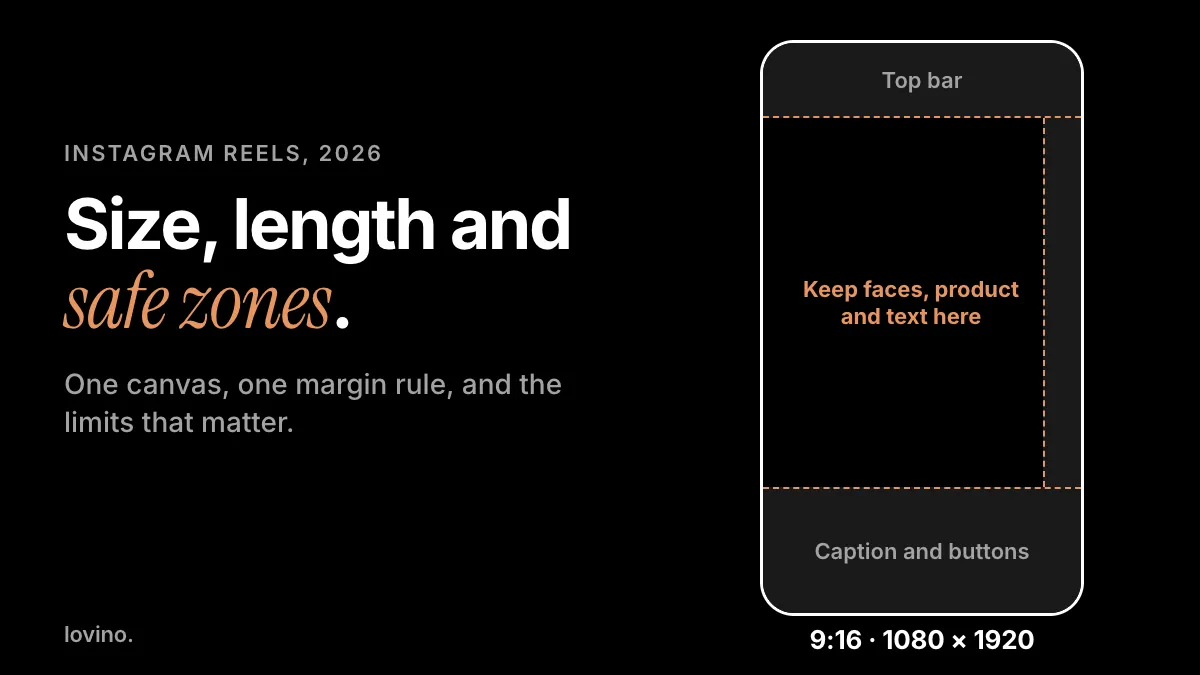
The Instagram Reels size is 9:16 vertical: 1080 by 1920 pixels. Instagram's Reels page describes reels of up to 3 minutes, and its help text adds that longer ones are not recommended to new audiences. Keep faces, products and text away from the top and bottom edges, because the profile bar, caption and buttons sit on top of the video.
Below are the numbers, which ones come from Instagram and which are working margins, and how to make AI images and clips that fit.
What is the Instagram Reels size?
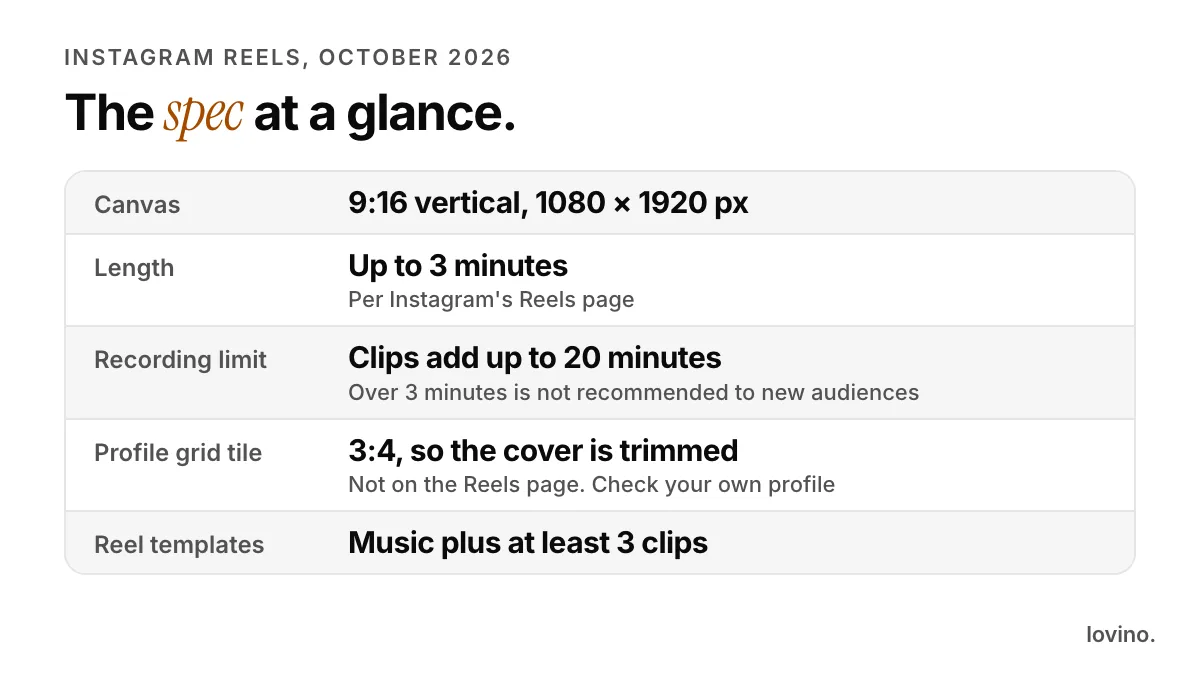
| Spec | Value | Source |
|---|---|---|
| Aspect ratio | 9:16, vertical, full screen | Standard vertical phone canvas |
| Canvas | 1080 by 1920 pixels | Standard vertical phone canvas |
| Length | Up to 3 minutes | Instagram's Reels page |
| Recording limit | Clips that add up to 20 minutes | Instagram's Reels page |
| Long reels | Over 3 minutes are not recommended to new audiences | Instagram's Reels page |
| Reel templates | Need music and at least 3 clips | Instagram's Reels page |
| Profile grid tile | 3:4, so a 9:16 cover is trimmed | Not on Instagram's Reels page. As of October 2026, check your own profile |
If you remember one line, make it this: shoot or generate at 9:16, 1080 by 1920, and leave the edges clear.
How long can an Instagram Reel be?
Instagram's Reels page says you can create multi-clip videos up to 3 minutes. Its help text adds that you can record clips adding up to 20 minutes, and that reels over 3 minutes will not be recommended to new audiences. In practice, 3 minutes is the ceiling for anything you want discovered.
Limits move. When Reels launched in August 2020, Instagram described them as 15-second multi-clip videos. The in-app timer is the source of truth, so check it before you plan a long edit.
Length is a ceiling, not a target. Four 5-second clips make a 20-second Reel, and that is a complete Reel. Use the extra room only when the story needs it.
Where are the Instagram Reels safe zones?
We could not find one safe-zone rule for organic Reels published by Instagram. What is certain is that the interface covers the video: the profile and top controls sit at the top, the caption, audio line and buttons at the bottom, and the like, comment and share column runs up the right side.
These are conservative working margins at 1080 by 1920. They are our recommendation, not an Instagram spec.
| Edge | Keep clear | What lives there |
|---|---|---|
| Top | 250 px | Profile name and top controls |
| Bottom | 420 px | Caption, audio line and buttons |
| Right | 120 px | The like, comment and share column |
| Left | 60 px | Breathing room for text |
That leaves a clear middle of about 900 by 1250 pixels. Faces, products and words belong there.
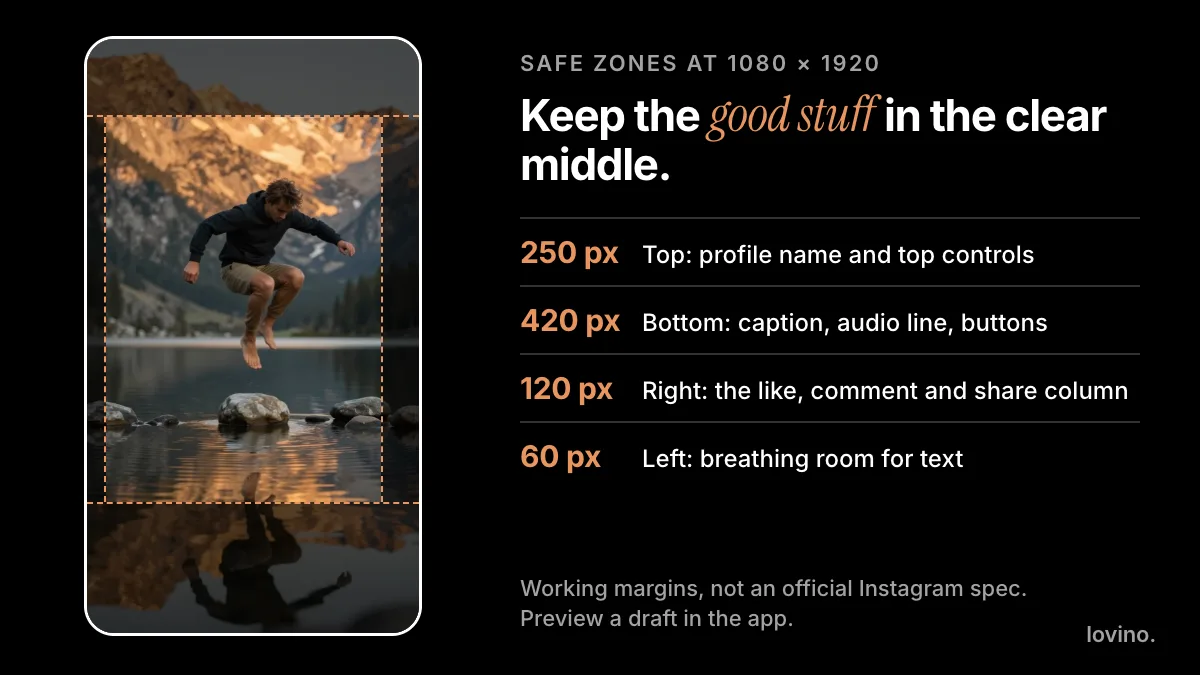
To check your own Reel, open it as a draft and look at where the interface lands. Try a small phone too, since smaller screens leave less room.
How does Instagram crop Reel covers on the profile grid?
A Reel plays full screen at 9:16, but the profile grid shows a shorter tile. As of October 2026, Instagram's profile grid shows 3:4 tiles instead of squares, so a 9:16 cover is trimmed to fit. Instagram's Reels page does not list this, so check your own profile to confirm what you see.

The arithmetic is simple. At 1080 pixels wide, a 3:4 tile is 1440 pixels tall. A 9:16 frame is 1920 tall. So the grid can lose roughly 240 pixels at the top and bottom. Keep the subject and any cover text in the middle.
You choose the cover when you post. Instagram's help text describes picking a cover from a frame in the clip with a slider, or choosing an image from your device. Our guide to Reels cover images covers the design side.
How do you make AI images and clips fit Reels?
Set the shape before you generate, not after. Cropping a wide image down to 9:16 throws most of it away.
- Generate vertical. Pick a 9:16 aspect ratio in the AI image generator. The aspect ratio guide lists the common platform sizes.
- Ask for margins in the prompt. Tell the model where to put the subject.
- Animate from the vertical still. Lovino returns a clip that follows the shape of your photo, so a vertical photo gives a vertical clip. See how to make a Reel from photos.
- Mind the resolution. Wan 2.2 Fast, one of the low-cost video models, makes clips at 480p or 720p. A 720p vertical clip is about 720 pixels wide, well under the 1080 of the Reels canvas, so it gets scaled up and fine detail softens. Some models offer higher resolutions, and the Upscaler can enlarge a still before you animate it.
A prompt that builds in the safe zones:
Vertical composition, a ceramic cup of coffee on a marble table centered in the middle third of the frame, calm empty space above and below, soft window light
The free daily credits cover image generation. Video and the Upscaler use paid credits, and the price shows before you generate. See pricing. Free results carry a watermark, and paid results do not.
How does the Reels size compare with Stories and feed posts?
Reels and Stories share a canvas. Feed posts are shorter, so one file will not always fit both.
| Format | Ratio | Common size |
|---|---|---|
| Reels | 9:16 | 1080 by 1920 px |
| Stories | 9:16 | 1080 by 1920 px |
| Feed, portrait | 4:5 | 1080 by 1350 px |
| Feed, square | 1:1 | 1080 by 1080 px |
If one image has to serve several formats, generate it at 9:16 with the subject in the middle. You can crop it to 4:5 or 1:1 later without losing the subject; going the other way is much harder.
How do you check a Reel before you post it?
Five quick checks catch most size problems:
- Open the draft and look at the interface. Is anything important under the caption, the buttons or the profile bar?
- Check the first frame. It should hold up as a still.
- Check the cover in the grid. Is the subject still in the middle after the 3:4 trim?
- Test on a small phone if you can.
- Look at the upload quality setting. Instagram's creator pages point to a setting in the app for uploading high-resolution reels.
What are the most common Reels size mistakes?
- Uploading a horizontal video. A 16:9 clip in a 9:16 frame is either small with empty bands or cropped hard.
- Putting words at the bottom. The caption and buttons cover them.
- Centering the cover text too low. The grid trims the top and bottom, so keep it near the middle.
- Starting from a tiny image. A very low-resolution still gives a soft clip, whatever size you export.
- Trusting a number you cannot source. Treat any margin that is not from Instagram as a starting point and test it yourself.
Which of these numbers are official?
Four kinds of number appear in this guide. The 3-minute length, the 20-minute recording limit and the template rule come from Instagram's Reels page. The 9:16, 1080 by 1920 canvas is the standard vertical phone format. The 3:4 profile grid tile is how the grid looks as of October 2026, and Instagram's Reels page does not state it. The safe-zone margins are ours. Instagram changes the app often, so reconfirm the limits in the app before a big project.
Set up your next Reel
Start with the shape. Open the AI image generator, choose 9:16 and put your subject in the clear middle. Want motion? Animate the still next, then cut your clips together in your editor. Running paid video? The video ad specs post covers Meta, TikTok, YouTube and LinkedIn ad placements.
Questions, answered.
What size should an Instagram Reel be?
9:16 vertical, which is 1080 by 1920 pixels. That fills a phone screen. Keep faces, products and text in the clear middle, away from the top and bottom edges where Instagram's interface sits.
How long can an Instagram Reel be?
Instagram's Reels page says you can create multi-clip videos up to 3 minutes. Its help text also says clips can add up to 20 minutes when you record, and that reels over 3 minutes will not be recommended to new audiences. Check the timer in the app, since limits change.
Does Instagram crop a Reel cover on the profile grid?
Yes. As of October 2026 Instagram's profile grid shows 3:4 tiles, so a 9:16 cover is trimmed at the top and bottom. Keep the subject and any cover text in the middle of the frame, and check your own profile to see how it looks.
Can I post a horizontal video as a Reel?
You can, but it will not fill the 9:16 screen. It shows small with empty bands, or it is cropped heavily. It is better to shoot or generate vertical from the start.