How to Make an AI Avatar of Yourself (2026): Photo to Profile Pic
Learn how to make an AI avatar of yourself from one photo: pick the right selfie, choose a style, check the likeness and size it for your profile picture.

To make an AI avatar of yourself, start with one clear photo of your face, run it through a style tool that takes a photo as input, and keep the look that still reads as you when it is tiny. Crop it square and it is ready for a profile. The whole job takes a few minutes. The part people skip, and regret, is the likeness check.
This guide walks through the steps on Lovino, plus the checks that separate an avatar people recognise from a cartoon of a stranger. You need an account to generate. Free results carry a watermark, which paid plans remove, and every user, free or paid, can use their results commercially.
What counts as an AI avatar of yourself?
Four different things get called an avatar, and each needs a different tool.
| You want | Use | What you get |
|---|---|---|
| A cartoon, anime or 3D look | Cartoon Filter | Your photo redrawn in a chosen style |
| A toy, puppet or figure look | Character Generator | You as a collectible-style character |
| Your real face, polished | Portrait HD | The same photo with a cleaner face and finer detail |
| The same face in many scenes | A saved Character | See how to create an AI influencer |
One trap: a portrait written from a text prompt alone invents a new person. It will not look like you, however carefully you describe yourself. For an avatar of yourself, the tool has to take your photo as input.
Step 1: Which photo should you start from?
The photo decides most of the result. Style tools copy what they can see, so a clear face gives them something to hold on to. Use one face in soft light, with nothing covering your eyes, and skip sunglasses, groups and filters.
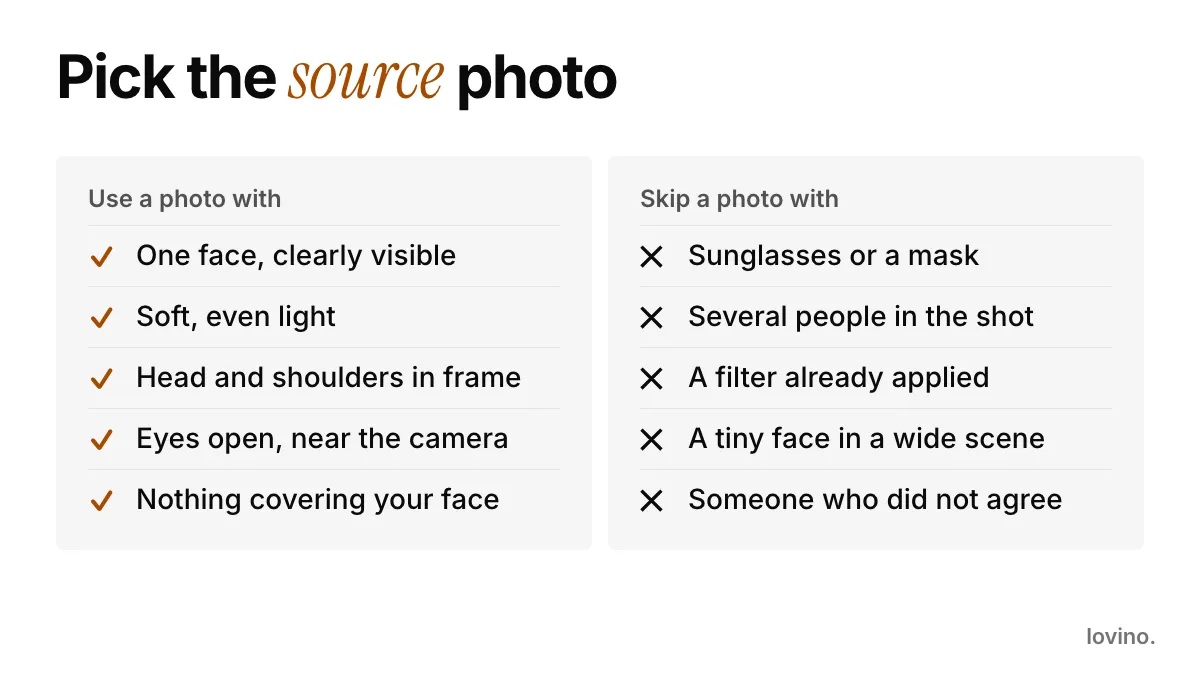
Two more habits help. Shoot near a window rather than under a ceiling light, so shadows stay soft. And use a recent photo: an avatar of your face from five years ago is a small lie in every chat.
Step 2: How do you pick a style that still looks like you?
Run the same photo through two or three styles before you commit. A look that flatters one face can flatten another.

The portrait above is an AI-made test image, not a real person. The anime frame is a Cartoon Filter result. The 3D movie, clay, comic and woodblock frames were made in Studio from the same photo with a written style prompt, because the filter has six fixed looks. Here is how the common looks behave:
- Anime and cartoon keep the outline of your face and hair and simplify everything else. They are the safest first try.
- 3D movie adds soft skin and bigger eyes. It is friendly, so check the likeness closely.
- Clay and comic have strong texture and bold shapes, which tend to survive being shrunk to a small circle better than fine line art does.
- Watercolour and woodblock rely on fine detail that can blur when shrunk. Test them at thumbnail size first.
Here is what a good result keeps. The anime version below changed the medium, not the person: same hair, same jacket, same stance.
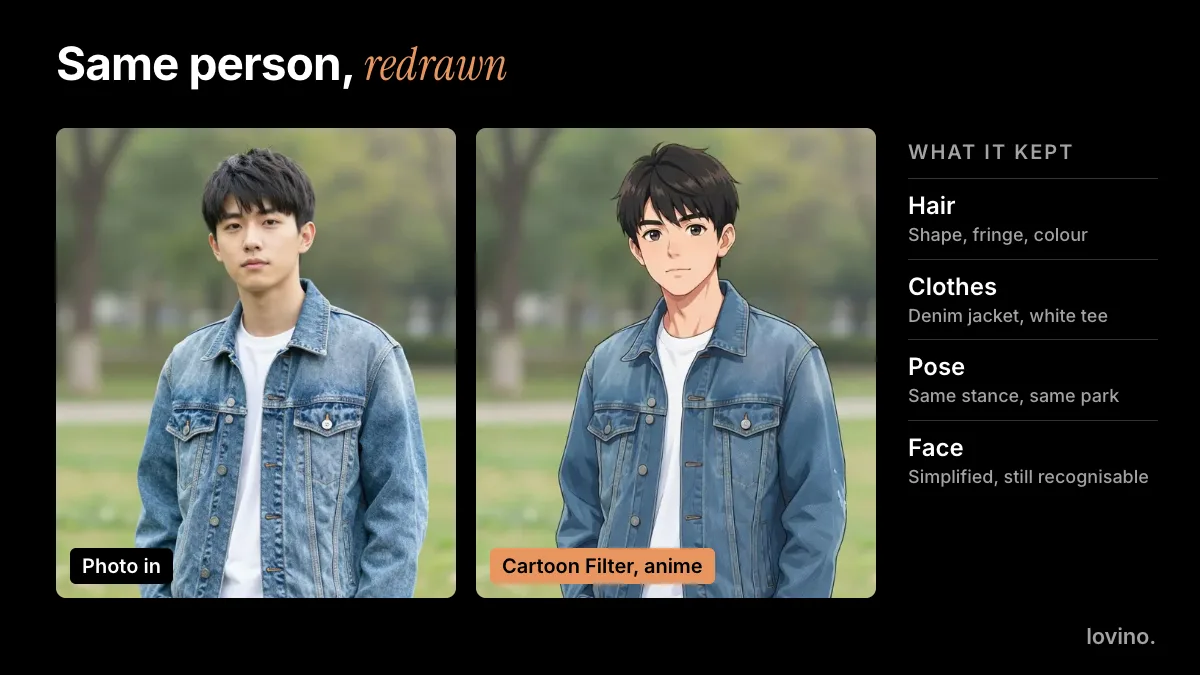
Cartoon Filter offers six styles: Ghibli, Disney and Pixar 3D, anime, cartoon, watercolour and comic book. Names like these describe a look; they do not mean the result comes from those studios. Each run costs 2 credits, and the free daily credits cover it.
Want more control? Write a short instruction
Some Studio models take a photo plus a written instruction, for example Nano Banana and GPT Image 2. Say what to keep, not only what to change:
Turn this photo into a flat, friendly illustrated avatar. Keep my face shape, curly hair and smile. Head and shoulders, plain pastel background, no text.
If the first result drifts, change one thing at a time: the style word, the background or the framing.
Which style fits where it will live?
Match the style to the place your avatar will be seen. A look that suits a gaming server can feel wrong on a work profile.
| Where it will live | Style that tends to work | Why |
|---|---|---|
| Gaming or Discord | Anime, comic or clay | Bold shapes survive a small circle |
| Creator or brand profile | Cartoon or 3D movie | Friendly, and easy to repeat across posts |
| Group chat | Caricature or a toy-style character | Fun, and instantly "you" to friends |
| Work or professional | A polished real portrait, not a cartoon | Many work sites expect a real photo |
Step 3: How do you check the likeness?
Do three quick checks before you save anything.
- The thumbnail test. Shrink it to the size of a chat bubble. Can you still tell it is you by hair, glasses or smile?
- The friend test. Show it to someone who knows you, without saying what it is. If they name you, you are done.
- The feature check. Look for what makes you recognisable: a beard line, glasses, a parting. If the tool dropped it, add it to your instruction or try another style.
If the result is cute but not you, it is a character, not an avatar of you. That is fine for a gaming profile. It is not fine where people expect your face.
What if the face drifts?
Most misses have a simple fix.
- The hair changed colour or shape. Name it in your instruction, for example "short black curly hair".
- The eyes look odd. Start again from a photo where you look straight at the camera with your eyes fully open.
- You look older or younger. Try a flatter style, such as cartoon or comic. 3D looks smooth the skin heavily.
- Something from the background crept in. Ask for a plain background, or crop tighter before you upload.
- It is close but not right. Run it again. Results vary, and a second pass at the same settings often lands better.
Step 4: How do you size it for a profile?
Almost every profile picture ends up square, shown small and often round. Google's account help, for example, asks you to rotate and crop the photo when you upload it. It also notes that a new picture can take a few days to update across Google products, so do not worry if the old one lingers.
So crop with the circle in mind:
- Put your face in the middle third, head and shoulders only.
- Leave a little margin so the circle does not clip your hair.
- Skip text. Small letters turn to noise.
- Export the biggest version you have, and let the platform shrink it.
If you want a larger, sharper file, see our image upscaler guide.
What to get right: consent, honesty and privacy
An avatar is easy to make and easy to misuse. Keep to these.
- Use your own face. Only upload a photo of another person if they agreed. Lovino is for people aged 16 and over.
- Know where your photo goes. Uploaded images are processed by third-party AI providers, so do not upload anything you would not send to an online service.
- Do not pass an avatar off as a photo. Some places expect a real photo, such as a work profile. Check the rules there. Our profile picture guide goes platform by platform.
- Say it is AI when it matters. For a business persona or an ad, disclose it. See AI content disclosure on social media.
Where can your avatar go next?
Once you have a look you like, reuse it. Run the avatar through Background Remover and you have a cut-out for a sticker pack. Or make it the centre of a phone wallpaper.
For anime-only looks, our photo to anime guide goes deeper on that one style.
Ready? Open Cartoon Filter, upload one clear photo and try three styles. Keep the one you would still recognise at thumbnail size. Each tool page shows its credit cost, and pricing lists the plans.
Questions, answered.
How do I make an AI avatar of myself?
Upload one clear photo of your face to a style tool that accepts photos, such as Lovino's Cartoon Filter or Character Generator. Choose a style, check that it still looks like you at a small size, then crop it square for your profile. You need an account to generate.
Will the AI avatar actually look like me?
It usually keeps your face shape, hair and expression, but no tool guarantees a perfect match. Strong styles such as clay and comic tend to hold up best when shrunk. Run two or three styles, and keep the one friends recognise without a hint.
Can I use my AI avatar commercially?
Yes. Under Lovino's terms, all users, free and paid, can use their results commercially. Free results carry a watermark, which paid plans remove. If a style imitates a named studio or brand, check the extra rules before using it in paid work.
Is it safe to upload my selfie?
Lovino processes uploaded images with third-party AI providers, so treat an upload like sending a photo to any online service. Only upload your own face or photos of people who agreed, and never anything you would not want processed. Lovino is for people aged 16 and over.
Can I use an AI avatar on LinkedIn or for work?
Check the platform's rules first. Many work profiles expect a real photo of you, so a stylised avatar may not be accepted there. For gaming, Discord, communities and creative profiles an avatar is usually fine.