AI Caricature Generator: Create Hilarious Portraits in Seconds
Learn how to use AI caricature generators to create funny, exaggerated portraits from any photo. Perfect for gifts, social media, and entertainment.
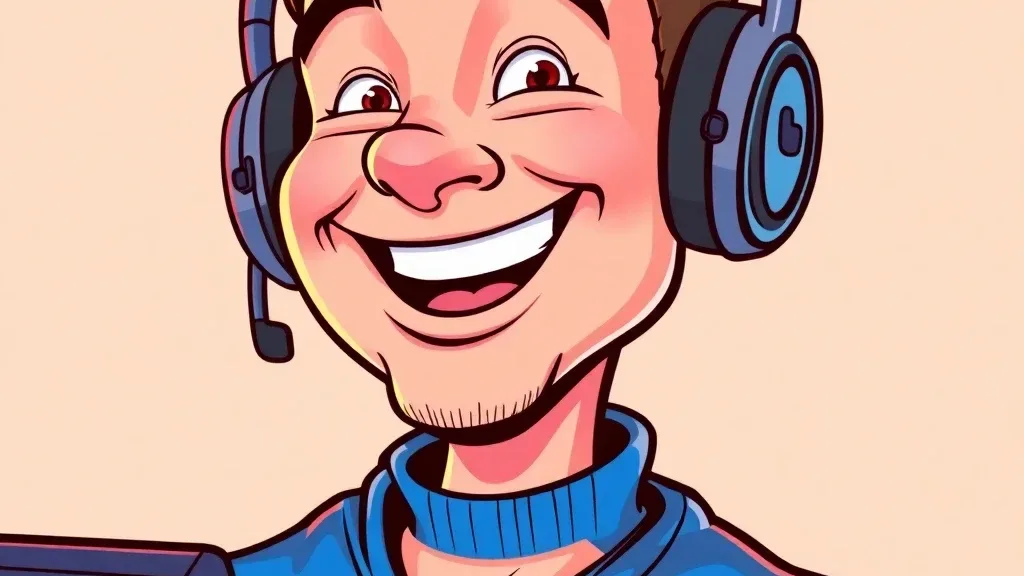
Short answer. Upload a clear, front-facing photo to Lovino's AI caricature generator, add an optional line about your job or personality for matching props, and download the result. It works on the free daily credits. For a softer cartoon look instead of exaggerated features, use the cartoon filter.
Caricature art has been making people laugh for centuries — exaggerating someone's most distinctive features into a memorable, funny portrait. Traditionally, getting a caricature meant sitting for a street artist at a fair or commissioning custom artwork. AI caricature generators have changed everything, letting anyone create personalized caricatures from a photo in seconds.
Whether you want to surprise a friend with a funny gift, make your social media profile unforgettable, or add humor to a birthday card, AI caricature tools deliver professional-quality results without any artistic skill required.
What Is an AI Caricature Generator?
An AI caricature generator takes a portrait photo and creates an exaggerated, artistic version that amplifies the subject's most distinctive features, such as a strong jawline, large eyes, a prominent nose or a distinctive hairstyle, in a way that's both recognizable and funny.
Modern AI caricature tools go beyond simple distortion. Some offer a choice of styles, from pencil sketch caricatures to bold cartoon and comic book looks. Lovino's tool makes one colourful look, and other Lovino tools cover the other styles (see below). The result is a piece of art that captures personality while delivering the humor caricatures are known for.
How the AI Caricature Tool Works
Traditional caricature artists spend years learning to spot and amplify a face's key features. Lovino's caricature tool takes a simpler route. It sends your photo and a short instruction to an image-editing model, which redraws the portrait as a colourful caricature with exaggerated features. If you add a description of your job or personality (up to 500 characters), the model adds matching props and accessories.
There is no exaggeration slider and no style picker, so the way to change the result is to run it again or to change the photo or the description. The best results keep enough likeness that the subject is clearly recognizable. The caricature looks like them, just funnier.
Step-by-Step: Creating Your First AI Caricature
Step 1: Choose Your Source Photo
Photo quality dramatically impacts caricature quality. Use a photo that is:
- Well-lit with even, flattering light
- Clearly showing the face without obstructions (sunglasses, hats, heavy shadows)
- Taken straight-on or at a slight angle — extreme profiles are harder to process
- High resolution (minimum 500x500px, ideally 1000x1000px or higher)
- Showing a relaxed, natural expression — though dramatic expressions can produce great results too
Candid photos often work wonderfully because natural expressions give the AI more personality to work with. A genuine laugh, a thoughtful look, or a characteristic smile translates into a more interesting caricature than a stiff, posed shot.
Step 2: Add a Short Description (Optional)
Describe your job or personality, such as "software developer" or "loves hiking", and the AI adds related props and accessories. Leave it empty for a general caricature. Keep it short and kind: the description is moderated like any other text.
Step 3: Generate and Refine
Upload your photo to Lovino's AI caricature generator, add your description if you want one, and generate. The tool page says it takes seconds from upload to finished caricature.
Review the output and consider:
- Is the likeness strong enough? Can you clearly identify the subject?
- Does the exaggeration feel right? Too subtle or too extreme?
- Would a different photo or description help?
If the first result isn't quite right, run it again or try a different source photo. Natural lighting and front-facing shots consistently produce better results.
Create your AI caricature on Lovino →
Caricature Looks to Try
The caricature tool makes one colourful look. For a different art style, run the result or the original photo through another tool:
- Cartoon and comic looks: the cartoon filter has six fixed looks, including Western Cartoon, Watercolor and Comic Book.
- Sketch and pop art: Style Transfer has presets such as Pencil Sketch and Pop Art, and uses paid credits.
Best Uses for AI Caricatures
Personalized Gifts
Caricatures make exceptional personalized gifts because they combine humor with recognition — the recipient knows it's them while laughing at the exaggeration. Popular gift applications include:
- Framed prints for birthdays and retirements
- Custom mugs, phone cases, and t-shirts
- Greeting cards for milestone occasions
- Office farewell gifts featuring the departing colleague
The personal element makes AI caricature gifts feel more thoughtful than generic presents.
Social Media and Profile Pictures
A caricature profile picture immediately stands out in any feed. It signals creativity and a sense of humor — qualities that build social media personality. Content creators, comedians, and personal brands use caricature profiles to differentiate themselves and attract followers.
For online games, forums, and communities where anonymity is valued, caricatures offer a way to have a visual identity without revealing your actual face.
Event Entertainment
AI caricature tools have enabled new event entertainment formats. Event organizers can set up caricature stations where guests submit their photos and receive printed or digital caricatures as party favors. This works especially well for:
- Company holiday parties
- Wedding receptions
- Bar and bat mitzvahs
- School events and reunions
Marketing and Content
Businesses use caricatures to make their team pages more approachable and memorable. Instead of a grid of professional headshots, caricature portraits signal a fun company culture. Editorial cartoons, blog illustrations, and social media content can all benefit from caricature-style images.
Tips for Better AI Caricature Results
Use multiple people for comparison: If caricaturing multiple people from the same event or family, use consistent style settings so the results look like they belong together.
High contrast lighting works best: Dramatic lighting creates stronger shadows and feature definition, giving the AI more to work with for exaggeration.
Think about the recipient: Some people love extreme caricatures, others prefer subtler versions. Consider the recipient's sense of humor before you share one, and run the photo again for a different take if it feels like too much.
Save the original photo alongside the caricature: The comparison makes for excellent social media content — "me vs. my AI caricature" posts consistently generate engagement.
Experiment with background removal first: Removing the background from your source photo before generating a caricature gives the AI a cleaner face to work with and produces cleaner results.
Caricature Generator or Cartoon Filter?
Dated table, checked against Lovino's tool pages on 15 October 2026.
| AI Caricature Generator | Cartoon Filter | |
|---|---|---|
| What it does | Exaggerates features into a colourful caricature, with optional props from your description | Restyles the photo in one of six fixed looks and keeps realistic proportions |
| Input | One photo and an optional description | One photo and a look |
| Free daily credits | Yes | Yes |
| Best for | Funny gifts and profile pictures | A cartoon, anime or comic version of a photo |
Pick the caricature generator for exaggeration and the cartoon filter for a clean style change.
Caricature Ethics and Consent
A few practical considerations when creating AI caricatures:
Use photos of yourself or people who've consented: Creating caricatures of people without their knowledge can cause offense, especially if shared publicly. A photo of an identifiable person is also personal data under GDPR.
Be thoughtful about public figures: While satirical caricature of public figures has a long tradition, purely mean-spirited or defamatory caricatures cross ethical lines.
Workplace use: Before creating caricatures of colleagues for workplace events, consider whether the specific person would find it funny and flattering rather than embarrassing.
Ready to create your first AI caricature? Try Lovino's caricature generator — sign up free and get 3 free credits every day.
Questions, answered.
What makes a good photo for AI caricature generation?
Clear, well-lit front-facing photos work best. The face should be unobstructed, with no sunglasses, heavy shadows, or hats covering features. Higher resolution (1000px+ wide) produces more detailed, accurate caricatures.
Can AI caricature generators handle group photos?
Most AI caricature generators work best on single-person portraits because they need to identify and exaggerate one set of features. For group photos, crop individual faces first, then create individual caricatures that you can combine.
How long does AI caricature generation take?
Lovino's tool page says seconds from upload to finished caricature. Speed varies with server load.
Can I use AI caricatures for commercial purposes?
Yes, subject to the platform's terms of service. Under Lovino's Terms, all users — free and paid — can use generated images commercially; free-tier output carries a watermark, which paid plans remove. Always check the terms before using AI-generated caricatures in paid marketing materials or merchandise. The U.S. Copyright Office publishes reports on the copyright status of AI-generated outputs.