

AI Sticker Generator
Lovino's AI sticker generator draws a sticker from a text description, then Background Remover can cut out the background to leave a transparent PNG. Use it for chat packs, laptop stickers and social posts. The sticker image costs 4 credits on a paid plan, and the cut-out is 1 credit more.
4 credits per sticker image (paid plan) · optional cut-out with Background Remover 1
What is AI Sticker Generator?
Describe a sticker in a sentence and Lovino draws it with Recraft V4 in Studio, then Background Remover can cut it out as a transparent PNG. The sticker image costs 4 credits on a paid plan, and the cut-out is 1 credit more.
How to use AI Sticker Generator


- 01
Describe your sticker
Write one subject and its colours, for example a folded taco with meat, lettuce and tomato. Leave text out of the picture.
- 02
Draw it in Studio with Recraft V4
Pick Recraft V4 and generate. It costs 4 credits and needs a paid plan. Ask for a die-cut sticker with a thick white border.
- 03
Cut out the background
Send the image to Background Remover. It costs 1 credit. It may trim the white border, so check the edge.
- 04
Download a transparent PNG
Save the cut-out and use it in a chat app, a story, a slide or a print layout.
- 05
Try another look
Run the same subject again as flat clipart instead of a die-cut sticker, and keep the one you like.
Stickers made with Recraft V4
Each sticker was drawn by Recraft V4 in Studio from the subject line shown. A style line was added that asks for a die-cut look, a thick white border and no text. The backgrounds were removed outside Lovino for this page, so Background Remover may treat the white border differently. These are AI-made pictures, not photos.
 Recraft V4
4 credits
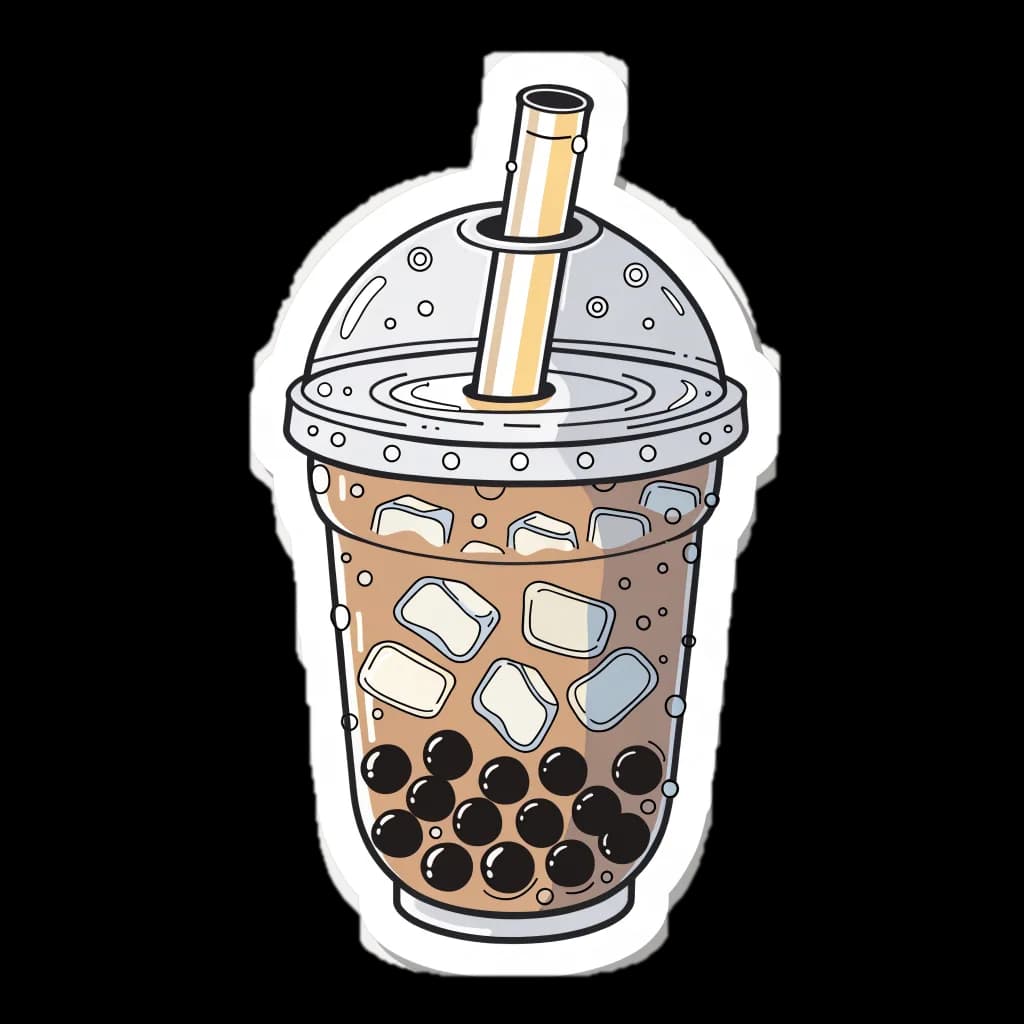
Boba tea sticker. Drawn by Recraft V4 in Studio. Background removed outside Lovino for this page.
A clear plastic cup of milky brown bubble tea with a wide straw and black tapioca pearls at the bottom
 Recraft V4
4 credits
Taco sticker. Drawn by Recraft V4 in Studio. Background removed outside Lovino for this page.
A folded hard-shell taco stuffed with seasoned meat, shredded lettuce, and diced tomato
 Recraft V4
4 credits
Croissant sticker. Drawn by Recraft V4 in Studio. Background removed outside Lovino for this page.
A flaky golden brown crescent-shaped croissant
 Recraft V4
4 credits
Ramen sticker. Drawn by Recraft V4 in Studio. Background removed outside Lovino for this page.
A bowl of ramen noodles in broth with a soft-boiled egg half, a slice of pink narutomaki fish cake, and green scallions on top
 Recraft V4
4 credits
Heart-eyes smiley sticker. Drawn by Recraft V4 in Studio. Background removed outside Lovino for this page.
A round bright yellow emoji smiley face with two red heart shapes for eyes and a wide open smile
 Recraft V4
4 credits
Starry-eyes smiley sticker. Drawn by Recraft V4 in Studio. Background removed outside Lovino for this page.
A round bright yellow emoji smiley face, a plain simple circle with nothing outside its outline, with two sparkling gold four-point star shapes for eyes and a big open smile
 Recraft V4
4 credits
Laughing smiley sticker. Drawn by Recraft V4 in Studio. Background removed outside Lovino for this page.
A round bright yellow emoji smiley face laughing with eyes squeezed shut and a blue teardrop flying off each side
 Recraft V4
4 credits
Thinking smiley sticker. Drawn by Recraft V4 in Studio. Background removed outside Lovino for this page.
A round bright yellow emoji smiley face, a plain simple circle, thinking hard: one small yellow hand with its index finger resting on its chin, one eyebrow raised, eyes glancing up and to the side, a flat closed mouth, no blush marks, no rays or shapes around it


AI sticker maker for chat packs and social posts
A sticker has to read in one glance. Describe a single subject, such as a boba tea, a croissant or a smiley with heart eyes, and Recraft V4 draws it flat and bold.
After a cut-out you have a transparent PNG. Drop it into a chat app, a story, a slide or a planner page. Make a few in a row with the same wording for the style, and they sit together as a pack.
Custom sticker AI for laptops, bottles and planners
For print, the file is where you start. The example files are 1024 by 1024 pixels, which is about 3.4 inches at 300 dpi. For a larger sticker, run the PNG through the Image Upscaler, which uses paid credits.
Lovino makes the image file. It does not print or ship stickers, so send the PNG to the print shop of your choice.
Prompts that give clean stickers
The examples above follow the same few habits.
- Name one subject and its colours.
- Ask for a die-cut sticker with a thick white border, or for flat clipart if you want a plainer look.
- Ask for a plain shape with nothing outside the outline. Extras around the subject get in the way of the cut-out.
- Leave words out. The examples have no text, so check any lettering you ask for.
What Lovino does and does not do for stickers
| Task | Does Lovino do it? | Detail |
|---|---|---|
| Draw a sticker from a text description | Yes | Recraft V4 in Studio, 4 credits, paid plan |
| Cut out the background | Yes | Background Remover, 1 credit, transparent PNG |
| Turn your own photo into a sticker with Recraft V4 | No | Recraft V4 takes text only |
| Promise readable words inside a sticker | No | The examples were made with no text |
| Print or ship stickers | No | You get the image file |
What it can't do
- Recraft V4 needs a paid plan. The 3 free daily credits do not cover it.
- It starts from text. Recraft V4 does not take a photo as input, so it will not turn a selfie into a sticker.
- The white border is drawn by the model from your prompt, so it varies. Lovino's Background Remover may trim it, so check the edge after the cut-out.
- Free-plan images carry a watermark, which is a poor fit for stickers. Content made on paid plans is watermark-free.
- Lovino makes the image file only. It does not print, ship or sell stickers.
Start free. Scale anytime.
One credit system across Studio, Flow and every tool. Cancel anytime.
| Plan | Per month | Credits |
|---|---|---|
| Free | $0 | 3 credits per day |
| Plus | $7.99 | 50 credits per month |
| Pro | $19.99 | 200 credits per month |
| Max | $44.99 | 500 credits per month |
Questions, answered.
Is the AI sticker generator free?
Not with the Recraft V4 recipe. Recraft V4 costs 4 credits and needs a paid plan, and the optional Background Remover cut-out adds 1 credit. The 3 free daily credits cover a cheaper model such as Z-Image Turbo at 1 credit and the cut-out, but the look differs and free images carry a watermark.
Which model makes the stickers?
The examples on this page were drawn by Recraft V4 in Studio. It costs 4 credits per image and needs a paid plan.
Can I make a sticker from my own photo?
Not with Recraft V4, which takes text only. Background Remover cuts out the subject of a photo for 1 credit and returns a transparent PNG.
Do the stickers have a transparent background?
Yes, after the cut-out. Background Remover returns a transparent PNG for 1 credit.
How big are the stickers?
The example files are 1024 by 1024 pixels, about 3.4 inches square at 300 dpi. For a larger print, use the Image Upscaler, which takes paid credits.
Can I use the stickers commercially?
Content made on paid plans is watermark-free and yours to use commercially. Free-plan images carry a watermark. Avoid brands and logos in your prompt.
What should I put in the prompt?
One subject, its colours, and the look: a die-cut sticker with a thick white border, or flat clipart. Ask for a plain shape with nothing outside the outline, and leave text out.
More AI tools
Related guides
- AI Background Remover: Remove Any Background in SecondsRemove backgrounds from any photo instantly with AI. Free online tool for product photos, portraits, and creative projects.
- Lovino (formerly LensGo) vs. Photoroom: Which Editor Is Better?Lovino (formerly LensGo) vs. Photoroom, compared on features, pricing, background removal, and creative range — which fits you better in 2026?
- AI Product Photo Prompts for E-commerce: Copy-Paste TemplatesCopy-paste AI product photo prompts for studio shots, backdrop swaps and selfie-style ads, with the real prompts and results behind five examples.
Ready to try AI Sticker Generator?
4 credits per sticker image (paid plan) · optional cut-out with Background Remover 1. No purchase is made until you confirm a generation.