AI Headshot Generator: Professional Portraits From a Brief
How to make a professional AI portrait on Lovino from a written brief, refine one you already have with Portrait HD, and when a selfie-trained tool fits better.
A polished portrait is rarely optional. Company sites, conference bios, email signatures and press pages all need one, and traditional headshot photography takes time, scheduling and money. That is why AI headshot tools have become a common alternative.
AI headshot tools work in two different ways, and it matters which you choose:
| Selfie-trained tools | Lovino (brief-based) | |
|---|---|---|
| Input | A set of your selfies | A written description, or one existing portrait |
| Output | Portraits that look like you | A new professional-looking portrait (not your likeness), or a refined version of your own photo |
| Best for | A real profile photo that must look like you | Placeholders, mock-ups, characters, second options, polishing a photo you already like |
This guide covers the Lovino workflow: a written brief in Studio, and Portrait HD for refining an existing portrait. If you need a headshot that looks like you from a set of selfies, see our comparison of AI headshot generators.
How Lovino Handles Headshots
1. Describe the portrait in Studio
Open the AI headshot generator and write the brief. Cover wardrobe, lighting, background and framing. For example: "professional corporate headshot, navy suit, white shirt, soft studio lighting, seamless neutral gray background". Then pick a model. Studio carries 50 image and video models, and images start at 1 credit, so they run on the 3 free daily credits.
2. Regenerate until the framing is right
Studio images generate in seconds, around 3 seconds on the default model and up to about 30 on heavier ones. Change one thing at a time, such as the collar, the backdrop or the crop, and regenerate until it works.
3. Refine and finish
If you already have a portrait you like, Portrait HD refines the face and detail for 2 credits. It does not invent anything about your likeness. Background Remover strips the backdrop for 1 credit, which is the usual last step before a profile upload. Free downloads carry a watermark, and any paid plan removes it.
A Brief-Based Portrait, With Its Prompt
This example comes from an earlier Lovino tool demo. It is a new person generated from text, not a headshot of a real person. The prompt is trimmed: the original said "the same man" because the image was made as one half of a before-and-after pair, and the model expanded the prompt before generating, so the image is not an exact result of the text shown.
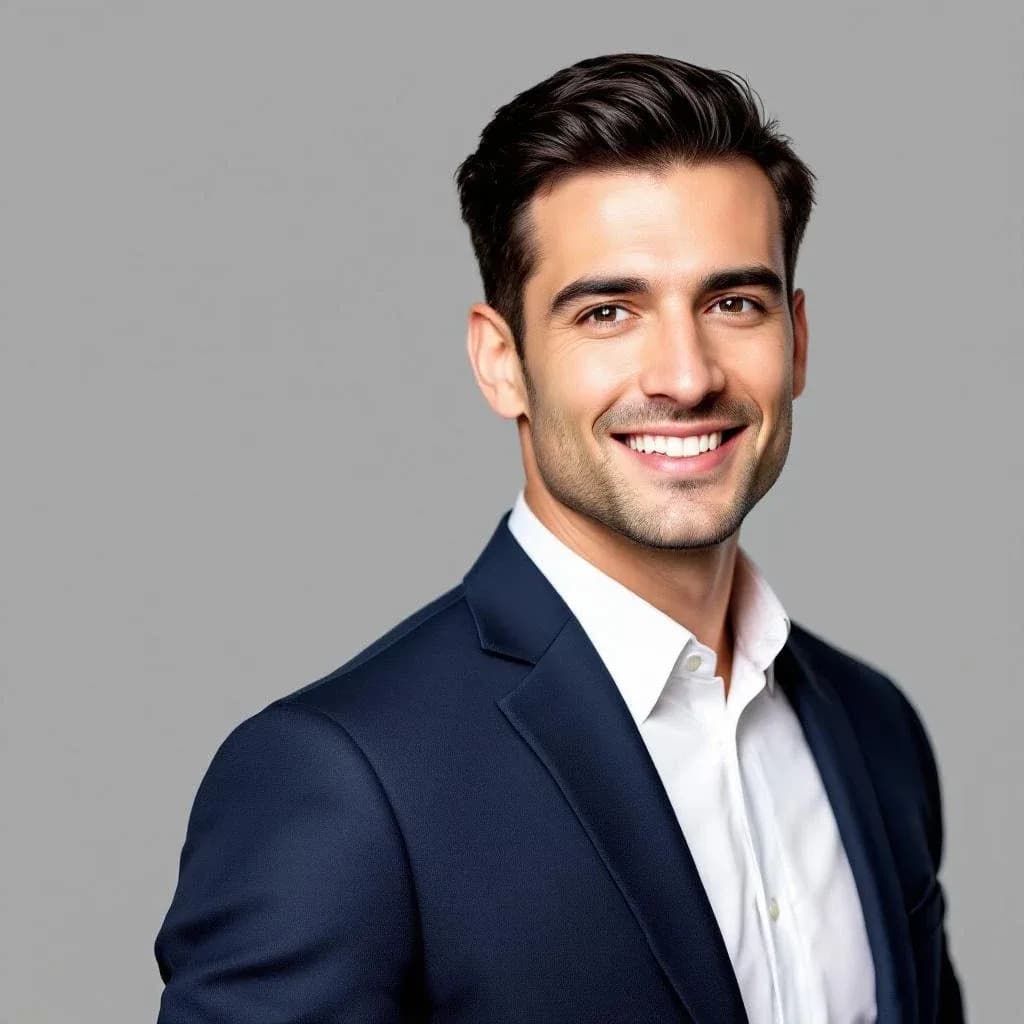
Prompt used: "Professional corporate headshot portrait of … man with dark hair, wearing a tailored navy suit and white shirt, sharp studio lighting, seamless neutral gray background, LinkedIn-ready" — generated with FLUX 1.1 Pro on Lovino.
Briefs to Try
- Corporate: navy or charcoal suit, white shirt, soft studio light, seamless neutral gray backdrop
- Creative and startup: smart casual, textured modern wall, warm natural light
- Academic: cardigan or blazer, bookshelf or office in soft focus, approachable expression
- Outdoor and natural: relaxed jacket, blurred greenery, soft daylight
- Minimal: plain white or gradient backdrop, tight head-and-shoulders crop
Where This Fits, and Where It Does Not
Brief-based portraits suit team-page placeholders while real photos are being scheduled, design mock-ups, fictional personas, and character art. They also work as a second option next to a real photo.
They do not suit a real profile. A LinkedIn photo, a resume photo or a company bio should look like the person it belongs to, and a portrait generated from a brief shows someone else. For those, use a selfie-trained service or a real photograph.
AI Portraits vs. Traditional Photography
| Factor | Brief-based AI portrait | Traditional photography |
|---|---|---|
| Cost | From 1 credit per image | A session fee |
| Time | Seconds per image | Booking, travel and studio time |
| Likeness | A new person, or your own photo refined | Your real face |
| Retakes | As many as your credits allow | Usually one setup |
| Authenticity | Generated | A direct photograph |
Tips for Better Results
Be specific about light. "Soft studio lighting from the left" beats "good lighting". Our guide to fixing common AI image problems covers lighting, faces and hands.
Keep the crop simple. Head-and-shoulders framing reads best at profile sizes.
Iterate one change at a time. You will learn which words move the result.
Check the details. Look at hands, glasses and collars before you use any generated portrait.
Try the AI headshot generator — 3 free credits a day, no credit card required. Building a team page? Read AI headshots for teams.
Questions, answered.
Do I need to upload photos to make an AI headshot on Lovino?
No. In Studio you write a brief for the portrait you want. Portrait HD takes one existing portrait and refines it. Lovino does not train on a set of your selfies.
How long does it take to generate an AI headshot?
Studio images generate in seconds, around 3 seconds on the default model and up to about 30 seconds on the heavier ones. Portrait HD refinement also takes seconds.
Can I use a generated portrait on LinkedIn?
A portrait generated from a brief shows a new person, not you, so it is not suitable for a real profile photo. Use a real photo or a selfie-trained service for that, and check LinkedIn's current photo guidelines.
How much does an AI headshot cost on Lovino?
Studio images start at 1 credit, and free accounts get 3 credits a day. Portrait HD costs 2 credits and Background Remover costs 1 credit. Free downloads carry a watermark, which any paid plan removes.
Do AI headshots look fake?
Quality varies by model and prompt. Check hands, glasses and collars, and regenerate until the result looks natural. At small sizes they are easier to get right than at full size.