Autumn Photo Ideas With AI: Looks, Prompts and Colour
Autumn photo ideas with AI: seven looks, copy-ready prompts and a colour palette, plus how to swap seasons in your own photos without faking a place.
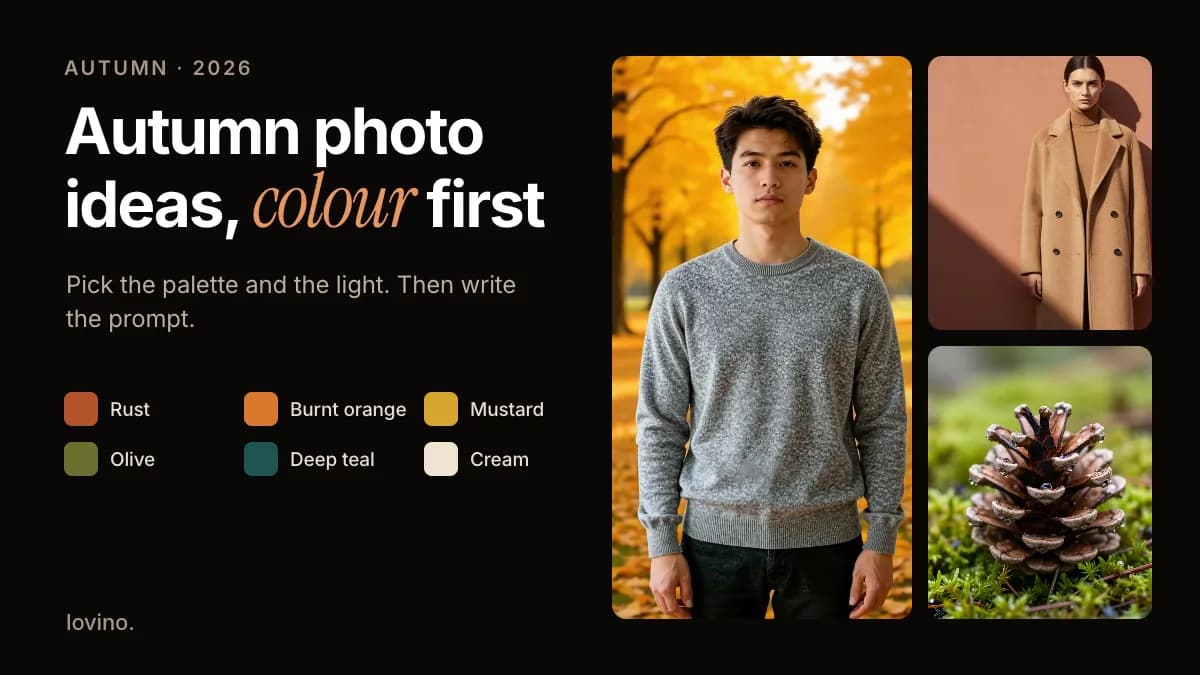
The best autumn photo ideas with AI start with colour and light, not props. Pick a warm palette, choose low sun or soft window light, then add one clear subject. This guide gives you seven autumn (or fall, if you are in the US) looks with prompts you can copy, and shows how to swap the season in your own photos without pretending you were somewhere you were not.
Autumn is forgiving to shoot because the light is already low and the colours are already doing the work. AI gives you two extra options. You can build a scene from words when the weather will not cooperate, or you can restyle a photo you already took.
What are the best autumn photo ideas to make with AI?
Each look below pairs a type of light with a palette, so the prompt has something concrete to hold on to.
| Look | Light | Palette | Prompt hook |
|---|---|---|---|
| Woodland walk | Low golden-hour sun from behind | Rust, mustard, olive | "leaf-covered path, backlit, long shadows" |
| Café window | Soft side light, overcast day | Cream, caramel, deep teal | "steam from a mug, rain on the glass" |
| Knitwear portrait | Open shade, even and gentle | Cream, camel, burnt orange | "chunky knit sweater, natural skin tones" |
| Market or pumpkin patch | Late-afternoon sun | Orange, green, straw yellow | "wooden crates, hay, no signs or text" |
| Foggy morning | Diffused, low contrast | Grey-green, muted gold | "mist between trees, quiet and still" |
| Rainy street | Street lights on wet pavement | Amber, deep teal, charcoal | "wet cobblestones, reflections, umbrellas" |
| Harvest still life | Window light on a wooden table | Orange, olive, warm brown | "bowl of fruit, worn wood, soft shadows" |
Start with the look that matches a photo you could actually take this month. Then use AI to extend it, not to replace it.
What colours make a photo look like autumn?
Warm tones carry the season, but one cool counterweight stops the picture going muddy. Think of it as one warm lead and one cool support.
| Colour | Role in the frame | Where to use it |
|---|---|---|
| Rust | Lead accent | Leaves, a scarf, a door |
| Burnt orange | Warm highlight | Pumpkins, foliage, a mug |
| Mustard | Soft highlight | Knitwear, grasses, lamp glow |
| Olive | Grounding tone | Foliage, coats, hedges |
| Deep teal | Cool counterweight | Shadows, water, a jacket |
| Cream | Breathing room | Knits, walls, negative space |
Name the colours in your prompt. Foliage can come out oversaturated, so add "natural colour, nothing neon" to keep it believable.

The loop below shows the idea with almost no props. The terracotta wall carries the rust, the camel coat sits between mustard and cream, and the hard shadow does the cool counterweight's job. It is an AI-made editorial still, animated into a five-second clip with Wan 2.2 Fast, one of the image-to-video models on Lovino.
How do you write an autumn photo prompt?
Use five parts, in this order: subject, setting, light, palette, mood. Short and specific beats long and vague. The animation below walks through one example.

Put together, that becomes:
A woman in a cream knit sweater holding a mug, on a leaf-covered woodland path,
low golden-hour sun behind her with soft rim light, rust, mustard and olive tones,
nothing neon, calm and unhurried, natural film look
Two more you can adapt, one for a café and one for the street:
Rain on a café window in autumn, a steaming ceramic mug on a wooden sill,
soft overcast light, cream and deep teal palette, shallow depth of field, quiet mood
Wet cobblestone street at dusk in October, warm shop lights reflected in puddles,
amber and deep teal palette, one person with an umbrella far in the distance, no text
Change one part at a time. If the light is wrong, rewrite the light line and leave the rest alone. For more on wording, see Instagram photo prompts and how to make cinematic AI images.
How do you get warm golden light on your own photo?
Restyle the light, keep the street. The pair below is an AI-made cobblestone street, restyled with a golden-hour look: warm backlight and long amber shadows. The buildings, bikes and walker stay put, while the light and colour change. It was made with FLUX.2 Klein, one of the Studio models that accepts a reference image.
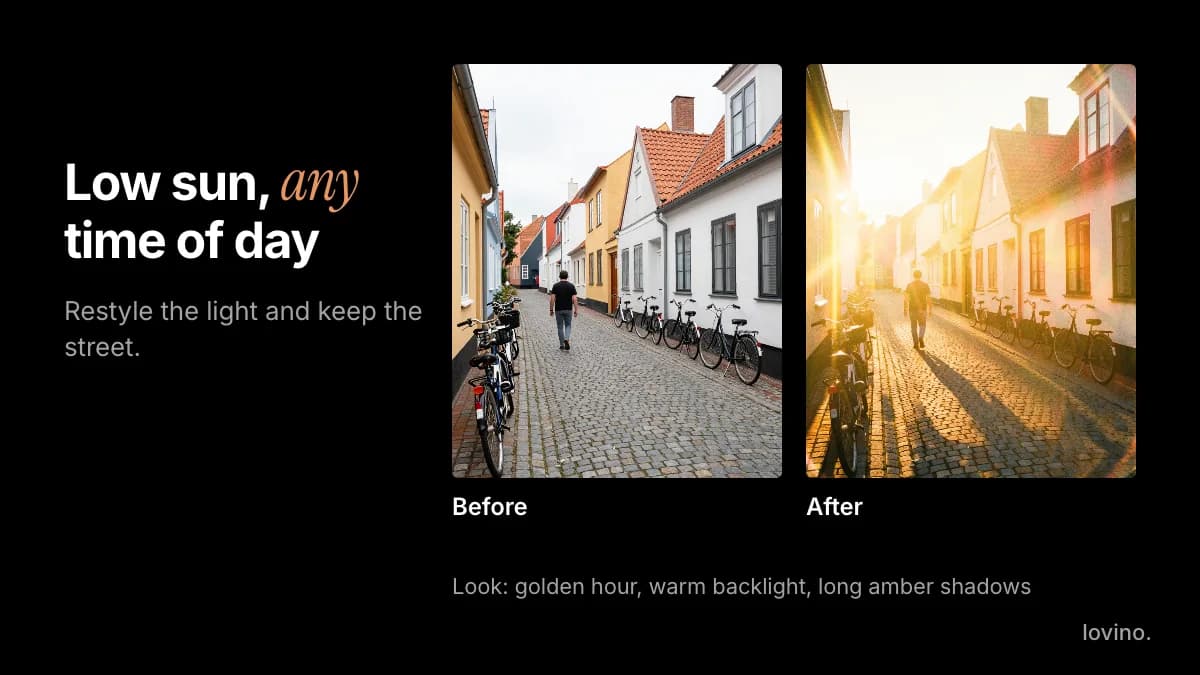
Use this when a grey day ruined a good composition. Upload the photo, ask for the look, and compare faces and details with your original before you post.
How do you turn any photo into an autumn one?
Name the autumn setting and say what must stay the same. The pair below shows it on an AI-made test photo. One instruction swapped the living room for a park of golden leaves, and the face, sweater and pose carried over. The sweater's texture shifted a little, which is the kind of detail to check before you post.
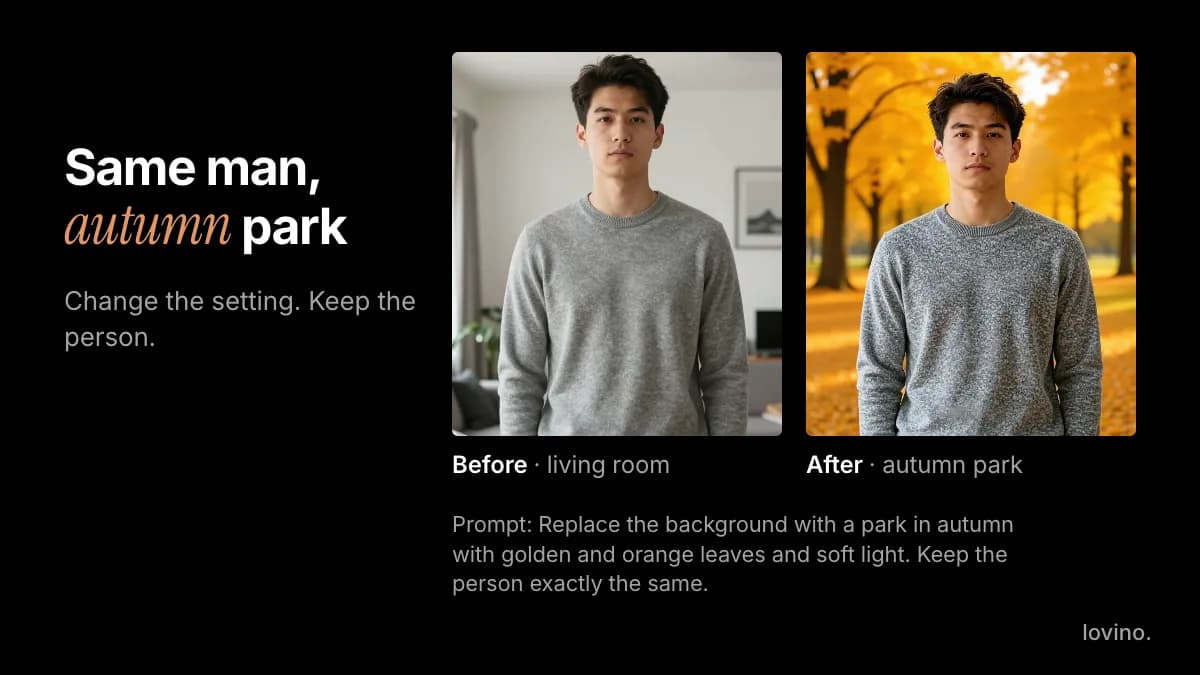
The AI background changer works from a written instruction like that one, using FLUX Kontext Fast, and runs on the free daily credits. For a landscape or a street, ask for the season itself. The same model handles that, or use the AI image editor, which uses paid credits:
Make it an autumn afternoon with orange and gold leaves on the trees and the ground.
Keep the path, bench and framing the same. Soft warm light, natural colour.
A season swap on your own photo is fine for a mood post. It is not fine as evidence. Do not use it to claim that a real park was at peak colour on a day it was not.
Which small details make autumn shots feel real?
Details sell the season. Add one or two per image and leave the rest quiet.
- Texture: knit, wool, bark, moss and wet leaves. The pine cone at the top of this post is an AI-made macro, enlarged with an AI upscaler. If a detail shot comes out soft, the Upscale mode in the AI photo enhancer goes up to 4x.
- Steam and warmth: a mug, a window, a lamp.
- Hands and faces: these are common weak spots in generated images. Zoom in and check fingers before you post.
Motion is the last layer. A still with something that can move, such as steam, rain or a coat in the wind, animates well with image to video. Video always uses paid credits; the free daily credits cannot be spent on it. See pricing.
What should you not fake in autumn content?
Style the season. Do not manufacture the evidence.
- Peak foliage at a real place. If you are a travel creator, do not present a generated forest as a location you visited. Say it is AI-made, or shoot it for real.
- Seasonal products that do not exist. A brand posting a pumpkin-themed product, pack or menu needs to have that product.
- A farm, orchard or event you did not attend. A generated pumpkin patch is a backdrop, not a visit.
- People who were not there. Restyle the light, never the guest list.
Your uploaded photos are processed by third-party AI providers, so share only pictures you are comfortable with. You need a free account to generate, free-plan images carry a watermark that paid plans remove, and everything you make, including on the free plan, comes with commercial rights. When a picture is generated, a short label builds trust, and AI content disclosure on social media explains how.
Pick one look and shoot it this week
Choose the look from the table that you could shoot nearest to home. Take the real photo, restyle the light, then add one generated detail. Autumn also leads straight into the next events on the calendar: costumes in Halloween pet costumes with AI, and tables and thanks in Thanksgiving content ideas.
Ready? Paste the woodland prompt into the AI image generator, change the light line twice, and keep the version you like.
Questions, answered.
What are good autumn photo ideas for Instagram?
A woodland walk in low sun, a café window with a steaming mug, a knitwear portrait in open shade, a market or pumpkin patch, a foggy morning, a rainy street at dusk and a harvest still life. Pair each with a warm palette and one cool counterweight.
How do I write an autumn photo prompt for AI?
Use five parts in order: subject, setting, light, palette and mood. For example, a woman in a cream knit sweater on a leaf-covered path, low golden-hour sun, rust and mustard tones, calm mood. Change one part at a time when you iterate.
Can AI turn my summer photo into an autumn photo?
Yes. Upload the photo to an image editor and ask for an autumn afternoon with orange and gold leaves, naming what to keep, such as the path, bench and framing. Check the result against your original, and do not present it as a real location on a real day.
What colours should I use for autumn photos?
Rust, burnt orange, mustard, olive, deep teal and cream. Lead with one warm colour, add a cool counterweight such as teal, and ask for natural colour so foliage does not look neon.
Are AI autumn images free to use?
You need a free account to generate. Free-plan images carry a watermark that paid plans remove, and all users, including free ones, get commercial rights to their creations. Video needs paid credits.