A thumbnail prompt has two jobs. It describes the picture, and it tells the model where to leave empty space for your title. Get the second job right and the rest is editing. This page shows the layout, the exact prompts behind two real 16:9 thumbnail bases, and templates for six kinds of video.
YouTube thumbnail prompts at a glance
| Question | Short answer |
|---|---|
| Size and shape | 1280 x 720 pixels, 16:9. YouTube recommends this size |
| What the prompt must say | The subject, and which side stays empty for the title |
| Where the title goes | Added afterwards in an editor, or baked in with GPT Image 2 for a few words |
| Cost on Lovino | The YouTube Thumbnail tool costs 1 credit per image, and the free plan includes 3 credits a day (signup required, free downloads watermarked) |
The layout to prompt for
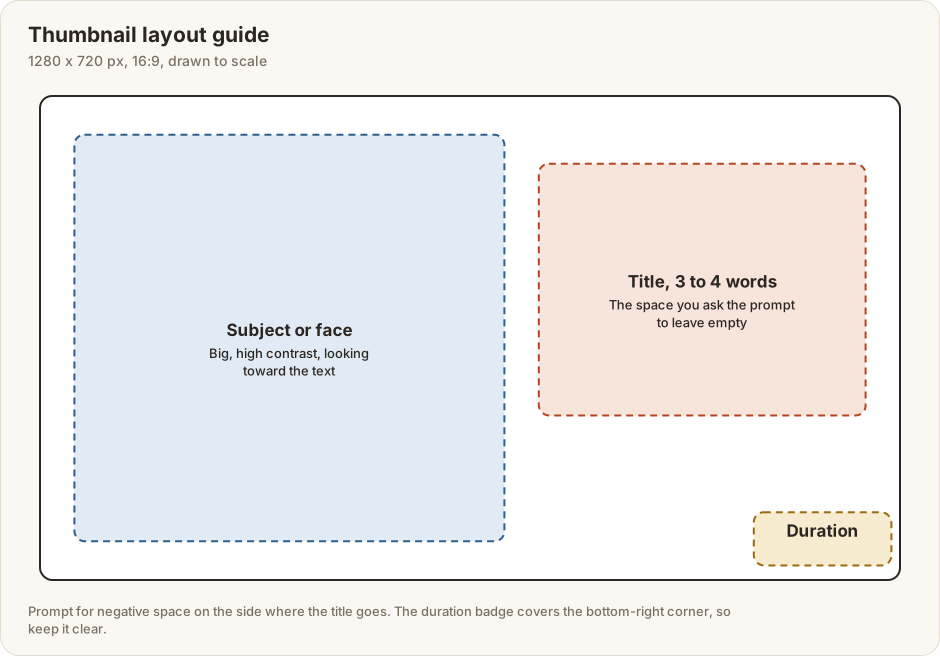
Put the subject or face on one side and keep the other side calm for three or four words of title. The bottom-right corner is where YouTube draws the video length, so nothing important should live there. Shrink your thumbnail to phone size before you decide it works, because most of the detail will disappear.
Two real prompts, and how well they were followed
These are the prompts behind two thumbnail bases in Lovino's showcase. They ask for the empty space on opposite sides: left for the chef, right for the backpacker.
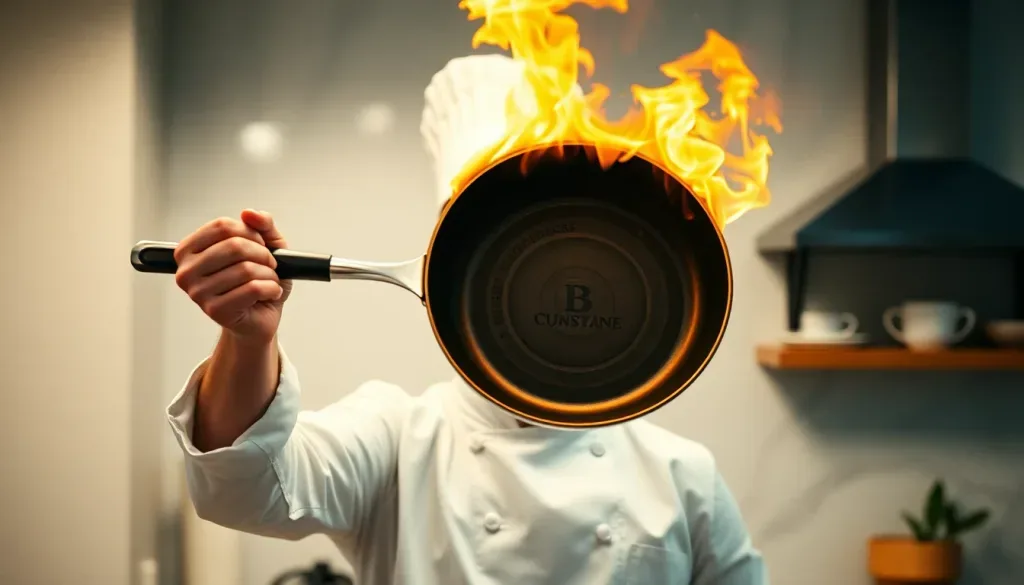
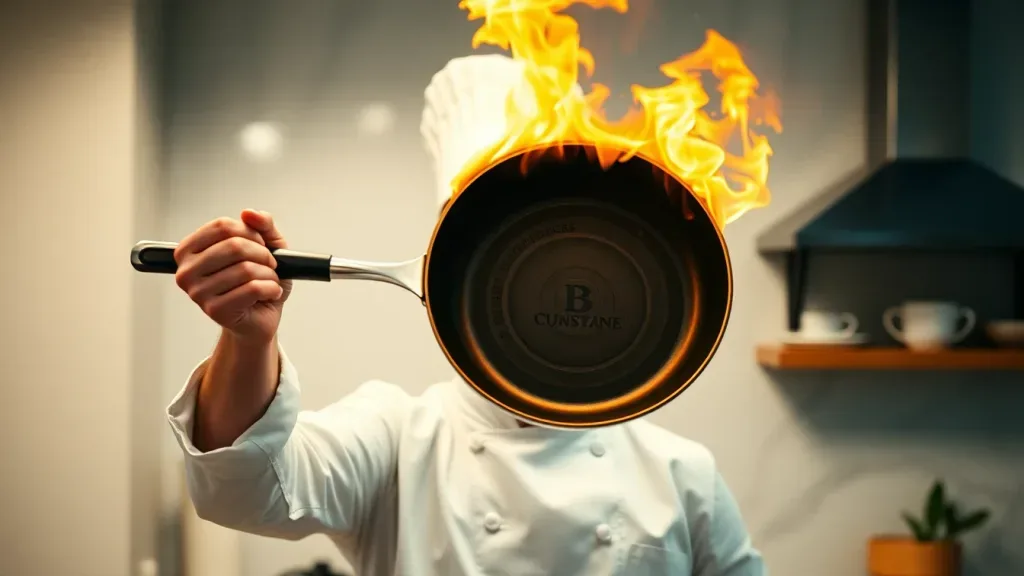
Prompt: Excited chef holding up a flaming pan toward camera, dramatic kitchen backdrop, high-energy YouTube thumbnail composition with clear negative space left, cinematic warm-neutral color grade, soft directional key light, 35mm lens, shallow depth of field, natural skin tones, subtle film grain
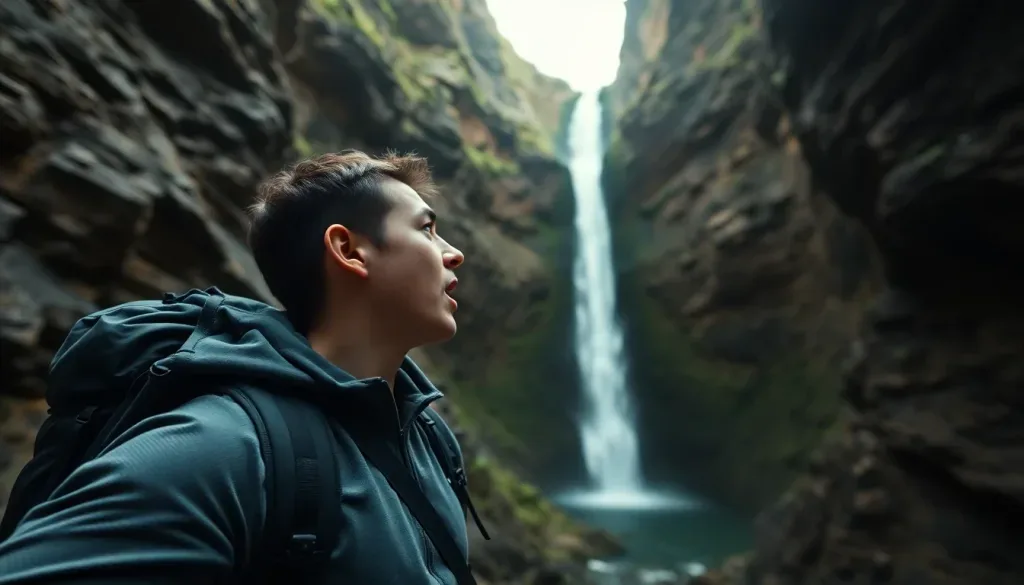
Prompt: Backpacker gasping at a hidden waterfall canyon, point-of-view drama, YouTube thumbnail composition with negative space right, cinematic warm-neutral color grade, soft directional key light, 35mm lens, shallow depth of field, natural skin tones, subtle film grain
Both images were made with FLUX Schnell, a model Lovino has since replaced with Z-Image Turbo as its free default, so the same prompt today will give a different picture. "YouTube thumbnail composition" and "negative space" are the framing instructions.
Read the results before you copy the wording. The backpacker shot follows the brief reasonably: the subject sits on the left and the right side is dark rock, though its texture is busy for a title. The chef shot follows it only loosely: the pan covers his face, only a narrow strip on the left is calm, and the base of the pan carries made-up lettering. A prompt for empty space is a request, not a guarantee, so generate a few bases and keep the one with the calmest side.
What each part of the prompt does
| Element | What to write | From the real prompts |
|---|---|---|
| Subject | One clear person or object | Excited chef holding up a flaming pan toward camera |
| Feeling | The expression or moment | gasping at a hidden waterfall canyon |
| Viewpoint | How close, from where | point-of-view drama |
| Framing | The shape and the empty side | YouTube thumbnail composition with clear negative space left |
| Look | A shared style clause | cinematic warm-neutral color grade, soft directional key light, 35mm lens |
Reserving room in a different way
Lovino's own carousel art reserves space with another clause: "main subject in the upper two-thirds of the frame, calm darker lower third left clear for text". These four 16:9 plates were made that way.
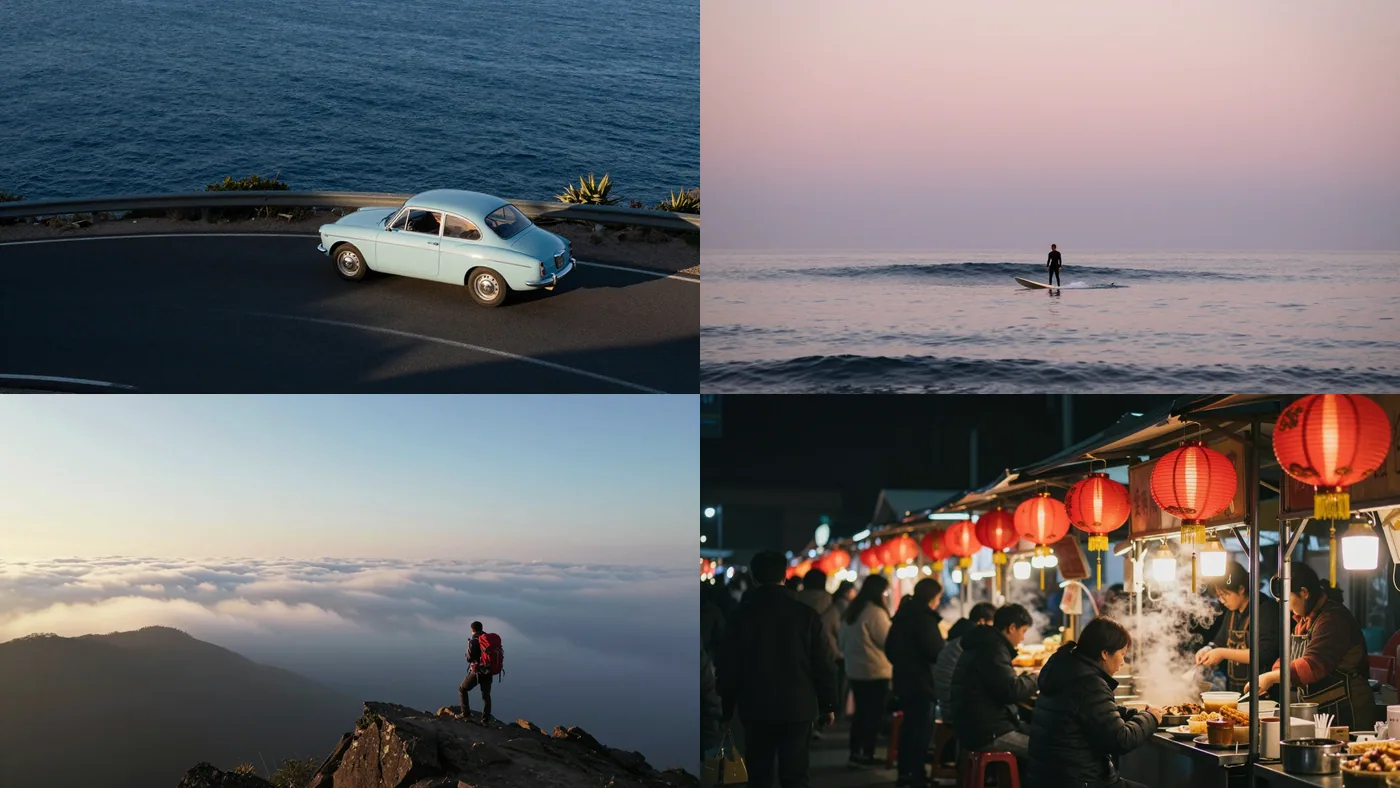
Coastal drive: A pale blue vintage car driving along a winding coastal road, late-afternoon sun, high aerial angle, deep blue sea, main subject in the upper two-thirds of the frame, calm darker lower third left clear for text
Dawn surfer: A lone surfer paddling out at dawn under a pastel pink sky, calm glassy sea, long lens, soft low light, main subject in the upper two-thirds of the frame, calm darker lower third left clear for text
For a thumbnail you would ask for a side rather than a lower third, but the idea is the same: say where the calm area goes, in words the model can follow.
Six templates to adapt
These are patterns, not tested prompts. Replace the [brackets], check the result, and change the empty side to suit your layout.
- Tutorial: [Person] pointing at a glowing [tool or screen], bright clean background, YouTube thumbnail composition with negative space right.
- Reaction: Close-up of a [person] with a surprised expression looking toward the right of the frame, high-contrast lighting, negative space right.
- Travel: [Traveller] gasping at [landmark], point-of-view drama, YouTube thumbnail composition with negative space left.
- Food: A [dish] fresh from the pan with steam and flame, dark kitchen backdrop, negative space right.
- Comparison: Two [products] side by side against a split background, bold colours, negative space at the top.
- Review: A [product] held toward the camera on a plain coloured backdrop, negative space left.
If your face is the brand
An AI-generated person will not be you. When viewers come for your face, use your own photo for the person and use AI for the background. The Background Remover returns a transparent cut-out of your photo, and a prompt like the ones above can supply a base with room for your cut-out. Keep the two lit from the same side so they match.
Adding the title
- Generate two or three bases and pick the one where the empty side is calmest.
- Add three or four words in an editor, in a thick font that contrasts with the background.
- Zoom out to phone size and check the words still read.
- Test two versions on the same video with YouTube's Test and compare feature, listed in the sources below.
If you would rather have the words drawn by the model, GPT Image 2 is the model to try, at 3 credits per low-quality image, and our GPT Image 2 prompts show how to ask for text and how it goes wrong. Read every letter either way.
Check the base at thumbnail size
Before you add a title, run four quick checks on each base.
- Shrink it to phone width. Can you still tell what the picture shows?
- Look for a hidden subject. In our chef example the pan covers his face, which would weaken a thumbnail that relies on a reaction.
- Look for invented lettering. Pans, signs and packaging often pick up gibberish text. Crop it out or cover it with your own words.
- Test the contrast. Turn the image grey in your editor. If the title zone and the subject blur together, the thumbnail will be hard to read in a busy feed.
If a base fails, generate another. A few extra credits are cheaper than a thumbnail you have to rescue.
What it costs
The YouTube Thumbnail Maker costs 1 credit per image, so the free plan's 3 daily credits give you 3 bases a day. Paid plans start at $9.99 a month for 50 credits and remove the watermark. If you pick a model yourself in the Studio, Z-Image Turbo is 1 credit.
Keep going
The strategy side, meaning what makes a thumbnail worth clicking, is in our AI YouTube thumbnail generator guide. For cover images on other platforms see AI Reels cover images, and for a general prompting base read the ultimate guide to AI image prompts.