

Photo to 3D Cartoon AI
The Disney/Pixar look redraws a photo as a 3D animated film still: bright saturated colours, a smooth render, expressive rounded features and cinematic studio lighting. Use the Disney/Pixar look in Lovino's Cartoon Filter. The Disney/Pixar look costs 2 credits a run and works on the 3 free daily credits, which cover 1 run a day, with a watermark on free results.
2 credits per run · 1 free run a day on the free daily credits
What is Photo to 3D Cartoon AI?
Photo to 3D Cartoon AI redraws a photo with the Disney/Pixar look. The Disney/Pixar look redraws a photo as a 3D animated film still: bright saturated colours, a smooth render, expressive rounded features and cinematic studio lighting. Lovino runs it in the Cartoon Filter. The Disney/Pixar look costs 2 credits a run and works on the 3 free daily credits, which cover 1 run a day, with a watermark on free results.
Real photos in the Disney/Pixar look
The first picture is a 3D movie look on an AI-made test portrait, made in Studio with a custom prompt. The other three were made from text prompts with FLUX Schnell, not from photos, to show the same 3D animated look on a teen, a grandmother and a puppy.
 Nano Banana 2 Lite
2 credits
3D movie look from the input photo, made in Studio with a custom prompt.
Restyle this photo: turn her into a character from a 3D animated feature film, big expressive eyes, soft stylised skin, detailed hair strands, warm cinematic lighting and a softly blurred café behind. Keep the same person, face, pose and composition. Do not add any text, letters, logos or signage.
 FLUX 1.1 Pro
The input: an AI-made test portrait, not a real person.
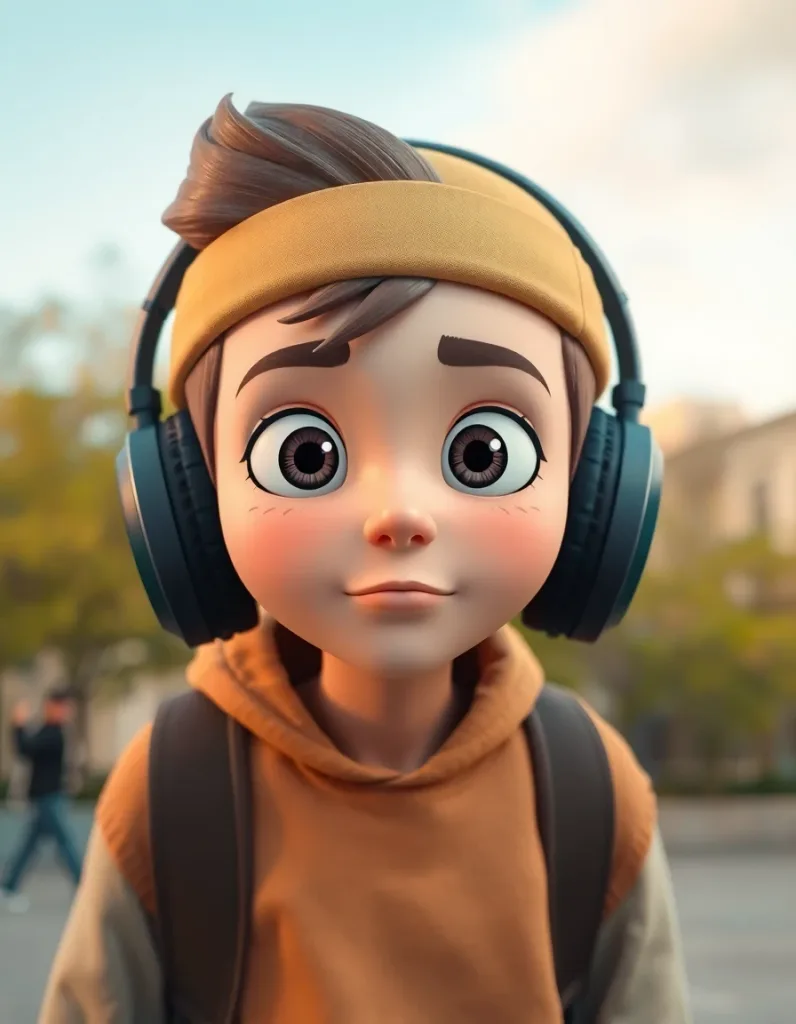 FLUX Schnell
Made from a text prompt, not from a photo.
3D animated film style portrait of a teenage skater with headphones, expressive big eyes, city park background
 FLUX Schnell
Made from a text prompt, not from a photo.
Heartwarming 3D animation style portrait of a grandmother baking, flour dust, warm kitchen
 FLUX Schnell
Made from a text prompt, not from a photo.
Playful 3D animated golden retriever puppy with a red bandana, tongue out, studio backdrop
How to use Photo to 3D Cartoon AI
01
Upload a photo
A portrait, a pet or a family photo. One clear face in even light works best.
02
Pick Disney/Pixar
Open the Cartoon Filter and choose the Disney/Pixar look for the 3D animated style.
03
Generate and compare
Download it, or run the same photo through Anime or Cartoon to compare.
Photo to 3D Cartoon AI: what the look does
The Disney/Pixar look redraws a photo as a 3D animated film still: bright saturated colours, a smooth render, expressive rounded features and cinematic studio lighting.
Open the Cartoon Filter, upload a photo and choose Disney/Pixar. The filter asks the model to keep the same person, face, pose and composition, so the result reads as your photo redrawn, not a new picture.
A photo that gives a better result
The model redraws what it can see, so the source photo matters more than any setting.
- Use a front-facing photo with the eyes visible. The look leans on big, expressive eyes.
- The Cartoon Filter works on pet photos as well as people.
- Run it twice and keep the face that is closest to the person.
- Only use photos you have the right to use, and people who have agreed to it.
What it costs
The Disney/Pixar look costs 2 credits a run and works on the 3 free daily credits, which cover 1 run a day, with a watermark on free results. Plans start at $7.99 a month and remove the watermark.
What it can't do
- Free credits cover 1 run a day. More runs need paid credits.
- It is a redraw, not a trace. Faces and fine detail can shift, so compare a few runs and keep the closest.
- It restyles the whole picture. To change one object or area, use a photo editing tool instead.
- The pictures on this page are examples. Your photo will give a different result.
Pricing
Start free. Scale anytime.
One credit system across Studio, Flow and every tool. Cancel anytime.
| Plan | Per month | Credits |
|---|---|---|
| Free | $0 | 3 credits per day |
| Plus | $7.99 | 50 credits per month |
| Pro | $19.99 | 200 credits per month |
| Max | $44.99 | 500 credits per month |
Questions, answered.
Is Photo to 3D Cartoon AI free?
Partly. The Disney/Pixar look costs 2 credits a run and works on the 3 free daily credits, which cover 1 run a day, with a watermark on free results. For more runs you need credits from a paid plan or a credit pack.
How do I make a 3D cartoon from a photo?
Open the Cartoon Filter, upload a photo, choose the Disney/Pixar look and generate. It redraws the photo as a 3D animated film still.
Can I do this with a pet photo?
Yes. The Cartoon Filter works on pet photos as well as people. Lovino also has an AI Pet Portrait tool for pets.
Are all the pictures on this page made from photos?
No. The first picture is a photo redrawn in Studio. The last three were made from text prompts, and their captions say so.
Will it still look like me?
The tool asks the model to keep your face, pose and composition, and the examples stay close to their photos. It is still a redraw, so details can shift. Try a few runs and keep the closest.
Do I need an account?
Yes. A free Lovino account tracks your credits and saves the result to your Library.
Can I use the results commercially?
Images you create are yours to use. A style is not a licence, so for client or commercial work prefer descriptive looks over named studios, artists or characters, and read the provider's terms.
More AI tools
Related guides
- How to Make an AI Avatar of Yourself (2026): Photo to Profile PicLearn how to make an AI avatar of yourself from one photo: pick the right selfie, choose a style, check the likeness and size it for your profile picture.
- AI Cartoon Filter: Ghibli, Pixar & Anime StylesTransform your photos into Studio Ghibli, Pixar, anime, and cartoon styles with AI. Instant results from any photo.
- AI Caricature Generator: Create Hilarious Portraits in SecondsLearn how to use AI caricature generators to create funny, exaggerated portraits from any photo. Perfect for gifts, social media, and entertainment.
Try a template
Ready to try Photo to 3D Cartoon AI?
2 credits per run · 1 free run a day on the free daily credits. No purchase is made until you confirm a generation.