

Photo to Watercolor AI
The Watercolor look repaints a photo as a loose watercolor painting with flowing washes, soft edges and a muted pastel palette. Use the Watercolor look in Lovino's Cartoon Filter. The Watercolor look costs 2 credits a run and works on the 3 free daily credits, which cover 1 run a day, with a watermark on free results.
2 credits per run · 1 free run a day on the free daily credits
What is Photo to Watercolor AI?
Photo to Watercolor AI redraws a photo with the Watercolor look. The Watercolor look repaints a photo as a loose watercolor painting with flowing washes, soft edges and a muted pastel palette. Lovino runs it in the Cartoon Filter. The Watercolor look costs 2 credits a run and works on the 3 free daily credits, which cover 1 run a day, with a watermark on free results.
Real photos in the Watercolor look
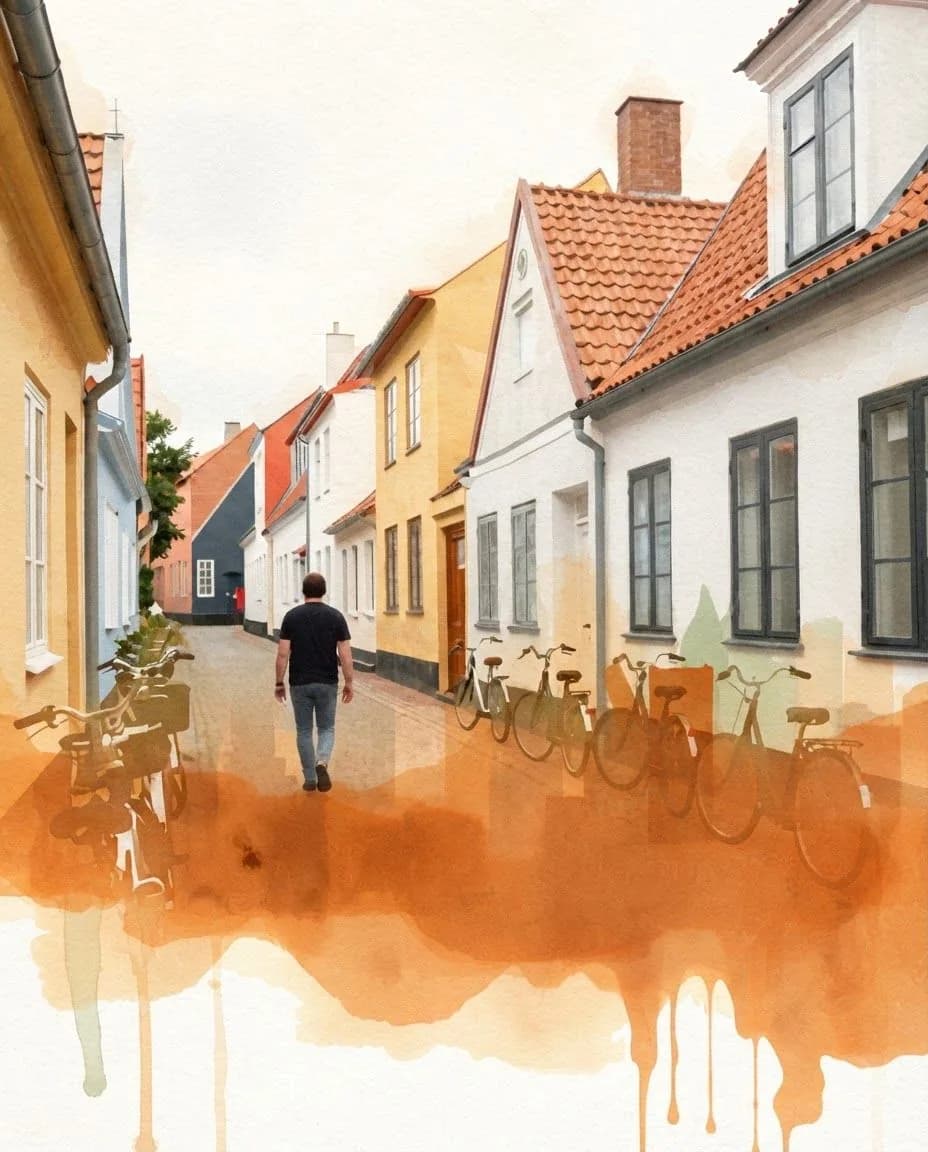
The photo and the style image are AI-made test pictures. The watercolour result came from Style Transfer using the style image shown, which costs more than the Cartoon Filter's Watercolor look and uses paid credits. The Cartoon Filter's own result will look different.
 Nano Banana 2 Lite
3 credits
Style Transfer: the street photo painted in the watercolour reference style.
Redraw the first image in the visual style of the second image. Keep the same person, face, pose and composition. Do not add any text, letters, logos or signage.
 Z-Image Turbo
The input photo: an AI-made test photo.
 FLUX Schnell
The style image used for the watercolour result.
A city skyline as a loose watercolor wash, bleeding pigments, paper texture, warm-neutral palette, soft diffused lighting
How to use Photo to Watercolor AI
01
Upload a photo
Landscapes, streets and still life suit watercolor well. Portraits work too.
02
Pick Watercolor
Open the Cartoon Filter and choose Watercolor. For a specific look, use Style Transfer with a watercolour style image.
03
Generate and download
Save the painting, or try the Oil Painting preset in Style Transfer to compare.
Photo to Watercolor AI: what the look does
The Watercolor look repaints a photo as a loose watercolor painting with flowing washes, soft edges and a muted pastel palette.
Open the Cartoon Filter, upload a photo and choose Watercolor. The filter asks the model to keep the same person, face, pose and composition, so the result reads as your photo redrawn, not a new picture.
A photo that gives a better result
The model redraws what it can see, so the source photo matters more than any setting.
- Pick a photo with clear shapes. Washes simplify fine detail.
- For a particular watercolour look, use Style Transfer with a style image, as in the example.
- Check the result at full size. Fine detail such as faces can shift.
- Only use photos you have the right to use, and people who have agreed to it.
What it costs
The Watercolor look costs 2 credits a run and works on the 3 free daily credits, which cover 1 run a day, with a watermark on free results. Plans start at $7.99 a month and remove the watermark.
What it can't do
- Free credits cover 1 run a day. More runs need paid credits.
- It is a redraw, not a trace. Faces and fine detail can shift, so compare a few runs and keep the closest.
- It restyles the whole picture. To change one object or area, use a photo editing tool instead.
- The pictures on this page are examples. Your photo will give a different result.
Pricing
Start free. Scale anytime.
One credit system across Studio, Flow and every tool. Cancel anytime.
| Plan | Per month | Credits |
|---|---|---|
| Free | $0 | 3 credits per day |
| Plus | $7.99 | 50 credits per month |
| Pro | $19.99 | 200 credits per month |
| Max | $44.99 | 500 credits per month |
Questions, answered.
Is Photo to Watercolor AI free?
Partly. The Watercolor look costs 2 credits a run and works on the 3 free daily credits, which cover 1 run a day, with a watermark on free results. For more runs you need credits from a paid plan or a credit pack.
How do I turn a photo into a watercolor painting?
Open the Cartoon Filter, upload a photo, choose the Watercolor look and generate. For more control, Style Transfer takes a watercolour style image, a Watercolor preset or your own words.
What is the difference between the filter and Style Transfer?
The Cartoon Filter has one fixed Watercolor look for 2 credits and works on free daily credits. Style Transfer costs 3 credits, needs paid credits, and lets you borrow the look of a specific picture.
Does the example come from the Cartoon Filter?
No. It came from Style Transfer with the style image shown beside it, and the page says so. The Cartoon Filter's Watercolor look will give a different result.
Will it still look like me?
The tool asks the model to keep your face, pose and composition, and the examples stay close to their photos. It is still a redraw, so details can shift. Try a few runs and keep the closest.
Do I need an account?
Yes. A free Lovino account tracks your credits and saves the result to your Library.
Can I use the results commercially?
Images you create are yours to use. A style is not a licence, so for client or commercial work prefer descriptive looks over named studios, artists or characters, and read the provider's terms.
More AI tools
Related guides
- How AI Style Transfer Works: Art Styles, Steps and TipsTransform any photo into an oil painting, watercolor, pencil sketch, or any artistic style using AI. Complete guide with tips and examples.
- Ghibli-Style AI Prompts and 6 More Art Styles to CopyCopy-paste prompts for Ghibli-style scenes plus Pixar, anime, pop art, oil painting, ukiyo-e and watercolor, with real before-and-after results.
- How to Make an AI Avatar of Yourself (2026): Photo to Profile PicLearn how to make an AI avatar of yourself from one photo: pick the right selfie, choose a style, check the likeness and size it for your profile picture.
Try a template
Ready to try Photo to Watercolor AI?
2 credits per run · 1 free run a day on the free daily credits. No purchase is made until you confirm a generation.