

Ghibli Filter AI
The Studio Ghibli look redraws a photo as a hand-painted animation frame with soft watercolor tones, gentle warm light and a dreamy painted background. Use the Studio Ghibli look in Lovino's Cartoon Filter. The Studio Ghibli look costs 2 credits a run and works on the 3 free daily credits, which cover 1 run a day, with a watermark on free results.
2 credits per run · 1 free run a day on the free daily credits
What is Ghibli Filter AI?
Ghibli Filter AI redraws a photo with the Studio Ghibli look. The Studio Ghibli look redraws a photo as a hand-painted animation frame with soft watercolor tones, gentle warm light and a dreamy painted background. Lovino runs it in the Cartoon Filter. The Studio Ghibli look costs 2 credits a run and works on the 3 free daily credits, which cover 1 run a day, with a watermark on free results.
Real photos in the Studio Ghibli look
These two before-and-after pictures come from our Ghibli prompt guide. They were made with FLUX Kontext Fast (the cabin) and Nano Banana 2 Lite (the portrait) from the guide's Ghibli-style prompts. The Cartoon Filter uses its own fixed instruction, so a filter run will look a little different.
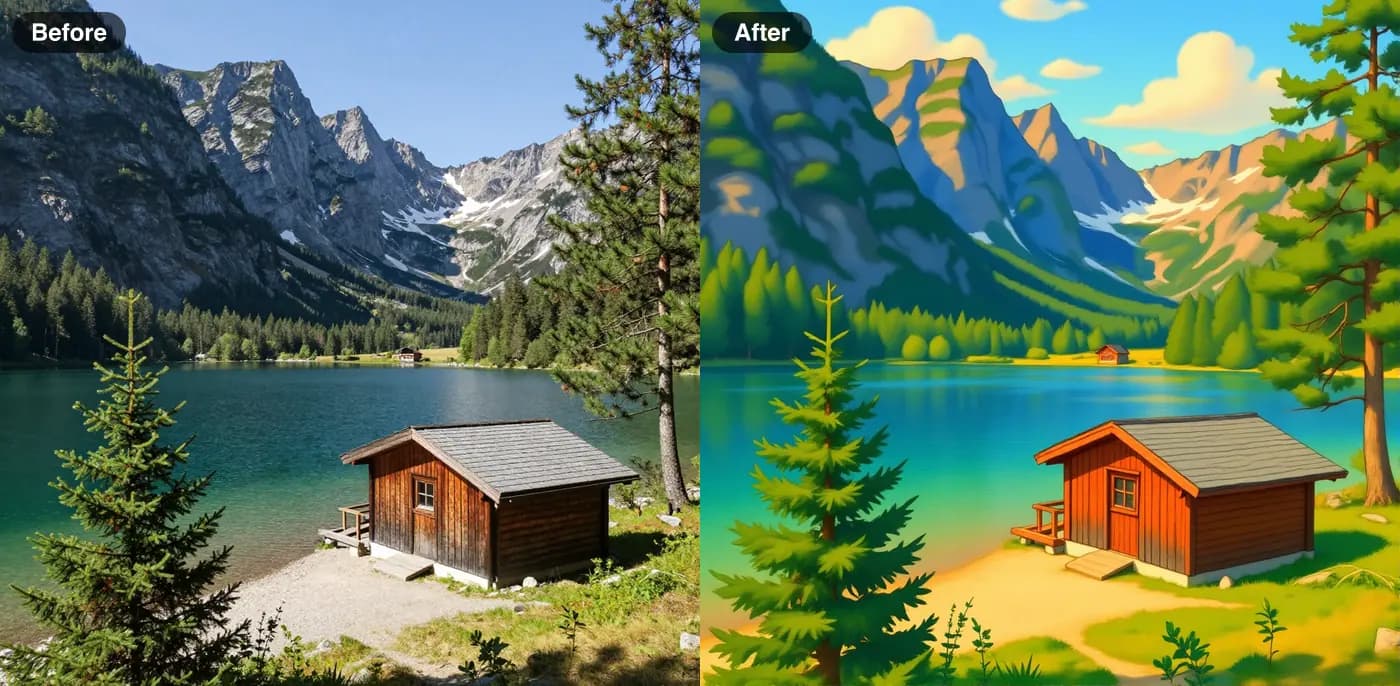 FLUX Kontext Fast
2 credits
Before and after. The cabin, the pine and the mountain shape survive; colours move towards saturated greens and blues.
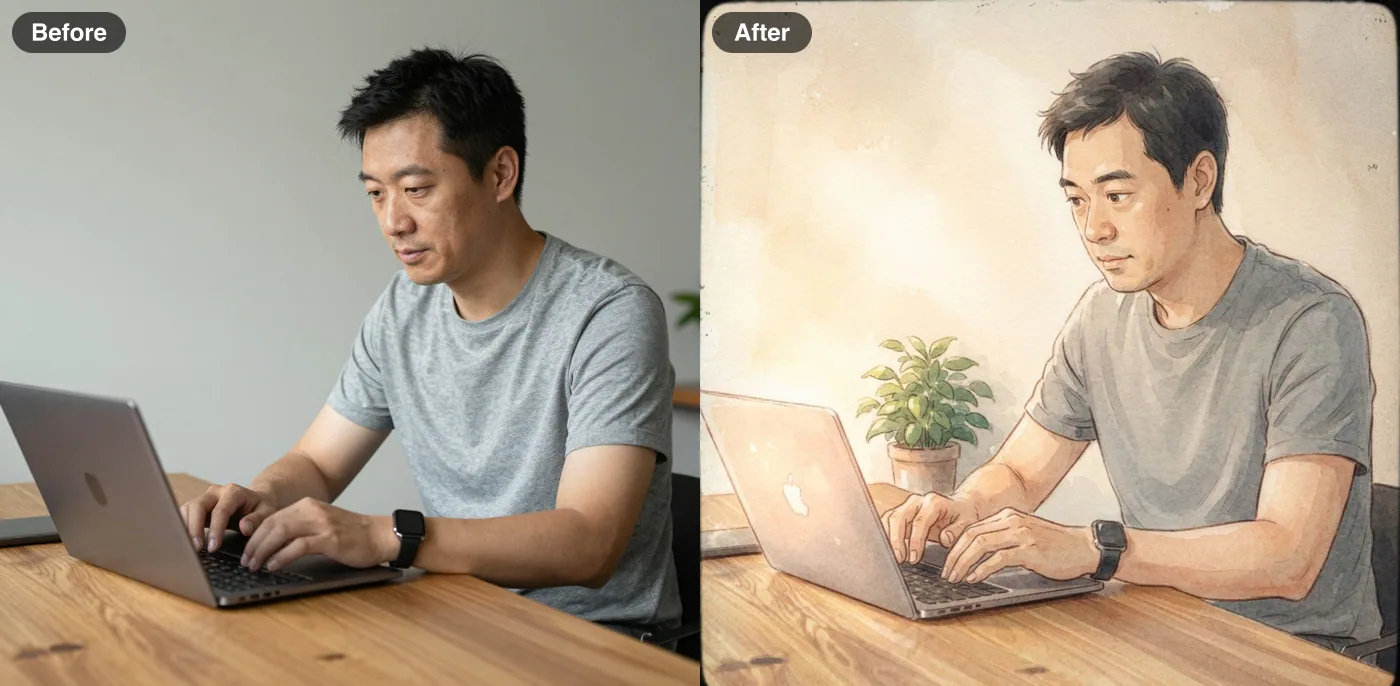 Nano Banana 2 Lite
2 credits
Before and after. The face, pose and laptop held. The model added a small plant the prompt never asked for.
How to use Ghibli Filter AI
01
Upload a photo
A scene or a portrait. One clear subject gives the cleanest result.
02
Pick Studio Ghibli
The Cartoon Filter opens on the Ghibli look, so you can run it straight away.
03
Generate and compare
Download the picture, or run the same photo through another look to compare.
Ghibli Filter AI: what the look does
The Studio Ghibli look redraws a photo as a hand-painted animation frame with soft watercolor tones, gentle warm light and a dreamy painted background.
Open the Cartoon Filter, upload a photo and choose Studio Ghibli. The filter asks the model to keep the same person, face, pose and composition, so the result reads as your photo redrawn, not a new picture.
A photo that gives a better result
The model redraws what it can see, so the source photo matters more than any setting.
- Start with a sharp photo and one clear subject. Busy scenes give the model more to reinterpret.
- Expect colours to move towards saturated; the prompt guide's cabin example shows it.
- Compare before and after object by object. The model can add small details, such as the plant in the portrait example.
- Only use photos you have the right to use, and people who have agreed to it.
What it costs
The Studio Ghibli look costs 2 credits a run and works on the 3 free daily credits, which cover 1 run a day, with a watermark on free results. Plans start at $7.99 a month and remove the watermark.
What it can't do
- Free credits cover 1 run a day. More runs need paid credits.
- It is a redraw, not a trace. Faces and fine detail can shift, so compare a few runs and keep the closest.
- It restyles the whole picture. To change one object or area, use a photo editing tool instead.
- The pictures on this page are examples. Your photo will give a different result.
Pricing
Start free. Scale anytime.
One credit system across Studio, Flow and every tool. Cancel anytime.
| Plan | Per month | Credits |
|---|---|---|
| Free | $0 | 3 credits per day |
| Plus | $7.99 | 50 credits per month |
| Pro | $19.99 | 200 credits per month |
| Max | $44.99 | 500 credits per month |
Questions, answered.
Is Ghibli Filter AI free?
Partly. The Studio Ghibli look costs 2 credits a run and works on the 3 free daily credits, which cover 1 run a day, with a watermark on free results. For more runs you need credits from a paid plan or a credit pack.
What is the Ghibli filter?
It is the Studio Ghibli look in Lovino's Cartoon Filter. It redraws your photo as a hand-painted animation frame with soft watercolor tones and warm light.
Can I use Ghibli-style images commercially?
A style is not a licence, and rules differ by model and platform. Ask for a hand-painted look rather than a named character, prefer descriptive words over a studio name for client work, and read the provider's terms. This is not legal advice.
Where do I find Ghibli prompts?
See the Ghibli-style prompts guide, which lists copy-paste prompts and the before-and-after results for each.
Will it still look like me?
The tool asks the model to keep your face, pose and composition, and the examples stay close to their photos. It is still a redraw, so details can shift. Try a few runs and keep the closest.
Do I need an account?
Yes. A free Lovino account tracks your credits and saves the result to your Library.
Can I use the results commercially?
Images you create are yours to use. A style is not a licence, so for client or commercial work prefer descriptive looks over named studios, artists or characters, and read the provider's terms.
More AI tools
Related guides
- AI Anime Character Generator: Turn Your Photo Into ArtTransform any photo into Studio Ghibli, shonen, or classic anime style with AI. Instant results, multiple anime styles, free to try.
- AI Cartoon Filter: Ghibli, Pixar & Anime StylesTransform your photos into Studio Ghibli, Pixar, anime, and cartoon styles with AI. Instant results from any photo.
- Ghibli-Style AI Prompts and 6 More Art Styles to CopyCopy-paste prompts for Ghibli-style scenes plus Pixar, anime, pop art, oil painting, ukiyo-e and watercolor, with real before-and-after results.
Try a template
Ready to try Ghibli Filter AI?
2 credits per run · 1 free run a day on the free daily credits. No purchase is made until you confirm a generation.